🧠 AI Quiz
Think you really understand Artificial Intelligence?
Test yourself and see how well you know the world of AI.
Answer AI-related questions, compete with other users, and prove that
you’re among the best when it comes to AI knowledge.
Reach the top of our leaderboard.


















NB Pro

What is NB Pro?
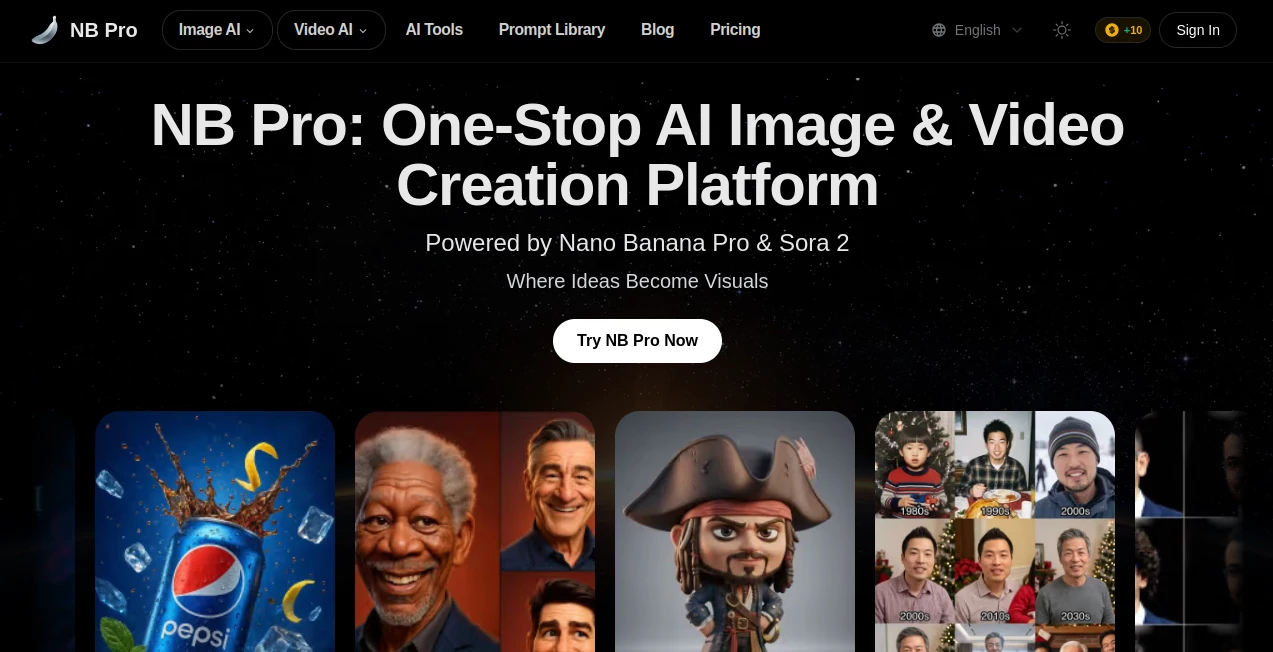
Ever had one of those moments where a wild idea hits you for a visual, but the thought of opening five different apps or waiting for credits to trickle in kills the vibe? This tool wipes that frustration away by putting everything in one spot—text-to-image, image-to-video, upscaling, even inpainting—all without a price tag. I remember a friend of mine, a small business owner, who used to dread creating product visuals because the tools were either clunky or expensive. One afternoon he tried this, typed a description of his handmade candles in cozy settings, and had a batch of stunning photos ready to post. The look on his face when he saw how sharp and consistent they were? Priceless. It's the kind of thing that makes you wonder how you ever managed without it.
Introduction
In a sea of AI generators that nickel-and-dime you for every pixel, this platform stands out by giving you a full creative suite for free. It combines Nano Banana Pro's advanced image smarts with Sora 2's video prowess, letting you go from a quick prompt to a finished clip or high-res still in one flow. What really won me over is how approachable it feels—there's no intimidating dashboard or hidden fees, just a straightforward spot to experiment and create. Creators, marketers, and hobbyists alike keep coming back because it delivers results that look polished and professional without the usual barriers. It's not just another tool; it's the one you reach for when you want quality without the hassle.
Key Features
User Interface
The layout is refreshingly simple: a big prompt box up front, clear buttons for image or video mode, and options like resolution or style tucked neatly away. Upload a reference photo or clip if you want, hit go, and the results appear in seconds. It's the kind of design that lets you focus on your idea instead of fighting the tool—my first time using it, I had a full video storyboard ready before my coffee was cold. No clutter, no confusion; just pure creation.
Accuracy & Performance
When you describe something specific—like a moody cyberpunk street with neon reflections—the output matches your vision almost eerily well, with lighting and details that feel intentional. Videos flow smoothly, characters stay consistent across shots, and even complex prompts don't throw it off. It's quick too; most generations land in under a minute, keeping your momentum alive instead of testing your patience.
Capabilities
Beyond basic images, it handles video generation with motion that looks natural, upscales for print-ready quality, and lets you inpaint to fix or enhance parts of an image. Mix in references for style control or consistency, and you get outputs that work for everything from social posts to ad mockups. It's versatile enough that one creator I know went from static product shots to short animated demos in the same session—seamless and impressive.
Security & Privacy
Your prompts and uploads are handled discreetly, with no unnecessary storage or sharing. It's built with care for creators who value their ideas, so you can experiment freely knowing your work stays yours. That quiet confidence is rare in free tools, but here it's standard, letting you focus on the fun part.
Use Cases
Small business owners craft eye-catching product visuals without hiring photographers. Content creators spin short videos for socials that match their brand vibe perfectly. Graphic designers prototype ideas fast, tweaking scenes on the fly. Even educators use it to bring concepts to life visually, making lessons more engaging. It's the tool that bridges the gap between "I wish I could" and "look what I made."
Pros and Cons
Pros:
- Completely free with no hidden catches, perfect for heavy use.
- One platform for images, videos, upscaling—saves time and hassle.
- High-quality results that look professional and consistent.
- Fast generations that keep creative flow going strong.
Cons:
- Free tier might have occasional queue times during peak hours.
- Video length limited to short clips, best for quick hits.
Pricing Plans
It's free to use with full access to core features—no subscriptions or credit systems required. Everything from image generation to video creation is available right away, making it one of the most generous tools out there. No upsells or paywalls blocking the good stuff; just pure, open creation for everyone.
How to Use It
Head to the dashboard, type your idea into the prompt box—be as detailed as you like. Choose image or video mode, add a reference if you want style control, and hit generate. Results pop up quickly; download what you love or tweak the prompt for another spin. I often start with a rough description, see what comes out, then refine based on the first batch—it's that forgiving and fast.
Comparison with Similar Tools
While some generators lock features behind paywalls or deliver inconsistent results, this one gives you a full suite for free with quality that rivals premium options. It skips the bloat of extra apps, keeping everything in one place without sacrificing speed or polish. For creators who want reliable output without the cost, it's the clear choice that just works better.
Conclusion
This platform quietly changes the game by making high-quality visuals accessible to anyone with an idea and a few minutes. It's the tool you wish existed years ago—free, fast, and surprisingly powerful. Whether you're building a brand, creating content, or just playing with ideas, it opens doors that used to stay locked. Give it a try; you might find yourself wondering how you ever created without it.
Frequently Asked Questions (FAQ)
Is it really completely free?
Yes—no hidden fees or credit limits; use it as much as you need.
Can I use the outputs commercially?
Absolutely—generate for business, socials, or projects without restrictions.
How good is the video quality?
Smooth motion, good resolution, and natural pacing—great for shorts and promos.
Does it need a powerful computer?
No, everything runs online; just a browser and internet.
What if my first result isn't perfect?
Tweak the prompt or add references; it responds well to refinements.
AI Animated Video , AI Image to Video , AI Video Generator , AI Text to Video .
These classifications represent its core capabilities and areas of application. For related tools, explore the linked categories above.
NB Pro details
This tool is no longer available on submitaitools.org; find alternatives on Alternative to NB Pro.
Pricing
- Free
Apps
- Web Tools
Categories

NB Pro Alternatives Product

AI Motion Co…

Toon Composer

Mimo AI

Seedance 2.5
Seedance 4.0
kling 5.0

Seedance 2.0
Seedance 2.0

VIGGLE