
🧠 AI Quiz
Think you really understand Artificial Intelligence?
Test yourself and see how well you know the world of AI.
Answer AI-related questions, compete with other users, and prove that
you’re among the best when it comes to AI knowledge.
Reach the top of our leaderboard.


















News Factory

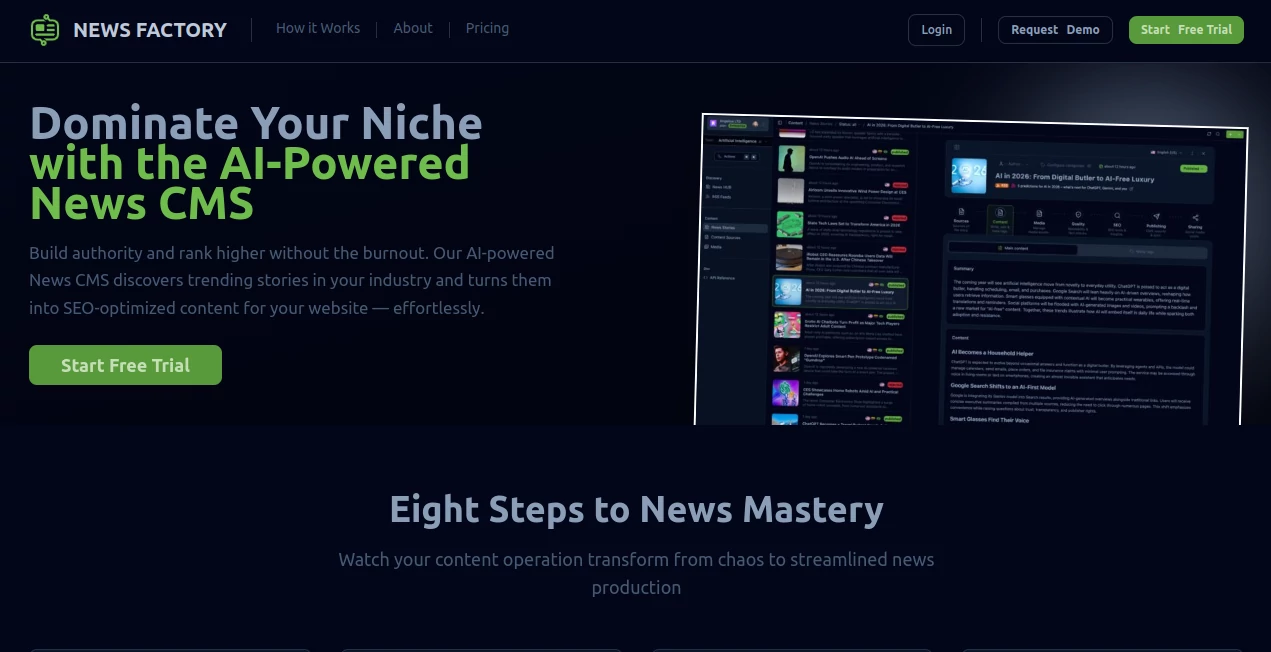
What is News Factory?
Picture this: you spot a trending story, type a quick summary, pick a voice and style, hit generate—and sixty seconds later you have a complete, broadcast-ready news clip with smooth voiceover, relevant B-roll, captions, and transitions that actually look expensive. That’s not a dream; it’s what this tool quietly delivers every day. I’ve seen creators go from “I wish I could jump on this trend” to posting a polished 60-second explainer before the topic cools off. The speed is addictive, but it’s the quality—the natural-sounding narration, the intelligent clip selection—that keeps people coming back for more.
Introduction
News moves fast. By the time you script, record, edit, and export, half the internet has already moved on. This platform collapses that timeline into under a minute while keeping the output looking like something a real newsroom produced. You give it a headline or short text, choose a presenter style (serious anchor, energetic reporter, calm explainer), and it builds everything: spoken narration with proper intonation, relevant stock footage or AI-generated visuals, auto-captions, subtle graphics, and smooth cuts. It’s become a go-to for social media creators, journalists, educators, and marketers who need to explain breaking stories, trends, or updates before attention shifts. The results feel current, credible, and surprisingly human.
Key Features
User Interface
The dashboard is clean and focused: a large text box for your story or prompt, dropdowns for voice style and language, a few quick toggles (length, tone, captions on/off), and one prominent “Generate” button. Previews start rendering almost instantly so you can stop and tweak mid-flow if needed. Everything is where you expect it—no digging through sub-menus. It’s built for speed, so you stay in creative mode instead of configuration hell.
Accuracy & Performance
The voice synthesis is remarkably natural—pauses, emphasis, and intonation match real news delivery, not robotic monotone. Footage selection pulls contextually relevant clips (no random cat videos when you’re talking politics). Captions time perfectly with speech, and transitions feel purposeful rather than generic. Generation usually takes 30–90 seconds even for longer clips. Consistency across languages and accents is strong—rarely do you get the awkward mispronunciations that plague other tools.
Capabilities
Text-to-news-video in multiple languages, 20+ presenter voices (male/female, serious/energetic/calm), auto B-roll sourcing, AI-generated visuals when stock isn’t enough, timed captions with style options, background music selection, aspect ratio presets (vertical for Reels/TikTok, horizontal for YouTube), and export in high quality. It handles breaking news, explainers, listicles, updates, and opinion summaries—anything that benefits from a quick, authoritative video format.
Security & Privacy
Your prompts and generated videos are processed privately—nothing is stored long-term unless you save it. No mandatory account for basic use, and paid plans add end-to-end encryption and data deletion controls. For creators handling sensitive topics or brand content, that clean approach is reassuring.
Use Cases
A news aggregator creates 60-second daily trend summaries and posts them across platforms before competitors finish scripting. A small media outlet turns press releases into shareable video explainers that get picked up by larger pages. An educator summarizes complex topics into short, engaging clips for students who prefer video over text. A marketer jumps on viral moments with branded explainers that ride the wave. Wherever timely, credible video content matters, it delivers fast without sacrificing polish.
Pros and Cons
Pros:
- Shockingly fast turnaround—idea to finished video in under 90 seconds.
- Voice quality and intonation genuinely sound like a real broadcaster.
- Intelligent B-roll and visual selection save hours of manual hunting.
- Multiple languages and presenter styles open global reach.
- Free tier is usable—enough to test real content before committing.
Cons:
- Long-form videos (beyond 2–3 minutes) still require splitting into parts.
- Very niche or breaking stories may pull less relevant B-roll (common to all AI tools).
- Unlimited generations and premium voices live behind paid plans.
Pricing Plans
Free plan gives daily credits for short clips—perfect for testing or light posting. Paid tiers unlock unlimited generations, longer videos, premium voices, priority queue, no watermark, and commercial rights. Pricing is reasonable—many creators say one month pays for itself after a single viral post that would’ve taken days to produce manually.
How to Use News Factory
Paste your story summary or headline into the prompt box. Choose presenter style (anchor, reporter, explainer), language, and video length/aspect ratio. Optionally add custom instructions (“focus on key facts,” “energetic tone”). Hit generate—watch the preview build. Tweak wording or voice if needed, then export. Post directly to TikTok, YouTube Shorts, Instagram Reels, or download for editing. The loop is fast enough to iterate several versions in one session.
Comparison with Similar Tools
Many AI video tools still sound robotic or pull mismatched visuals. This one excels at news-style delivery—credible tone, relevant footage, accurate captions, and presenter consistency. It’s less about artistic freedom and more about fast, trustworthy explainers, which puts it in a league of its own for current-events creators, educators, and marketers who need authority without production overhead.
Conclusion
Speed matters in news and trends, but credibility matters more. This tool gives you both—professional-looking videos that feel real, fast enough to ride the wave, and trustworthy enough to share without hesitation. It turns “I should make a video about this” into “done and posted” before the moment passes. For anyone creating timely content, that’s not just convenient—it’s essential.
Frequently Asked Questions (FAQ)
How long can videos be?
Typically 30–180 seconds; longer topics can be split into parts.
Do voices sound human?
Yes—natural intonation, proper pauses, and emotional range for news delivery.
Can I use it commercially?
Paid plans include full commercial rights; free tier allows non-commercial use.
What if the B-roll isn’t perfect?
Regenerate or edit the prompt for better relevance—most clips nail it first try.
Is there a watermark on free videos?
Small watermark on free tier; paid plans remove it completely.
AI Animated Video , AI Content Generator , AI Video Generator , AI Text to Video .
These classifications represent its core capabilities and areas of application. For related tools, explore the linked categories above.
News Factory details
This tool is no longer available on submitaitools.org; find alternatives on Alternative to News Factory.
Pricing
- Free
Apps
- Web Tools
Categories

News Factory Alternatives Product

wan2-6.org

seedance 3.0

Seedance 2.0

Motion Contr…

AI Baby Dance

WonderShare …

Gemini AI vi…

Kling 4.0 AI

Mimo AI
