🧠 AI Quiz
Think you really understand Artificial Intelligence?
Test yourself and see how well you know the world of AI.
Answer AI-related questions, compete with other users, and prove that
you’re among the best when it comes to AI knowledge.
Reach the top of our leaderboard.


















Nim

What is Nim?
Imagine firing off a wild idea for a short film, and in minutes, you've got a polished clip ready to drop on your feed—complete with smooth animations, spot-on voiceovers, and that cinematic flair that usually takes a whole team to pull off. That's the kind of everyday magic this powerhouse brings to creators who are tired of staring at blank timelines. I've seen friends go from "eh, maybe someday" to posting viral hits, all because it strips away the barriers and lets the fun take over.
Introduction
Picture this: you're a small business owner juggling a million tasks, and suddenly you need a quick promo video to hype your latest drop. Or maybe you're that indie storyteller who's always doodling concepts but never quite gets them moving. Enter this gem of an app, a one-stop haven where cutting-edge models like Veo 2, Kling Pro, and Luma Ray 2 team up to turn your scribbles into stunning visuals. What hooked me early on was how it feels less like wrestling software and more like jamming with a talented collaborator who just gets you. Since bursting onto the scene, it's gathered over 2.5 million creators in its orbit, each one raving about those "aha" moments when a simple prompt blooms into something shareable and pro-level. It's not just about speed; it's that spark that keeps you creating late into the night, knowing you've got the tools to match your vision without the usual headaches.
Key Features
User Interface
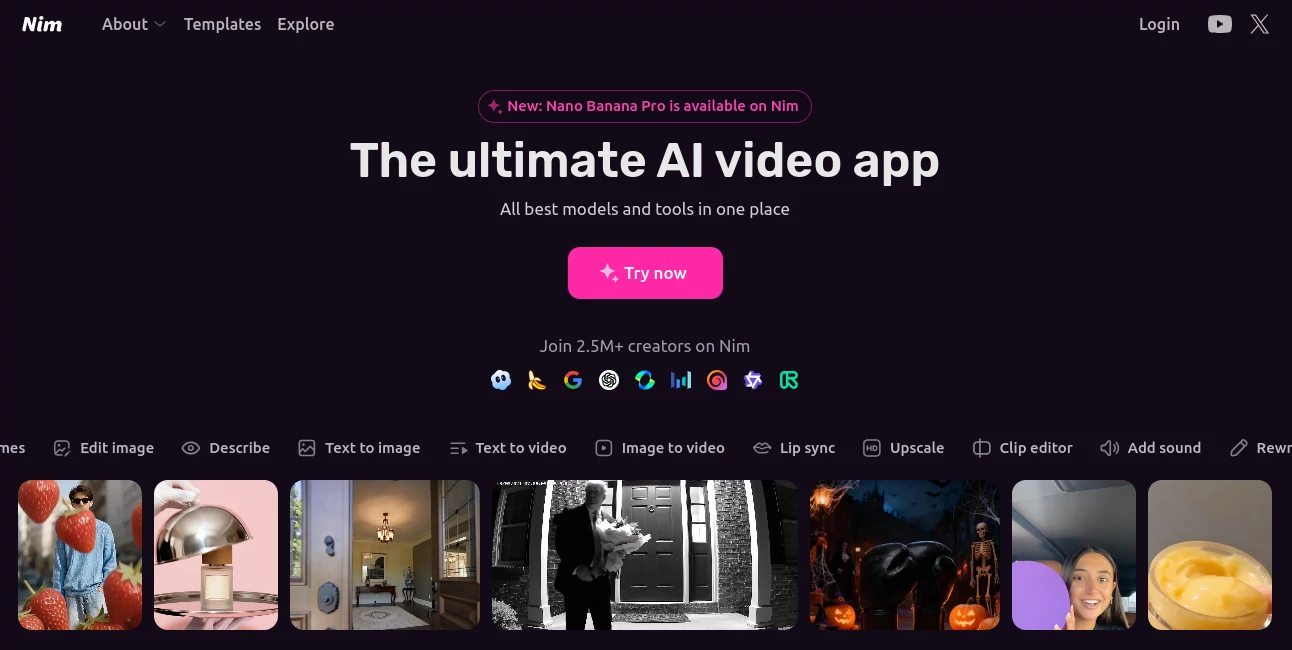
The dashboard hits you like a well-organized sketchbook—clean lines, intuitive drags, and everything right where your hands want it. Drop in a text prompt or an image, tweak with keyframes or a quick restyle, and watch the preview update live without a single glitchy pause. I remember my first go: uploading a rough doodle of a coffee shop scene, and within taps, it was layering in ambient sounds and lip-synced chatter. No buried menus or confusing icons; it's designed for those flow states where ideas chase each other, keeping you immersed instead of irritated.
Accuracy & Performance
When it nails a prompt—like turning "sunset beach run with a golden retriever chasing waves" into footage that captures the exact glow and splash—it's pure poetry. Powered by state-of-the-art engines, it handles nuances like motion blur or emotional beats with a finesse that rivals hand-crafted edits, all while clocking in under a minute for most clips. In my testing, even on a mid-range laptop, renders flew by without overheating or dropping frames, leaving me with buttery-smooth outputs that looked ready for festivals. It's that reliability that turns skeptics into superfans, promising results you can bank on every time.
Capabilities
From text-to-image sparks that evolve into full-blown videos, to lip-sync magic that makes avatars feel alive, or even upscaling grainy clips to 4K glory—this toolkit is a creator's dream arsenal. Add in clip editing for seamless cuts, sound layering for that immersive punch, and prompt rewrites that refine your vision on the fly, and you've got a suite that covers ideation to export without skipping a beat. One standout for me was using it to restyle old family footage into a heartfelt montage; the way it preserved the warmth while adding subtle animations was nothing short of heartfelt genius.
Security & Privacy
In an era where every upload feels like a gamble, this app stands out by keeping your files locked down tight—processed on secure servers with no sneaky data grabs or third-party shares unless you opt in. Exports stay yours alone, and the inspiration feed draws from community gems without compromising your originals. It's the kind of thoughtful backbone that lets you pour your soul into projects, knowing your raw ideas and finished works are safe from prying eyes, which is a huge relief for anyone dipping into personal storytelling.
Use Cases
Social media hustlers crank out eye-candy reels for TikTok or Instagram, blending stock templates with custom twists to rack up views overnight. YouTubers without a face for the camera build faceless narrations that feel intimate and engaging, saving hours on scripting and shooting. Small biz owners whip up product demos that highlight features in dynamic ways, turning static listings into scroll-stoppers. And for educators or nonprofits, it's a lifesaver for crafting quick explainers that make complex topics pop, all without needing a full production crew.
Pros and Cons
Pros:
- Blends top models into one seamless spot, so you experiment without app-hopping.
- Lightning renders mean more time creating, less waiting around.
- Inspiration feed sparks ideas when you're staring at a blank prompt.
- Versatile enough for pros yet welcoming for total newbies.
Cons:
- Free tier teases with limits on length and exports, nudging toward premium.
- Occasional prompt tweaks needed for super-specific visions.
- Sound library could use more niche options for global creators.
Pricing Plans
You can dive in free with basic generations and a taste of the models, perfect for testing waters or casual clips—think short bursts that still pack a punch. The pro tier, around $20 a month, unlocks unlimited renders, high-res exports, and full access to premium engines like Kling Pro, making it a steal for regular users. Teams or heavy hitters go enterprise for custom integrations and priority queues, but honestly, even the starter feels generous, especially with that no-strings trial week to get hooked.
How to Use Nim
Kick things off by signing up with your email—takes seconds—and head to the dashboard for a quick tour. Jot a prompt like "cozy cabin in a snowy forest at dusk," hit generate, and let the models do their thing; tweak with keyframes if the motion needs a nudge. Layer in lip-sync for dialogue or upscale for that final polish, then export straight to your drive or socials. Pro tip: start with the inspiration feed for vibe checks—it'll save you from those off-day brain freezes.
Comparison with Similar Tools
Stack it against solo-model apps like Runway, and it wins hands-down for variety—no more bouncing between tabs for different effects. Where Synthesia shines on avatars, this one layers in broader creativity like restyling or sound adds without feeling niche-locked. It's the all-rounder that punches above its weight, especially for folks who want pro results without the pro price tag or learning curve.
Conclusion
This app isn't just another video maker; it's the quiet revolution that's handing creators the keys to their wildest ideas, turning "what if" whispers into watchable wonders that connect and captivate. Whether you're building a brand or just chasing that next story, it delivers the tools, the ease, and the wow factor to keep you going. Dive in, and you'll wonder how you ever got by without it—trust me, once you see your first clip come alive, there's no going back.
Frequently Asked Questions (FAQ)
Can beginners really jump in without tutorials?
Absolutely— the interface is so forgiving, you'll be churning clips in your first session, though the quick-start guides are gold for hidden gems.
What if my prompt flops the first time?
Hit rewrite, add a detail or two, and it bounces back stronger—it's built for iteration, not perfection on try one.
Does it work on mobile?
Web-first magic means it shines on any device, though desktop gives you that extra canvas for fine tweaks.
How about exporting for pro use?
High-res, watermark-free files ready for YouTube, TikTok, or client pitches—it's geared for the real world.
Is there community support?
Yep, forums buzzing with tips, plus responsive help that feels like chatting with a fellow creator.
AI Content Generator , AI Image to Video , AI Text to Video , AI Video Generator .
These classifications represent its core capabilities and areas of application. For related tools, explore the linked categories above.
Nim details
This tool is no longer available on submitaitools.org; find alternatives on Alternative to Nim.
Pricing
- Free
Apps
- Web Tools
Categories

Nim Alternatives Product

AISeedance2

Nano Banana …

AI Baby Dance

Shoorts AI

kling 3 AI

Kling O1

Flow Veo 3

Seedance 2.0…

Whisper Thun…