
🧠 AI Quiz
Think you really understand Artificial Intelligence?
Test yourself and see how well you know the world of AI.
Answer AI-related questions, compete with other users, and prove that
you’re among the best when it comes to AI knowledge.
Reach the top of our leaderboard.

















Noir Prompt
What is Noir Prompt?
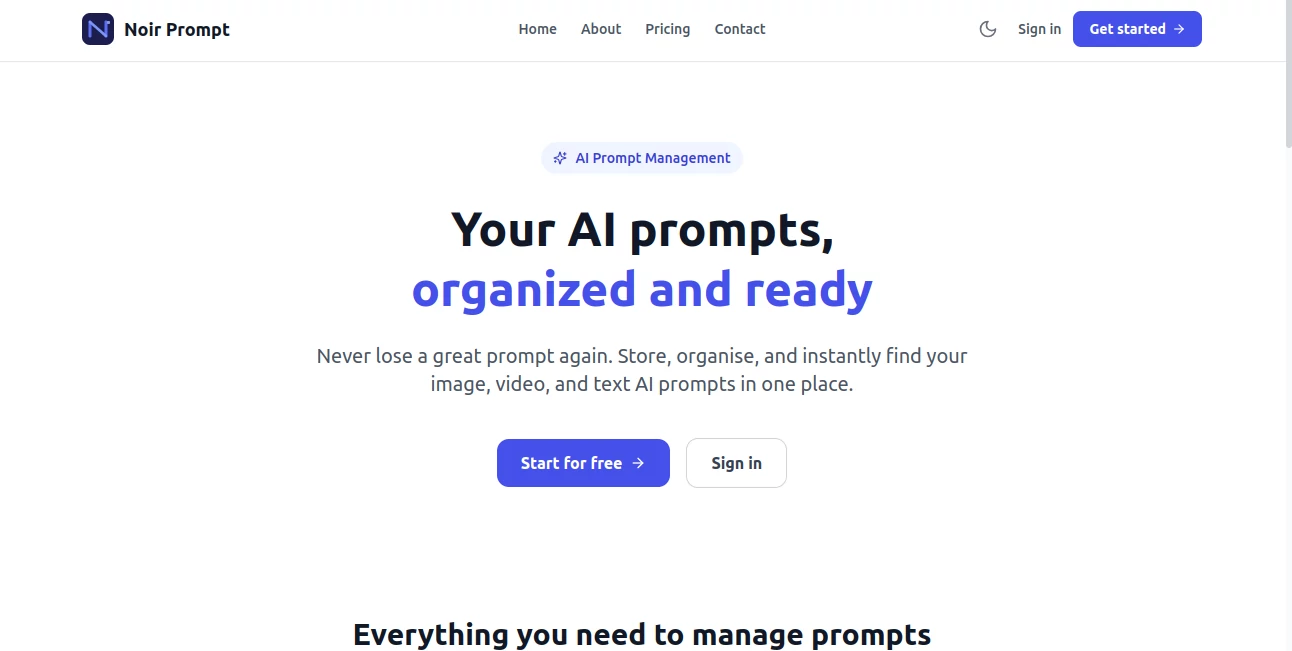
Have you ever spent twenty minutes trying to remember that perfect prompt you used last week, only to give up and start from scratch? Most of us have. This tool solves that frustration elegantly. It gives you a clean, organized home for every great prompt you create—for Midjourney, DALL-E, ChatGPT, Claude, or any other AI— so you can find, reuse, and build upon them instantly. I’ve watched creative friends go from scattered notes and forgotten gems to a well-curated library that actually speeds up their workflow. It feels like finally having a reliable assistant who remembers every clever trick you’ve ever discovered.
Introduction
Great prompts are the secret behind strong AI results, but they’re easy to lose track of. One day you nail a cinematic style, the next you can’t remember how you got there. Noir Prompt changes that by becoming your central hub for all things prompt-related. Whether you generate images, write text, or create video concepts, it helps you store, tag, search, and refine your prompts in one beautiful place. It’s not just another bookmark tool—it’s built specifically for the way creators actually work with AI: testing, tweaking, and returning to what worked before. For freelancers, hobbyists, and full-time creators, it quietly becomes one of those tools you wonder how you lived without.
Key Features
User Interface
The design is dark, elegant, and focused—easy on the eyes during long creative sessions. You can quickly add new prompts, organize them with tags and folders, and search with natural language. The interface stays out of the way so your prompts take center stage. Preview cards show examples without clutter, and everything feels fast and responsive. It’s the kind of clean workspace that makes you want to spend more time creating rather than organizing.
Accuracy & Performance
Search is impressively accurate—you can type fragments of a prompt or describe what you’re looking for, and it surfaces the right ones quickly. Prompts stay exactly as you saved them, with no formatting issues, and the library loads smoothly even as it grows to hundreds of entries. The reliability means you spend less time hunting and more time building on your best work.
Capabilities
It supports prompts for image generators (Midjourney, DALL-E, etc.), text models (ChatGPT, Claude), and video tools—all in one library. You can tag, folder, search, duplicate, and refine entries easily. Version history for evolving prompts, sharing options for collaboration, and quick copy buttons make daily use smooth. It’s flexible enough for solo creators and powerful enough for small teams managing brand-consistent prompts.
Security & Privacy
Your prompts stay private by default. The platform uses solid security practices, and you control what (if anything) gets shared. No unnecessary data collection or training on your creative work—your ideas remain yours. That respect for user content makes it especially appealing for professional or sensitive projects.
Use Cases
A brand designer keeps a growing library of consistent Midjourney styles for client work. A writer stores effective storytelling prompts for ChatGPT to maintain voice across projects. A social media manager organizes video and image prompts for different campaigns. An indie game developer saves reliable asset-generation prompts to speed up iteration. Anyone who uses AI regularly finds themselves returning to this as their “prompt brain”—saving time and improving consistency.
Pros and Cons
Pros:
- Beautiful, focused interface that makes prompt management enjoyable.
- Powerful search and organization that scales with your collection.
- Supports every major AI tool in one place.
- Quick copy and refinement features speed up daily workflows.
- Strong privacy focus gives peace of mind.
Cons:
- Free tier has reasonable limits for heavy users.
- Some advanced collaboration features are in higher plans.
Pricing Plans
It starts with a generous free plan that lets you build a solid personal library. Paid tiers unlock unlimited storage, advanced search, team sharing, version history, and priority support. The upgrade feels worthwhile once your collection grows and you start relying on it daily. Many users say the time saved quickly covers the cost.
How to Use Noir Prompt
Sign up (quick and simple), then start adding prompts—paste from Midjourney, DALL-E, ChatGPT, or any other tool. Add helpful tags and descriptions as you go. When you need something later, search naturally or browse your folders. Found a good one? Copy it instantly or duplicate and tweak for a new project. Over time, your library becomes a valuable creative asset that grows with you.
Comparison with Similar Tools
Basic note apps or browser bookmarks get messy fast. Other prompt libraries often feel generic or limited to one AI tool. This one stands out with its clean design, strong search, multi-tool support, and focus on creative workflows. It’s less about simple storage and more about making your best prompts easy to find and reuse—which is what actually improves your AI output over time.
Conclusion
Good prompts are half the battle with AI. This tool makes keeping and using them effortless and even enjoyable. It turns scattered ideas into an organized, searchable creative resource that improves your results across every project. For anyone serious about getting better outputs from AI—whether for work, art, or fun—it’s one of those quiet tools that becomes indispensable once you start using it. Your future self will thank you for building this library today.
Frequently Asked Questions (FAQ)
Do I need to pay to start using it?
No—the free plan is generous and great for building your initial library.
Can I import prompts from Midjourney or ChatGPT?
Yes—simply copy and paste them in; the tool handles formatting cleanly.
Is my prompt library private?
Yes—your data stays private by default, with strong security practices in place.
Can I share prompts with my team?
Yes—paid plans include collaboration and sharing features.
What AI tools does it support?
It works with Midjourney, DALL-E, ChatGPT, Claude, Stable Diffusion, video tools, and more.
AI Creative Writing , AI Content Generator , Prompt .
These classifications represent its core capabilities and areas of application. For related tools, explore the linked categories above.
Noir Prompt details
Pricing
- Free
Apps
- Web Tools
Categories

Noir Prompt Alternatives Product

wu tang name…

Quso AI

Flow Veo 3

Banana Promp…

FinalLayer
Publiq Studio

MidJourney
Slogan Gener…

SEOTakeoff
