🧠 AI Quiz
Think you really understand Artificial Intelligence?
Test yourself and see how well you know the world of AI.
Answer AI-related questions, compete with other users, and prove that
you’re among the best when it comes to AI knowledge.
Reach the top of our leaderboard.


















Opal

What is Opal?
There’s something genuinely exciting about typing a few sentences and watching a fully working app take shape right in front of you. That’s exactly what this tool makes possible—turning everyday ideas into interactive mini-apps without writing a single line of code. I remember showing a friend how to describe a quick habit tracker, and within minutes we had something she could share with her team. It felt like the future had quietly arrived, wrapped in the simplest interface imaginable.
Introduction
This platform was born from the desire to make AI creation feel as natural as talking about an idea. Instead of wrestling with code or complex builders, you simply describe what you want, and it builds it—step by step, visually, in plain English. It’s perfect for anyone who has an idea but doesn’t have the time or technical chops to bring it to life the traditional way. Early users have already turned it into everything from personal dashboards to fun shared tools, and the sense of possibility is contagious. It’s not just fast; it makes creation feel approachable and joyful again.
Key Features
User Interface
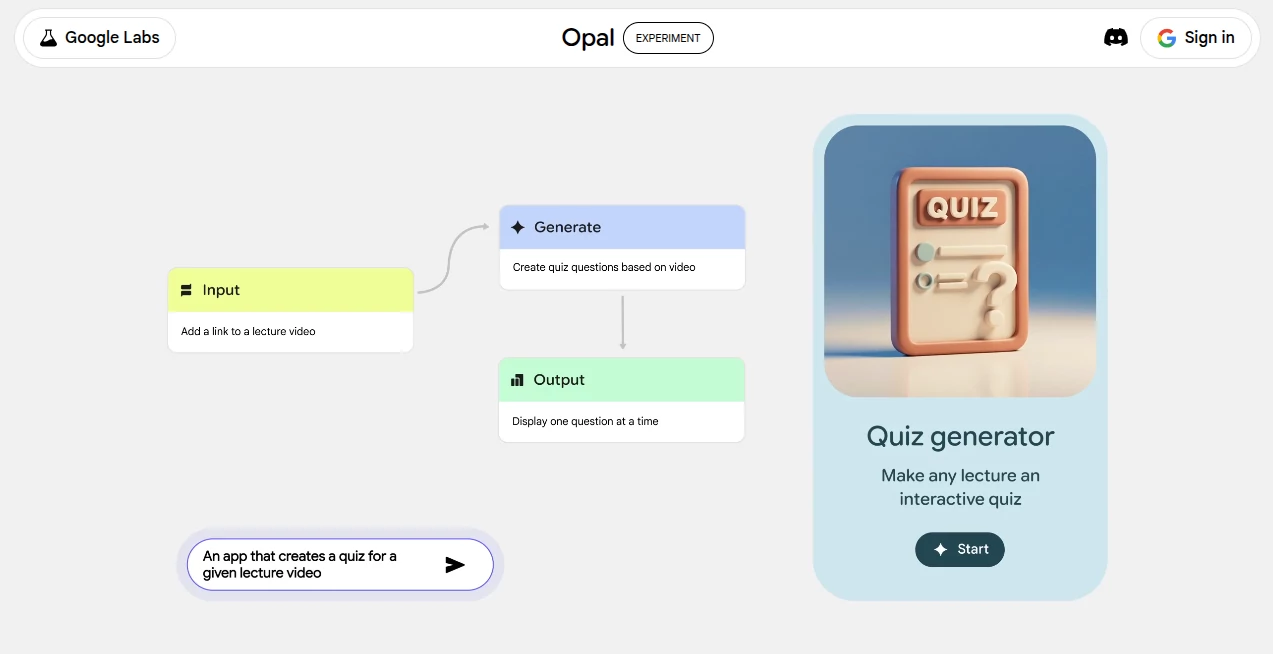
The moment you land, you’re greeted with a clean, spacious canvas that invites you to start typing. No overwhelming menus or hidden buttons—just a prompt area and a growing visual map of your app as it comes to life. You can drag nodes around, connect ideas, and see changes instantly. It’s almost meditative how smoothly everything flows; you never feel like you’re fighting the tool.
Accuracy & Performance
What stands out most is how well it understands intent. Describe a form with conditional logic or a dashboard that pulls data, and it rarely misses the mark. Generations are quick, and the visual editor lets you refine anything without starting over. I’ve seen complex apps built in under ten minutes that would have taken days otherwise. The speed and reliability are impressive for something that feels so experimental.
Capabilities
You can build from scratch or start with gallery examples, then tweak logic, add inputs, outputs, even integrate AI behaviors—all through natural language and a drag-and-drop canvas. It supports interactive elements, data flows, and sharing with a simple link. Whether it’s a personal tool or something collaborative, the flexibility keeps surprising me. It’s the kind of platform that grows with your imagination.
Security & Privacy
Since it’s a Google Labs experiment, it inherits the same thoughtful approach to data handling. Your creations stay private by default, and sharing is always intentional. There’s a real sense of care here—no creepy tracking or forced data grabs. You can build with peace of mind, knowing your ideas aren’t quietly being harvested.
Use Cases
A marketer once built a quick lead-scoring widget for their team in one afternoon. A student created a study planner with reminders and progress tracking. Someone else made a fun “what should we cook tonight” decision tool for their family group chat. The range is huge—personal productivity hacks, internal tools, educational aids, even playful experiments. It’s the versatility that keeps people coming back.
Pros and Cons
Pros:
- Feels like magic: describe it, and it appears.
- Visual editing makes refinement fun and fast.
- No-code yet powerful enough for real utility.
- Gallery inspires when you’re stuck.
Cons:
- Still an experiment—occasional rough edges.
- Requires a Google account to save and share.
Pricing Plans
It’s completely free to use right now, no credit card or subscription needed. You can build, share, and explore as much as you like. For a Google Labs project, it’s remarkably generous, and that openness is part of what makes it so inviting.
How to Use Opal
Head to the site, sign in with your Google account, and start typing your idea in the prompt box. Watch the app build itself node by node. Click into any part to edit, add conditions, connect data flows, or change visuals. When it feels right, hit share for a link anyone can use. I’ve found the best results come from clear, step-by-step descriptions—almost like explaining to a helpful friend.
Comparison with Similar Tools
Unlike traditional no-code platforms that demand hours of learning, this one skips the curve entirely. Bubble or Adalo might offer more advanced logic eventually, but they can’t match the sheer speed of starting from a sentence. It’s not trying to replace full app builders—it’s about instant ideas becoming instant reality, and it does that better than anything else I’ve tried.
Conclusion
This tool quietly redefines what “creating” can mean in 2025. It lowers every barrier until the only thing stopping you is your imagination. Whether you’re prototyping a side project or just playing with ideas, it makes the process feel alive and exciting again. I can’t wait to see what people build next—it’s one of those rare moments where the future feels closer than ever.
Frequently Asked Questions (FAQ)
Do I need coding knowledge?
None at all—just describe what you want in plain English.
Is it really free?
Yes, completely—no hidden fees or paywalls.
Can others use my mini-app?
Absolutely—just share the link and they can open it instantly.
What if my idea is complex?
Break it into steps in your description; the visual editor handles the rest.
Is it safe to use?
As a Google Labs project, it follows strong privacy standards.
AI App Builder , AI No-Code & Low-Code , AI Developer Tools .
These classifications represent its core capabilities and areas of application. For related tools, explore the linked categories above.
Opal details
This tool is no longer available on submitaitools.org; find alternatives on Alternative to Opal.
Pricing
- Free
Apps
- Web Tools
Categories

Opal Alternatives Product

Jujutsu Zero…

ShipAhead

Toonifyit

Somnio

Devplan

Lovable APP

Prelight

GPTLocalhost

Sento AI