
🧠 AI Quiz
Think you really understand Artificial Intelligence?
Test yourself and see how well you know the world of AI.
Answer AI-related questions, compete with other users, and prove that
you’re among the best when it comes to AI knowledge.
Reach the top of our leaderboard.


















Ordemio

What is Ordemio?
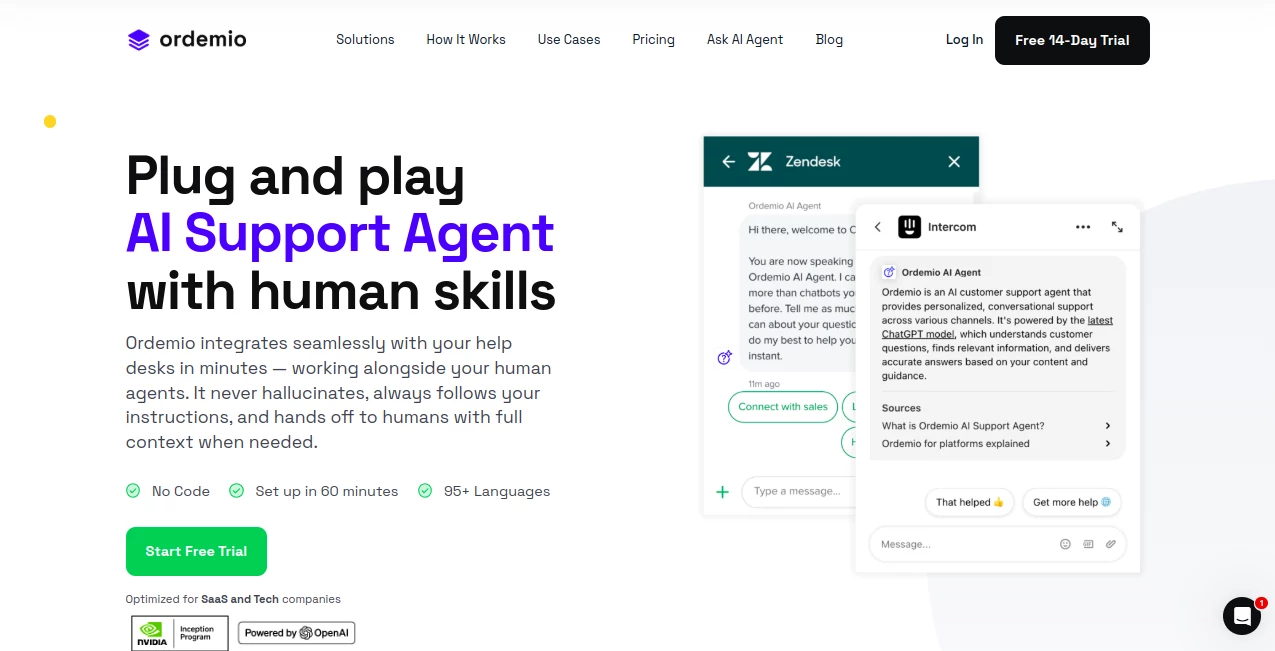
Ordemio steps in as a reliable partner for teams handling customer questions, blending smart responses with smooth handoffs to keep things running without a hitch. This setup lets support folks focus on the tough spots while it tackles the everyday back-and-forth, all tuned to match your brand's voice. Companies that have brought it on board often talk about how it lightens the load right away, turning scattered chats into organized flows that feel personal and on point.
Introduction
Ordemio came together from the real-world headaches of support leads who knew generic bots just weren't cutting it for their growing teams. A small group of folks who'd been in the trenches built it to handle the nitty-gritty without losing that human touch, and it took off among tech outfits looking to scale without adding headcount. Early users shared stories of slashing ticket piles overnight, with one startup noting how it turned chaotic inboxes into a steady stream of resolved issues. Over time, it's picked up steam by listening to those on the front lines, tweaking to fit the ebb and flow of busy days, and proving itself as more than a quick fix—it's a steady hand that grows with you, making sure no query slips through the cracks.
Key Features
User Interface
The dashboard opens up clean and to the point, with spots to pull in your info sources laid out like a simple checklist—no deep dives into menus that hide the good stuff. As you set up the tone or look, previews show up right away, letting you see how replies might land in a chat window. It's the kind of setup that clicks after a quick walk-through, feeling more like jotting notes in a shared doc than wrestling with switches, and it keeps things light even when you're layering in connections to other apps.
Accuracy & Performance
When a question rolls in, it draws straight from what you've fed it, serving up answers that stick to your guidelines without wandering off into odd territory. Replies land fast, even during peak hours, wrapping simple exchanges in seconds and passing the baton smoothly on trickier ones. Teams that track it closely often point out how it holds steady on repeat runs, cutting down on back-and-forth that used to drag on, and keeping satisfaction scores climbing without extra tweaks.
Capabilities
It pulls together bits from docs, videos, and sites to craft full answers, handling everything from quick how-tos to step-by-step fixes that guide folks through sticky spots. You can shape its style to echo your team's chatter, link it up with desks like Zendesk or chats in Slack, and even let it nudge actions like pulling user details or firing off updates. The real strength shows in mixing languages or passing threads to people with all the backstory intact, making it fit for outfits spread across time zones or tongues.
Security & Privacy
Chats and details get wrapped tight from the start, with strong locks on storage and sends that meet the usual high bars for keeping things safe. You can tuck it away on your own setup if needed, giving full say over where data sits, and it clears out the extras once a thread wraps. Support crews lean on that solid base, knowing sensitive swaps stay under wraps while still flowing free for the work at hand.
Use Cases
Tech startups drop it into their help lines to sort new user bumps, walking folks through setups without pulling agents off bigger fires. Bigger shops weave it into community spots like Discord, answering common gripes so mods can chase deeper chats. Onboarding teams use it to spotlight features in trials, nudging users toward that first win with tailored tips. Even internal groups tap it for quick pulls from shared notes, keeping everyone looped without endless searches.
Pros and Cons
Pros:
- Blends right into your flow, picking up where people leave off.
- Stays true to your info, dodging wild guesses that confuse.
- Gives back clear snapshots on what's working and what needs a nudge.
Cons:
- Extra chats beyond the cap add a small tab that stacks up.
- Shines best after a bit of tuning to your setup.
- Geared more toward tech crowds than every corner.
Pricing Plans
You can ease in with a no-cost trial that runs a couple weeks, full setup help included to get the wheels turning. From there, the entry point sits around fifty bucks monthly for a single setup with a good chunk of exchanges, stepping up to a few hundred for more reach and extras like custom steps. Top tiers bend to fit bigger needs with no caps, and they keep things flexible—no long ties, just month-to-month with a safety net to back out if it doesn't click.
How to Use Ordemio
Start by linking your sources like docs or sites, letting it chew through the details in a quick sweep. Shape its chat style with a few words on tone, hook up your desk or community spot, and tweak the look to match your colors. Drop it live on your page or app, watch it field the first waves, and peek at the wrap-ups to spot patterns. Swing back to refine as chats roll in, building a rhythm that hums without much watching.
Comparison with Similar Tools
Where catch-all bots throw wide nets that snag on specifics, Ordemio tunes tight to your world, though those might cover more ground for scattered needs. Against full-blown desks, it slips in as a booster rather than a takeover, saving steps but maybe missing the all-in-one sprawl. It pulls ahead for outfits wanting quick wins in support without rewriting the playbook, blending ease with edge over broader brushes.
Conclusion
Ordemio wraps up the scramble of support into something steady and sharp, giving teams room to breathe while keeping customers close. It turns the tide on ticket floods, proving a smart sidekick can lift more than it leans. As chats keep piling up across channels, this one's primed to stay in step, turning everyday exchanges into edges that stick.
Frequently Asked Questions (FAQ)
How quick does it get rolling?
Most folks have it humming in about an hour, trial tweaks and all.
Does it play nice with my current setup?
Yep, hooks into desks and chats like it's always been there.
What if a chat needs a real person?
It passes the full story over smooth, no starting from scratch.
Handles other languages?
Over ninety kinds, keeping things clear no matter the tongue.
What about keeping things safe?
Locked down tight, with options to host it all in-house.
AI Customer Service Assistant , AI Chatbot .
These classifications represent its core capabilities and areas of application. For related tools, explore the linked categories above.
Ordemio details
This tool is no longer available on submitaitools.org; find alternatives on Alternative to Ordemio.
Pricing
- Free
Apps
- Web Tools
Categories

Ordemio Alternatives Product

PolyBuzz

Romantic AI

Helploom

Vapi

FeatureShark

TWT Chat

Dewy Chat

Fleck

Lexikon AI
