🧠 AI Quiz
Think you really understand Artificial Intelligence?
Test yourself and see how well you know the world of AI.
Answer AI-related questions, compete with other users, and prove that
you’re among the best when it comes to AI knowledge.
Reach the top of our leaderboard.


















AI Padstyler

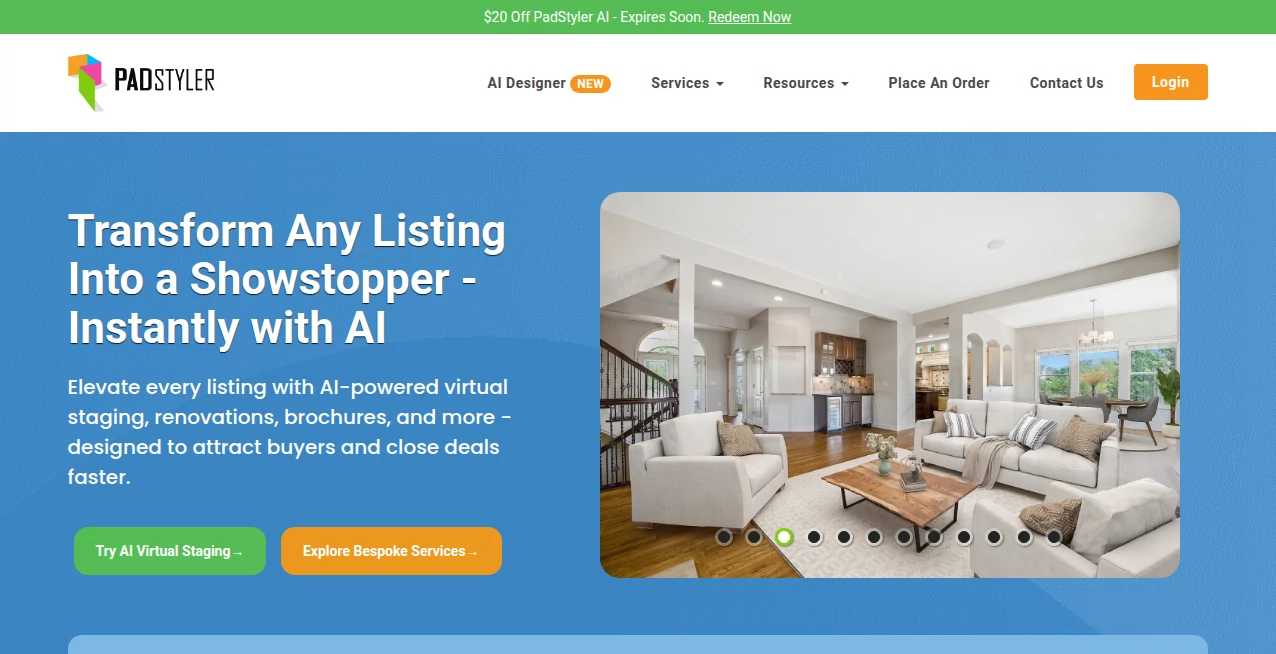
What is AI Padstyler?
There's something instantly appealing about those clean, elegant Notion pages that look like they were designed with care. The typography breathes, the spacing feels intentional, the colors are restrained yet warm. This tool takes that exact aesthetic and makes it dead simple to turn into a proper, live landing page—no code, no hosting headaches, no wrestling with templates that fight you. You start with a blank canvas or one of their beautifully curated starters, drag in blocks, type your copy, tweak a few settings, and in under ten minutes you have something that looks like it cost a designer days. I’ve watched non-technical founders go from “I need a landing page yesterday” to sharing a live link that actually feels premium. That speed combined with polish is addictive.
Introduction
Notion pages have quietly become the gold standard for clean, readable online content—notes, docs, personal sites, portfolios. But turning one into a real public website has always been clunky: embed hacks, third-party wrappers, or rebuilding from scratch in another tool. This platform bridges that gap perfectly. It gives you the familiar Notion-like editor everyone already knows how to use, then exports a fast, responsive, SEO-friendly static site you can host anywhere or use with their built-in publishing. No learning curve, no compromise on aesthetics. For indie makers, creators, consultants, educators, or anyone who wants their online presence to feel thoughtful without spending weeks (or thousands), it’s become the shortcut that finally makes sense.
Key Features
User Interface
The editor feels like home if you’ve ever used Notion—same block-based drag-and-drop, same slash commands, same clean sidebar. But it’s tuned specifically for public-facing pages: hero sections, pricing tables, testimonials, feature grids, and call-to-action blocks all sit ready to customize. Dark/light mode toggle, responsive preview, and one-click style adjustments (fonts, spacing, accent colors) make personalization fast. It never feels like you’re fighting the tool; it just quietly helps your content look better than you expected.
Accuracy & Performance
The generated sites load blazingly fast—optimized images, minimal JS, clean HTML/CSS. They pass basic SEO checks out of the box (meta tags, alt text, semantic structure). Mobile responsiveness is excellent—everything reflows naturally without weird breakpoints. Export is reliable: you get a ZIP with production-ready files or a one-click deploy to their hosting. No surprises when you go live; what you see in preview is what visitors get.
Capabilities
Full Notion-style editing (text, headings, lists, quotes, dividers, images, embeds, columns, callouts), built-in components (pricing cards, testimonials, feature sections, CTAs, footers), custom domains on paid plans, one-click publishing, static export (ZIP), SEO metadata controls, analytics integration, password protection, and dark mode support. It handles portfolios, product launches, personal sites, waitlists, service pages, and simple SaaS marketing beautifully—all while keeping the signature Notion elegance.
Security & Privacy
Pages can be private (unlisted), password-protected, or fully public. No forced tracking scripts. Your content stays yours—exports are clean HTML/CSS/JS with no vendor lock-in. For creators handling client work or sensitive launches, the control over visibility and lack of hidden analytics feels trustworthy and straightforward.
Use Cases
A solo consultant builds a services page in an afternoon that looks like a $5k agency site—leads start coming in. An indie hacker launches a waitlist with a beautiful hero section and gets sign-ups rolling before the product is even coded. A creator turns their Notion knowledge base into a public portfolio that impresses collaborators. A small team creates a clean pricing page that converts better than their previous messy Carrd attempt. Wherever clarity and elegance matter more than flashy animations, it shines.
Pros and Cons
Pros:
- Feels exactly like editing in Notion—zero learning curve.
- Output looks premium and professional without any design effort.
- Fast static exports give you full ownership and flexibility.
- Responsive by default, SEO-ready, and loads like lightning.
- Free tier is genuinely usable for simple personal sites.
Cons:
- Advanced interactivity (forms, payments) requires third-party embeds.
- Custom domains and removal of branding need a paid plan.
- Very complex layouts may require some creative block stacking.
Pricing Plans
Free plan covers personal projects with basic features and PadStyler branding. Pro plan removes branding, unlocks custom domains, password protection, analytics, and priority support. Enterprise adds team collaboration, unlimited sites, and dedicated assistance. Pricing stays reasonable—many users say the Pro tier costs less than one freelance design hour but delivers ongoing value every time they launch or refresh a page.
How to Use PadStyler
Sign up (or start as guest), choose a template or begin blank. Add blocks with slash commands or drag-and-drop: headings, text, images, pricing cards, testimonials. Customize fonts, colors, spacing via the right sidebar. Preview on mobile/desktop. When ready, hit publish for a free subdomain or export ZIP for custom hosting. For custom domains (Pro), connect via DNS settings in minutes. Edit anytime—changes go live instantly. It’s as intuitive as editing a Notion doc but with real website superpowers.
Comparison with Similar Tools
Carrd is fast but feels more rigid and less elegant. Notion itself requires clunky embeds or third-party wrappers to go public. Framer and Webflow offer more power but come with steeper curves and higher costs. This tool sits in a sweet spot: Notion familiarity + real website output + minimal price. It trades some advanced animation for simplicity and speed—exactly what most creators need when they just want something beautiful live fast.
Conclusion
Beautiful, functional landing pages shouldn’t require a design degree or a big budget. This platform proves that by letting anyone create pages that look thoughtfully crafted in the time it takes to write the copy. It turns “I need a site” from a stressful project into a satisfying afternoon. For makers, educators, consultants, creators, and small teams who want to look professional without the overhead, it’s the shortcut that finally feels right. When your page goes live and people say “this looks really good,” you know it was worth it.
Frequently Asked Questions (FAQ)
Do I need to know how to code?
Not at all—it’s as easy as editing a Notion page.
Can I use my own domain?
Yes—on Pro and higher plans, connect any domain in minutes.
Is the site fast and mobile-friendly?
Yes—static export, optimized images, fully responsive by default.
Can I remove your branding?
Absolutely—paid plans remove all PadStyler mentions.
Can I export and host myself?
Yes—download a clean ZIP anytime, host wherever you like.
AI Landing Page Builder , AI Website Builder , AI Website Designer , AI Design Generator .
These classifications represent its core capabilities and areas of application. For related tools, explore the linked categories above.
AI Padstyler details
This tool is no longer available on submitaitools.org; find alternatives on Alternative to AI Padstyler.
Pricing
- Free
Apps
- Web Tools
Categories

AI Padstyler Alternatives Product

Nano Banana 2

AI Image Edi…

Nano Banana …

Reztune

Logo Animati…
DLSS 5 Meme …

GenPPT AI

Caricature G…

ChromaPeel