🧠 AI Quiz
Think you really understand Artificial Intelligence?
Test yourself and see how well you know the world of AI.
Answer AI-related questions, compete with other users, and prove that
you’re among the best when it comes to AI knowledge.
Reach the top of our leaderboard.


















XIMA DIGITAL

What is XIMA DIGITAL?
Ever lost hours digging through a 200-page PDF trying to find that one sentence you vaguely remember? This tool ends that frustration in the most satisfying way possible. Drop any PDF in—research papers, contracts, ebooks, scanned manuals—and it instantly understands the content, letting you ask natural questions and get precise answers with page references. The first time I tried it on a dense legal document I’d been dreading, I found the exact clause in under ten seconds. It felt like having a very smart assistant who’d already read the whole thing and remembered every detail.
Introduction
PDFs are everywhere—reports, books, invoices, academic papers—but searching inside them is still painful. Ctrl+F works for exact words, but what about concepts, synonyms, or questions like “What does it say about liability limits?” This platform bridges that gap elegantly. It doesn’t just scan text; it actually understands meaning, context, and intent. Built for students, lawyers, researchers, business professionals—anyone who deals with long documents regularly—it turns static files into conversational knowledge bases. The difference in workflow is night and day: no more endless scrolling, no more missing key details. It’s one of those tools you use once and wonder how you ever lived without it.
Key Features
User Interface
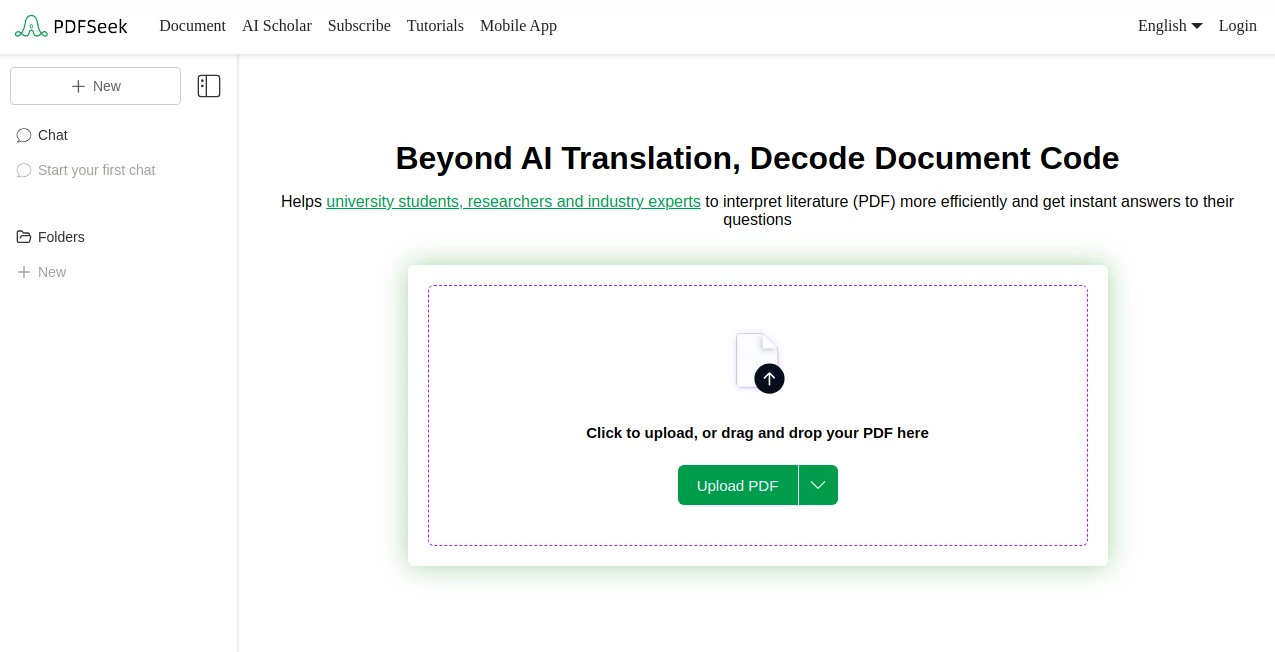
The experience is deliberately calm and focused. Upload your PDF (or drag it in), wait a few seconds while it indexes, then start asking questions in plain English right in the chat-like box. Answers appear with direct page citations, highlighted excerpts, and clickable jumps to the exact location. You can keep asking follow-ups, refine queries, or switch documents without resetting. It never feels cluttered or overwhelming—just a clean conversation with your document that gets smarter the more you use it.
Accuracy & Performance
It understands context far better than traditional search. Ask “What are the payment terms?” and it finds relevant sections even if the exact words “payment terms” aren’t used. Citations are precise—page number, paragraph, often sentence-level. Indexing is fast (seconds to a minute for most files), and queries return in 1–3 seconds. Even on very long or poorly scanned PDFs with OCR text, it performs reliably. The accuracy feels like talking to someone who read the document carefully, not just a keyword matcher.
Capabilities
Natural-language question answering, multi-document search (upload several at once), page-accurate citations with clickable links, support for scanned PDFs via built-in OCR, summarization of sections or full documents, extraction of tables/lists/figures, and follow-up questions that remember prior context. It handles technical documents, legal contracts, research papers, books, manuals—anything text-heavy. Outputs are exportable (answers, summaries) and shareable via links or PDF reports.
Security & Privacy
Your documents are processed in a secure, temporary session—nothing is stored permanently unless you explicitly save a project. No training on user files, no sharing with third parties. Files are encrypted in transit and at rest during processing. For sensitive contracts, research data, or client materials, that level of care is non-negotiable—and it’s delivered here without compromise.
Use Cases
A lawyer quickly finds every mention of “indemnity” across a 150-page contract and its amendments during negotiation prep. A grad student asks complex questions about a 400-page thesis bibliography and gets summarized insights with sources in minutes. A small business owner searches through years of supplier agreements to confirm warranty terms before a dispute. A medical researcher cross-references findings across multiple journal PDFs to spot patterns. Wherever deep document understanding saves time or prevents mistakes, it shines.
Pros and Cons
Pros:
- Understands meaning and context—not just keywords—so answers are actually useful.
- Lightning-fast indexing and query response even on large files.
- Page-accurate citations make verification effortless.
- Handles scanned PDFs and complex layouts reliably.
- Free tier is generous—real value before paying anything.
Cons:
- Very large or poorly OCR’d documents may need a moment longer to index.
- Unlimited documents and advanced export features require paid plan.
- Occasional edge cases with highly technical jargon need precise phrasing.
Pricing Plans
Free tier gives you several documents per month with full core functionality—enough for occasional heavy use or testing. Paid plans unlock unlimited uploads, priority processing, multi-document projects, advanced export (PDF summaries, CSV tables), and team sharing. Pricing is modest for the time and frustration it saves—many users say it pays for itself after one big research or contract review project.
How to Use PDFSeek
Drag your PDF into the upload area or click to select. Wait for indexing (usually seconds). Start typing questions in natural language—“What are the termination clauses?” or “Summarize section 4.2.” Read the answer with clickable page links and highlighted excerpts. Ask follow-ups, upload more files for cross-document questions, or export the conversation/summary. It’s conversational, fast, and feels like having a very well-read assistant who knows your documents inside out.
Comparison with Similar Tools
Basic PDF readers offer Ctrl+F but miss context. Other AI tools often hallucinate or give vague answers without sources. This one combines deep understanding with precise, verifiable citations—rare in this space. It’s less about keyword search and more about actual comprehension, making it stand out for serious document work where accuracy and source-trust matter most.
Conclusion
Drowning in PDFs is a modern reality; finding what matters shouldn’t be. This tool turns long documents from intimidating walls of text into helpful, conversational partners. It saves time, reduces errors, and gives confidence that you haven’t missed something important. For students, professionals, researchers, or anyone who regularly wrestles with information trapped in PDFs, it’s one of those rare tools that quietly makes life noticeably better. Once you’ve used it, going back to old search methods feels like stepping into the past.
Frequently Asked Questions (FAQ)
How many documents can I upload for free?
Several per month—enough for occasional deep dives or regular light use.
Does it work on scanned PDFs?
Yes—built-in OCR handles most scanned documents reliably.
Can multiple people share a project?
Paid plans support team collaboration and shared document sets.
Are my documents stored forever?
No—processed temporarily; nothing kept unless you save a project.
How accurate are the answers?
Very—grounded in exact page content with direct citations to prove it.
AI PDF , AI Documents Assistant , AI Research Tool , AI Files Assistant .
These classifications represent its core capabilities and areas of application. For related tools, explore the linked categories above.
XIMA DIGITAL details
This tool is no longer available on submitaitools.org; find alternatives on Alternative to XIMA DIGITAL.
Pricing
- Free
Apps
- Web Tools
Categories

XIMA DIGITAL Alternatives Product

AI OCR

Greek Numero…

ResumeFreePro
AnyToURL

Rename files…

IntoTheBlock

JSON to TOON…

Manus

PortBackLinks