🧠 AI Quiz
Think you really understand Artificial Intelligence?
Test yourself and see how well you know the world of AI.
Answer AI-related questions, compete with other users, and prove that
you’re among the best when it comes to AI knowledge.
Reach the top of our leaderboard.

















PPFMe

What is PPFMe?
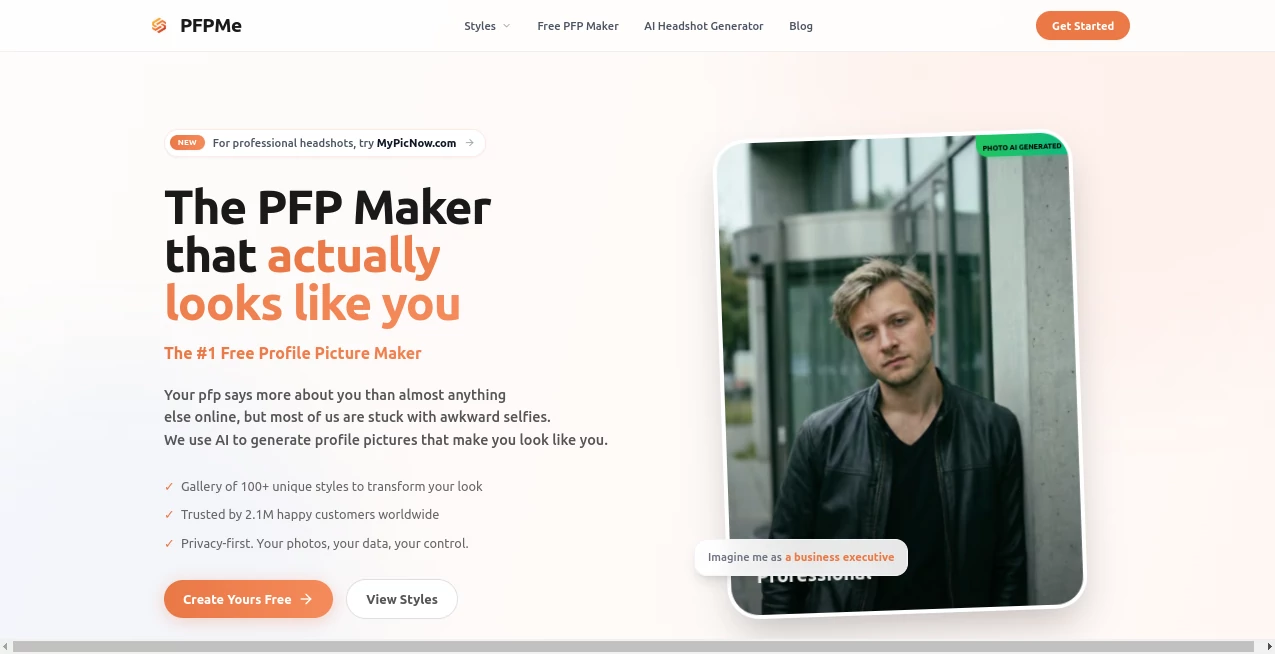
Your profile picture is often the very first thing someone notices about you online, and let's be honest—most of us don't have a photographer on speed dial or hours to spend perfecting a selfie. This tool changes that completely. You upload a handful of your own photos, pick a style that feels right, and in moments you get crisp, professional-looking avatars that actually look like you. I've seen friends go from blurry group shots to clean LinkedIn-ready portraits or fun Twitter icons, and the difference in how people respond is immediate—more connections, warmer replies, just because the photo feels polished and personal.
Introduction
There was a time when getting a decent profile picture meant booking a session or endlessly tweaking filters, but this platform quietly flips the script. It uses AI trained to understand faces and styles so well that the results rarely feel artificial—instead they enhance what’s already there. Whether you're updating your dating profile, refreshing your professional presence, or just wanting something playful for socials, it delivers fast and free to start. What stands out most is how effortless it is: no complicated sliders, no waiting around, just upload, choose, download. People who've tried it often say it's the quickest glow-up they've had online, and honestly, once you see your new avatar staring back, it's hard to go back to the old one.
Key Features
User Interface
The whole experience is built around simplicity. You land on a single, welcoming page with a big upload area that accepts multiple selfies at once. From there, you scroll through style options laid out like a mood board—professional headshots, artistic renders, cartoon vibes—and everything is clearly labeled with previews. No account needed to test a few generations, and downloads are one click away. It's refreshing how little friction there is; even someone who's not tech-savvy can get a solid result in under two minutes.
Accuracy & Performance
The AI really pays attention to your features—skin tone, facial structure, even expressions stay true while the style transforms around them. Generations are quick, usually just seconds per image, and the quality holds up even when you zoom in for smaller icons. I've noticed it handles different lighting in your uploads surprisingly well, avoiding that over-smoothed plastic look that plagues some tools. Consistency across multiple outputs is strong too; you get a set of variations that all feel like the same person, just dressed up differently.
Capabilities
It offers a wide range of looks: clean corporate portraits for LinkedIn, creative artistic versions for Instagram, playful cartoon styles for Discord or gaming profiles, and more. You can generate several at once from the same set of photos, giving you options without re-uploading. The tool optimizes for every major platform—square crops for Twitter/X, circular for some apps, head-focused for professional sites—so the final image always fits perfectly wherever you drop it. It's surprisingly versatile for such a straightforward setup.
Security & Privacy
Your photos are processed quickly and securely, with no permanent storage unless you choose to save your creations. The site makes it clear that privacy matters—uploads are handled transiently, and nothing lingers longer than needed. In a world where people worry about AI misusing images, this kind of transparency feels reassuring and respectful.
Use Cases
A recent grad updating their LinkedIn before job hunting uploads casual selfies and gets polished headshots that make them look ready for interviews. A content creator tired of the same old photo tries a stylized artistic version and watches engagement tick up on social posts. Someone on dating apps wants to refresh their profile without a full photoshoot and finds a warm, approachable avatar that feels authentic. Even gamers or online community members swap out default icons for something fun and personalized in seconds. It's the kind of tool that quietly boosts confidence across all corners of your digital life.
Pros and Cons
Pros:
- Completely free to generate and try—zero pressure to upgrade right away.
- Results look natural and flattering without over-editing.
- Multiple styles and variations from just a few photos.
- Fast, no-login-needed testing makes it easy to experiment.
Cons:
- Free outputs carry a small watermark in some cases.
- Best with clear, well-lit selfies—low-quality inputs can affect results.
Pricing Plans
You can jump in completely free—no card, no signup required for basic generations. When you're ready for watermark-free downloads, higher resolution, or unlimited access, affordable one-time or subscription options open up. It's built so you only pay once you're convinced of the value, which is rare and genuinely user-friendly.
How to Use PFPMe
Head to the homepage and drag a few clear selfies into the upload area—or click to browse. Scroll through the style options that appear, pick the ones that catch your eye (professional, artistic, cartoon, etc.), and hit generate. In seconds you'll see a grid of results. Download the ones you love. If you want cleaner versions without watermarks, upgrade at that point. It's so quick you can iterate a few times until it feels just right.
Comparison with Similar Tools
A lot of avatar generators lean heavily on cartoon or heavily stylized outputs, but this one excels at keeping things realistic when you want it—great for professional or dating profiles. Others might ask for more photos or charge upfront, while this lets you test freely and only upgrade when you're sold. It's lighter, faster, and more natural-looking in many cases, striking a balance that's hard to beat for everyday use.
Conclusion
In the end, a good profile picture does more than show what you look like—it shows how you want to be seen. This tool makes that moment of representation feel effortless and empowering. Whether you're stepping into a new job search, dating scene, or online community, having an avatar that truly reflects you can shift how people respond from the very first glance. It's simple, it's free to try, and the results speak for themselves. Give it a few minutes—you might just find the version of yourself you've been looking for.
Frequently Asked Questions (FAQ)
How many photos should I upload?
Three to five clear, well-lit selfies work best—more angles help the AI understand your features.
Are the results realistic?
Very much so, especially in professional styles—it enhances rather than cartoonifies unless you choose that.
Do I need an account?
Not for basic use—generate and download right away.
What platforms are the images optimized for?
All major ones—LinkedIn, Twitter/X, Instagram, Discord, dating apps, etc.—with proper crops and sizes.
Is it really free?
Yes for starting out and testing—upgrade only when you want extras like no watermark or more generations.
AI Avatar Generator , AI Profile Picture Generator , AI Selfie & Portrait , AI Design Generator .
These classifications represent its core capabilities and areas of application. For related tools, explore the linked categories above.
PPFMe details
This tool is no longer available on submitaitools.org; find alternatives on Alternative to PPFMe.
Pricing
- Free
Apps
- Web Tools
Categories

PPFMe Alternatives Product

Transform An…

Touchpoint

Z image AI
Vidmix
Dating photos

Nano Banana …

meta ai image

qwen image 2…
svgstud.io