
🧠 AI Quiz
Think you really understand Artificial Intelligence?
Test yourself and see how well you know the world of AI.
Answer AI-related questions, compete with other users, and prove that
you’re among the best when it comes to AI knowledge.
Reach the top of our leaderboard.


















PhotoEditorAI

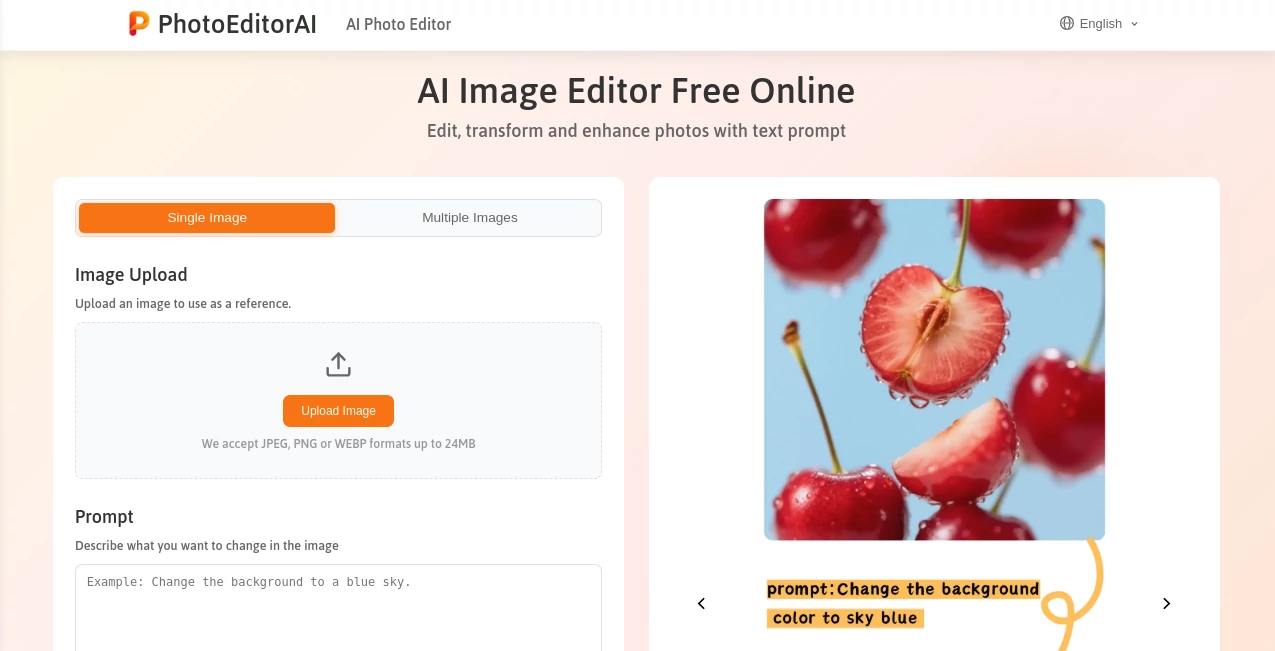
What is PhotoEditorAI?
Imagine tweaking a snapshot from your phone into something that looks straight out of a magazine spread, all by typing a simple sentence or two. That's the quiet thrill this editor delivers, blending everyday photos with pro touches that make colors pop and details sing. I've watched friends turn ho-hum vacation pics into frame-worthy keepers overnight, and it's that effortless spark that keeps pulling you back for more.
Introduction
In the rush of snapping and sharing, who hasn't wished for a quick fix to lift a good photo into great territory without diving into complicated software? This browser-based wonder steps up with text-driven magic, letting you describe changes—like swapping skies or smoothing skin—and watching them unfold seamlessly. Born from a desire to pack multiple tricks into one spot, it's won over creators big and small by skipping sign-ups and delivering instant results. Think of it as a chat with a talented retoucher who gets your vibe right away, turning personal fixes or pro polishes into something you can knock out over breakfast.
Key Features
User Interface
Everything unfolds on a single, uncluttered page where you drop your file, jot your wishes in a generous prompt box, pick a model or ratio, and let it rip. No accounts, no downloads—just pure, straightforward flow that adapts to phone or desktop alike. One buddy of mine uploaded a group shot mid-road trip, typed a quick note about brightening faces, and had polished versions ready before we hit the next stop. It's that kind of no-fuss charm that makes you feel like a wizard without the wand-waving.
Accuracy & Performance
Feed it a clear instruction, and it latches on with impressive grip, keeping faces familiar across swaps or nailing subtle shifts like logo tweaks without bleeding edges. Generations hum along briskly, even on detailed asks, churning out high-res files that hold their own for prints or posts. I've thrown tricky ones its way—like isolating a busy market stall—and come away grinning at how cleanly it handled the chaos, far smoother than I'd manage manually.
Capabilities
It juggles the classics with flair: yank backgrounds for clean product shots, erase stray objects like they're never there, retouch portraits for that natural glow, or transfer styles from a reference snap to match moods perfectly. Consistent characters shine for storytelling series, while precise regional tweaks let you zero in on eyes or skies alone. All wrapped in models tuned for clarity or speed, it's a versatile kit that feels like several specialists rolled into one.
Security & Privacy
Uploads get encrypted end-to-end, processed quick and wiped clean after a short spell, leaving no traces for anyone to sniff around. No permanent storage means your personal snaps or client work stay yours alone, a reassuring nod in a world full of data worries. It's the subtle care that lets you experiment freely, knowing your fixes won't linger longer than needed.
Use Cases
Shop owners refresh listings with crisp, background-free product views that draw clicks on busy marketplaces. Content makers craft eye-catching social tiles, blending styles for feeds that stand out without stock clichés. Marketers whip up campaign visuals, testing logo placements or scene swaps in minutes. Even casual users revive old family shots, smoothing blemishes or updating backdrops to share fresh memories that feel timeless.
Pros and Cons
Pros:
- Totally free access to powerful tweaks, no barriers to entry.
- Text prompts make complex edits feel conversational and quick.
- Keeps key details intact, from faces to fine text integrations.
- Browser-only means it's always ready, no installs or waits.
Cons:
- Best with sharp prompts—vague ones might need a second swing.
- File size caps keep things manageable but limit mega uploads.
Pricing Plans
It's all on the house, with full features unlocked from the get-go—no tiers, no trials, just straightforward access that lets you dive deep without watching a wallet. That open-handed approach feels refreshing, inviting tinkers and pros alike to play without the usual upsell nudge.
How to Use PhotoEditorAI
Grab a photo—up to decent size in common formats—and drop it in, then spill your edit wishes in the prompt field, like "swap the background to a sunny beach" or "smooth skin and brighten eyes." Choose a model for your flavor of speed or detail, tweak the ratio if needed, and generate. Results pop up for download in crisp quality; iterate with fresh prompts if you want variations. I once fixed a faded wedding pic this way—described the glow I remembered, and it brought back the warmth like magic.
Comparison with Similar Tools
While some editors lock prime tricks behind pays or pile on complexity, this one keeps the gate wide open with prompt-driven ease that rivals paid suites in everyday wins. It edges out basic removers by blending multiple moves in one go, and holds its own against heavier apps by skipping the bloat for browser swiftness. For anyone craving pro polish without the pro price tag, it's the sweet spot that delivers more bang per prompt.
Conclusion
This editor quietly redefines what's possible with a few words and a photo, handing everyday folks the keys to visuals that punch above their weight. It turns the tedious into delightful, proving you don't need fancy setups to craft images that captivate. Whether you're sprucing personal memories or fueling creative fires, it's a gem worth keeping bookmarked—simple, powerful, and endlessly inviting.
Frequently Asked Questions (FAQ)
Do I need to sign up?
Nope—just head straight in and start editing, no accounts required.
What file sizes work best?
Up to around 50MB in JPEG, PNG, or similar—plenty for most shots.
How private are my uploads?
Encrypted and auto-deleted soon after, keeping things tidy and secure.
Can it handle batch edits?
Focuses on quality per go, but quick reruns make multiples a breeze.
Works on mobile?
Smooth as can be in any browser, perfect for on-the-go tweaks.
Photo & Image Editor , AI Photo Enhancer , AI Background Remover , AI Design Generator .
These classifications represent its core capabilities and areas of application. For related tools, explore the linked categories above.
PhotoEditorAI details
This tool is no longer available on submitaitools.org; find alternatives on Alternative to PhotoEditorAI.
Pricing
- Free
Apps
- Web Tools
Categories

PhotoEditorAI Alternatives Product

flux 3

Kontext AI

CapCut

Z-Image Gene…

Image Descri…

Flux2 Klein

z-image.me

Flux 2 Klein

MAGIK FACE
