🧠 AI Quiz
Think you really understand Artificial Intelligence?
Test yourself and see how well you know the world of AI.
Answer AI-related questions, compete with other users, and prove that
you’re among the best when it comes to AI knowledge.
Reach the top of our leaderboard.


















Photo to Prompt
Extract AI Prompts from Any Image

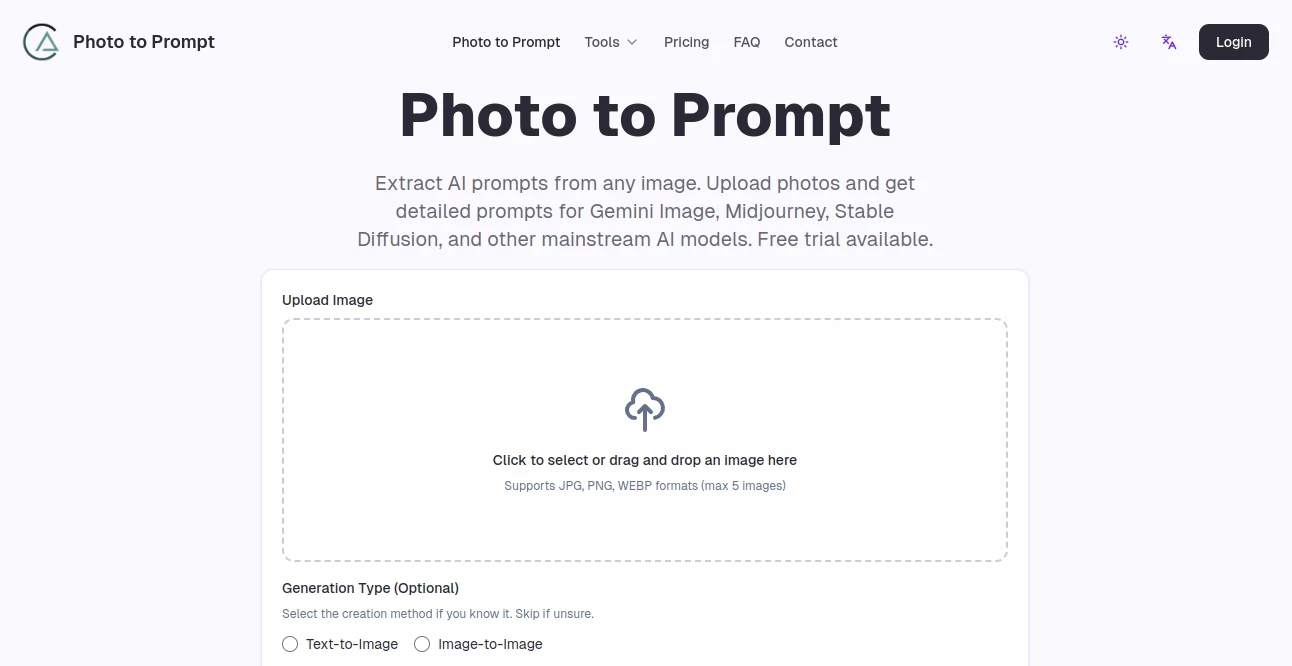
What is Photo to Prompt?
Photo to Prompt steps in as a handy sidekick for folks tinkering with digital art, taking a quick snap or sketch and breaking it down into words that spark fresh creations elsewhere. It's like having a sharp-eyed curator who spots the magic in a picture and spells it out, so you can chase similar vibes without starting from scratch each time. Creators who've played around with it often light up about those aha moments, where a single upload unlocks a whole new batch of ideas ready to run with.
Introduction
Photo to Prompt came together a bit over a year ago, cooked up by a handful of art lovers who'd grown weary of fumbling through endless tweaks to match a mood or motif. They figured there had to be a smoother path, one that let you borrow the essence of a visual without the trial-and-error slog, and soon enough, word got around in creative circles. Now it's a quiet favorite among hobbyists and pros alike, with users swapping tips on how it shaved hours off their routines. What draws people in is that unassuming knack for turning the seen into the said, bridging the gap between a frozen moment and endless possibilities, all while keeping things light and approachable for anyone with a picture and a hunch.
Key Features
User Interface
You ease in with a straightforward spot to drop your file or pick from the usual folders, no hoops or hidden spots to chase. As the upload settles, a clean preview pops up alongside spots to nudge the style or focus if you fancy, all laid out like a friendly chat rather than a control panel. Samples sit right there to spark ideas, showing how a simple portrait might bloom into a full rundown of lights and lines, making the first go feel more like a stroll than a setup.
Accuracy & Performance
It picks up the finer threads in a shot—the way shadows dance or colors whisper—with a reliability that shines brightest on crisp, thoughtful captures, often nailing the core feel in one pass. Outputs land quick, even with a few files at once, letting you build momentum without waiting around. Those who've pushed it with trickier scenes note how it holds its own, serving up solid bases that just need a light polish to sing, and tweaks from feedback keep it sharpening up over time.
Capabilities
Whether it's a quick phone pic, a polished drawing, or something cooked up in another program, it sifts through to pull out the bones—arrangement, glow, flair, and all—tailored for a spread of popular setups. You can layer in choices for the vibe or even flip the script to build from words back to visuals, with nods to keeping things fresh across tongues from English to Arabic. It's geared for folks wanting to learn the ropes too, highlighting what makes a scene pop so you can riff better next round.
Security & Privacy
Uploads get a one-and-done treatment, glanced at just long enough to do their job then whisked away for good, with no copies tucked in corners or fed into other pots. It leans on solid locks for the ride, putting you in the driver's seat on what sticks around, so you can toss in personal snaps without that nagging back-of-mind itch. Users breathe easier knowing their sparks stay sparks, private until they choose to share the glow.
Use Cases
A graphic whiz grabs a street scene to match its grit in a client mockup, tweaking the output to fit the brief without endless redraws. Aspiring painters study old masters by unpacking their strokes into words, rebuilding with fresh twists for class projects. Social sharers pull prompts from fave feeds to whip up matching edits, keeping their grid cohesive on the fly. Even teams in ad shops batch old campaigns, evolving looks for new pushes while honoring the roots.
Pros and Cons
Pros:
- Cuts right to the chase, turning visuals into actionable words in moments.
- Welcomes a wide mix of shots, from snaps to sketches, without batting an eye.
- Builds your chops by showing what clicks in strong scenes.
- Hands over clean starts you can tweak or trade, no strings attached.
Cons:
- Shines more on clear keepers; fuzzy ones might need a steadier hand upfront.
- Free spins cap the fun quick, nudging toward paid for steady play.
- Best as a launchpad—full flights still call for your own flair.
Pricing Plans
You snag a single free go right off the bat, enough to dip a toe without dropping a dime, perfect for that first curious whirl. Basic rolls in at about eight bucks a month on the yearly, handing over a hundred chances plus quicker lines and no pesky banners. Standard bumps to twelve-fifty for three hundred, tossing in front-of-the-line perks, while Pro at sixteen-sixty-seven nets five hundred with top-shelf help. All bend easy, no lock-ins, and longer hauls trim the tab nicely.
How to Use Photo to Prompt
Whip up an account to claim your starter credit, then hunt down that image you love and slide it into the slot—drag, click, whatever feels right. Pick a flavor if the mood strikes, or let it roll free, and watch the words weave out the scene's secrets. Skim the rundown, nudge if needed, then copy or save to fuel your next build. Circle back with faves to refine, turning one-offs into a growing gallery of go-tos.
Comparison with Similar Tools
Next to clunky analyzers that spit dry lists, Photo to Prompt warms it up with ready-to-run phrasing, though those might dig deeper on raw tech specs. Against full-blown editors, it skips the bells for laser focus on the word side, saving steps but maybe missing built-in tweaks. It nestles nice for quick visual-to-verbal hops, outpacing heavies with zip where others lumber or layer on extras you skip.
Conclusion
Photo to Prompt quietly revolutionizes the hunt for inspiration, handing over keys to unlock styles you admire without the usual sweat. It turns passive glances into active sparks, empowering creators to blend, borrow, and build in ways that feel fresh yet familiar. As digital canvases keep expanding, this little engine chugs along, proving that sometimes the sharpest tool is the one that simply says what you see—and sets you free to see more.
Frequently Asked Questions (FAQ)
What kinds of pictures work best?
Clear, composed ones with strong elements yield the richest breakdowns, but it handles a broad bunch just fine.
Do my uploads stick around?
Nope, they're in and out quick, just for the job at hand, then gone for good.
Can I use these for paid gigs?
Sure, as long as you've got the green light on the starting shot, the words are yours to run with.
How many tongues does it speak?
A solid eleven, covering spots from Tokyo to Madrid without missing a beat.
What if the output's off a tad?
Treat it as a strong opener—layer on your tweaks to make it sing just so.
AI Photo Enhancer , AI Image to Image , AI Image Recognition , AI Design Assistant .
These classifications represent its core capabilities and areas of application. For related tools, explore the linked categories above.
Photo to Prompt details
This tool is no longer available on submitaitools.org; find alternatives on Alternative to Photo to Prompt.
Pricing
- Free
Apps
- Web Tools
Categories

Photo to Prompt Alternatives Product

Pixelied

Yodayo AI

GTA AI

onstyle

Art-Neurona
labgen

Kirkified AI
Remove Text

WatermarkZero