
🧠 AI Quiz
Think you really understand Artificial Intelligence?
Test yourself and see how well you know the world of AI.
Answer AI-related questions, compete with other users, and prove that
you’re among the best when it comes to AI knowledge.
Reach the top of our leaderboard.


















picremake
What is picremake?
I still remember the day my grandmother handed me a box of faded family photos from the 1970s. The colors had turned yellow, faces were blurry, and some edges were torn. I thought those moments were lost forever—until I tried this tool. In minutes, those tired images came back to life: colors popped, details sharpened, scratches disappeared, and suddenly I could see my dad’s mischievous grin as a teenager again. It felt like getting a piece of family history back. That’s the quiet magic PicRemake offers—not just fixing photos, but bringing memories into focus.
Introduction
Old photos hold stories we don’t want to lose, but time, poor storage, and bad scans often steal their clarity. Most restoration tools either overdo the sharpening until everything looks plastic or leave too much damage behind. PicRemake strikes a beautiful balance. It gently restores faded colors, removes scratches and noise, sharpens details without creating artifacts, and can even upscale low-resolution shots into something crisp and print-worthy. Whether you’re digging through family albums, salvaging old Polaroids, or refreshing product photos for your shop, it turns “this is ruined” into “this looks better than I remembered.”
Key Features
User Interface
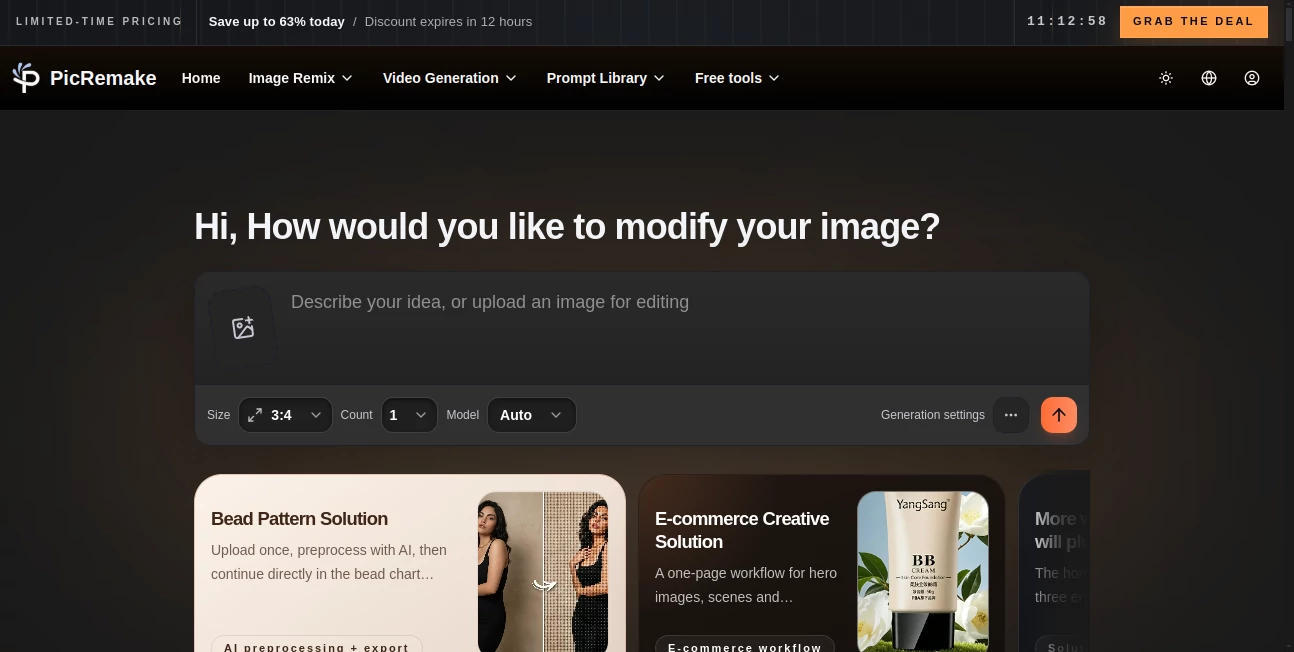
The whole experience is delightfully straightforward. You drag your photo into a clean upload area or click to browse. A few clear options appear—restore, enhance, colorize, upscale—and you simply choose what you need. Before-and-after previews load quickly so you can see the difference right away. There are no confusing sliders or hidden menus; it feels like having a helpful friend who knows exactly what your photo needs. Even my tech-shy mother managed her first restoration without asking for help.
Accuracy & Performance
The results consistently impress because the AI seems to understand context. It restores skin tones naturally instead of turning people orange, sharpens eyes and hair without creating weird halos, and brings back faded colors without making everything look overly saturated. Processing is fast—most photos finish in under 15 seconds—and the output quality holds up even on challenging images like very old, low-contrast scans. The difference before and after is often dramatic yet believable.
Capabilities
It handles photo restoration (removing scratches, noise, blur), colorization of black-and-white images, intelligent upscaling that adds real detail rather than just making things bigger, face enhancement that smooths without erasing character, and background cleanup. You can do one or combine several enhancements in a single pass. Outputs are high-resolution and ready for printing, framing, or sharing online. It works beautifully on family portraits, old vacation shots, vintage documents, and even product photography that needs a refresh.
Security & Privacy
Your photos are processed securely and not stored long-term on their servers. No account is required to start, so you can test it privately without creating a profile. For personal family memories or client work, that respectful approach to privacy makes a real difference—you focus on the restoration, not worrying about where your images end up.
Use Cases
A daughter restores her late father’s faded military photo and frames it for her mother’s birthday. A small business owner revives old product catalog images so they look professional on the website again. A genealogist brings 100-year-old family portraits back to life for the family reunion slideshow. A social media creator enhances vintage-style photos for nostalgic posts that get strong engagement. Wherever a photo matters but its current condition doesn’t, this tool quietly saves the day.
Pros and Cons
Pros:
- Restoration looks natural and respectful to the original moment.
- Fast processing that keeps the experience enjoyable.
- Multiple enhancement options in one easy tool.
- High-quality outputs suitable for printing or large displays.
- Generous free tier lets you try it on meaningful photos right away.
Cons:
- Extremely damaged or torn photos may still need light manual touch-up.
- Unlimited batch processing and advanced features require a paid plan.
- Very low-resolution images have limits on how much detail can be recovered.
Pricing Plans
The free tier gives you several high-quality restorations per day—more than enough to bring back a few treasured memories or test it on product shots. Paid plans remove daily limits, unlock batch processing, higher resolutions, and priority support. Pricing feels fair for the time and emotional value it delivers; many users say restoring one important family album already makes the investment worthwhile.
How to Use PicRemake
Drag your old or low-quality photo into the upload area. Choose the type of enhancement you need—restore, colorize, upscale, or a combination. Wait a few seconds while it works its magic, then use the before-and-after slider to admire the difference. If you’re happy, download the enhanced version in high resolution. For multiple photos, paid users can process them in batches. The entire process is gentle and rewarding—you’ll often find yourself smiling at the result.
Comparison with Similar Tools
Many photo enhancers either leave too much damage behind or push the sharpening so hard that everything looks artificial. This one keeps a natural, respectful touch while still delivering impressive improvements. Where other tools feel clinical, PicRemake feels caring—like it understands these photos matter. The combination of speed, quality, and ease of use makes it stand out from both basic free apps and more complicated paid software.
Conclusion
Photos are more than pixels—they’re pieces of our stories, our families, and our past. PicRemake gives those stories a second chance at clarity and beauty without asking for technical skill or endless tweaking. It turns “I wish this looked better” into “I can’t believe how good this looks now.” Whether you’re preserving family history, refreshing old business images, or simply making memories shine again, it’s a gentle, powerful companion that delivers real joy with every upload.
Frequently Asked Questions (FAQ)
How many free restorations can I do?
You get several high-quality enhancements per day—enough for meaningful personal use.
Will it make my photo look fake?
No—it focuses on natural restoration rather than heavy filters or plastic effects.
Can I use it for professional photos?
Yes—many small businesses and photographers use it to refresh product shots and client images.
What if my photo is very old and damaged?
It handles faded, scratched, and low-res images well, though extremely torn photos may need minor manual prep first.
Are my photos stored anywhere?
They are processed temporarily and not stored long-term unless you choose to save them.
AI Background Remover , Photo & Image Editor , AI Photo Enhancer , AI Image to Image .
These classifications represent its core capabilities and areas of application. For related tools, explore the linked categories above.
picremake details
Pricing
- Free
Apps
- Web Tools
Categories

picremake Alternatives Product
Kirkify Al

Caricature G…

City Boy Meme

GEMPIX2

Nano Banana 2

Pixelied

Image to Ima…

ImageKontext…

PostPlus AI
