
🧠 AI Quiz
Think you really understand Artificial Intelligence?
Test yourself and see how well you know the world of AI.
Answer AI-related questions, compete with other users, and prove that
you’re among the best when it comes to AI knowledge.
Reach the top of our leaderboard.


















Pika Art

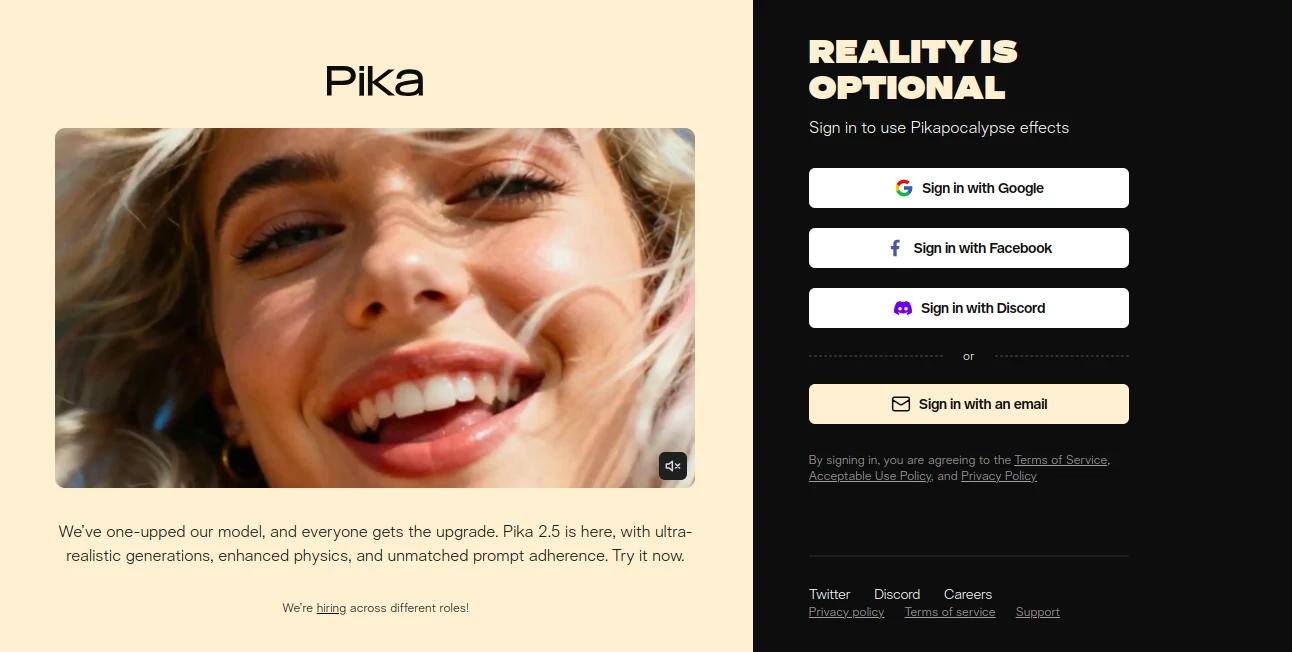
What is Pika Art?
Pika slips into the creative flow like a trusted collaborator, transforming static sketches or fleeting thoughts into dynamic clips that pulse with life. This platform has a way of capturing the essence of motion, letting users breathe energy into concepts without wrestling with timelines or renders. Those who've dived in often emerge with wide eyes, clutching footage that feels like it was born from a brainstorm rather than a button press, turning what could be a week's worth of edits into an afternoon's delight.
Introduction
Pika took its first steps a few years back, sparked by a band of filmmakers and tinkerers who grew weary of the endless grind between idea and screen. They set out to craft something that felt more like sketching with light than slaving over software, and it resonated quick among indie creators sharing clips that popped with unexpected flair. From humble betas that hooked a handful to a thriving space where thousands swap secrets on extending shots or layering sounds, it's woven itself into the fabric of modern making. What lingers is that sense of play—how it nudges you toward discoveries, like a character that walks with your unspoken rhythm, making the leap from still to story feel less like labor and more like letting go.
Key Features
User Interface
The dashboard unfolds with a welcoming blank slate, where a simple text field invites your vision and an upload spot waits for images or clips to build on. Controls for length and style hover nearby, easy to slide without breaking stride, and the preview window brings drafts to life in real time, letting you scrub through seconds like flipping a storyboard. It's the kind of setup that whispers rather than shouts, drawing you in with subtle hints for refinements while keeping the chaos at bay, even when juggling multiple moods in a single session.
Accuracy & Performance
When you describe a scene with twists—like a dancer mid-leap or rain tracing window panes—it holds the line with a fidelity that surprises, preserving the intent through every frame without drifting into the uncanny. Outputs arrive swift, often in under a minute for short bursts, scaling smoothly to longer takes without the usual stutters. Creators point to those moments where a prompt's subtlety shines through, like the flicker of emotion in an eye, proving it's tuned for the nuances that make motion memorable rather than mechanical.
Capabilities
From extending a static portrait into a wandering gaze to remixing footage with new backdrops or beats, it layers possibilities like a patient editor who never tires. Dive into styles from gritty noir to whimsical whims, and it even lets you guide elements with rough sketches or voice notes, opening doors to hybrid crafts that blend live action with dreamed details. The real magic unfolds in iterations, where you can tweak a clip's pace or pivot a plot, building narratives that evolve as naturally as a late-night chat.
Security & Privacy
Your uploads and drafts stay tucked in personal vaults, processed on the fly and cleared unless you choose to archive, with no peeks from the outside world. It gives you the reins on shares, from private saves to community drops, all wrapped in standard safeguards that keep things quiet. That behind-the-scenes care lets you experiment bold, knowing a half-baked hero or secret sequence won't slip out before it's ready to strut.
Use Cases
Short-form storytellers spin social snippets from napkin notes, watching likes climb as clips capture moods in mere moments. Ad folks prototype pitches that pulse with product personality, testing vibes without camera crews. Musicians pair tracks with visuals that sync to the swell, turning demos into immersive drops. Even educators craft quick explainers, animating abstract ideas into flows that stick with students long after the bell.
Pros and Cons
Pros:
- Turns vague vibes into vivid videos without the usual wait.
- Intuitive tweaks that feel like chatting with a co-creator.
- Community vibes fuel fresh tricks without solo stumbles.
Cons:
- Longer sequences can chew through credits quick.
- Fine control lags behind full-suite editors for pros.
- Peak-hour queues might slow the spark.
Pricing Plans
Start free with a handful of generations to test the waters, enough for sparking a few favorites without a fee. Basic bumps to monthly for around ten bucks, unlocking more runs and longer lengths, while pro at thirty opens unlimited ups and priority queues. Teams tag on shares for a slight hike, with annual arcs trimming the tab—trials tease the full flow for a week, easing the dive.
How to Use Pika
Slip in with a sign-up, then jot your scene in the prompt box or drag an image to anchor it. Set the seconds and style, hit create, and watch the wheel spin to reveal your reel. Scrub for spots that sing, remix with a nudge like "add wind" or "slow the spin," then export or extend. Save the strong ones to your shelf, looping back to layer sounds or share for feedback that fuels the next frame.
Comparison with Similar Tools
Where some focus on raw renders that demand heavy hardware, Pika's cloud charm skips the setup, though those might edge for endless edits. Against text-only twisters, it weaves images in smoother, trading pure prose power for visual verve but perhaps pinching on plot depth. It hits home for hybrid hunters, blending breeze with bite where others lean too light or load too heavy.
Conclusion
Pika paints motion with a poet's touch, handing creators a canvas that moves as freely as their minds. It turns the solitary spark into shared spectacle, proving that a dash of digital daring can dance past the drudgery of drafts. As screens keep craving stories that stir, this platform stands ready, whispering possibilities into every pixel and promising that the next great clip might just be one prompt away.
Frequently Asked Questions (FAQ)
Can I start from a photo or clip?
Yes, upload to guide the glow-up, blending your base with fresh flair.
How long can clips run?
From snappy fives to fuller threes, with extensions for epic arcs.
Does it add sound?
Silent by default, but pair with your picks or community cues for full feel.
What's the community like?
Vibrant spot for swaps and sparks, full of tips from fellow framers.
Mobile-friendly?
Web-first, but snaps sharp on phones for on-the-go glows.
AI Animated Video , AI Image to Video , AI Text to Video , AI Video Generator .
These classifications represent its core capabilities and areas of application. For related tools, explore the linked categories above.
Pika Art details
This tool is no longer available on submitaitools.org; find alternatives on Alternative to Pika Art.
Pricing
- Free
Apps
- Web Tools
Categories

Pika Art Alternatives Product

Kling 3.0 – …

Omnigen Stud…
Render of Dr…

Seedance 2.0…

Kling 3.0

Faceless vid…

Veo 3.1

Image to Vid…

Seedance 2.0
