
🧠 AI Quiz
Think you really understand Artificial Intelligence?
Test yourself and see how well you know the world of AI.
Answer AI-related questions, compete with other users, and prove that
you’re among the best when it comes to AI knowledge.
Reach the top of our leaderboard.


















PixPretty

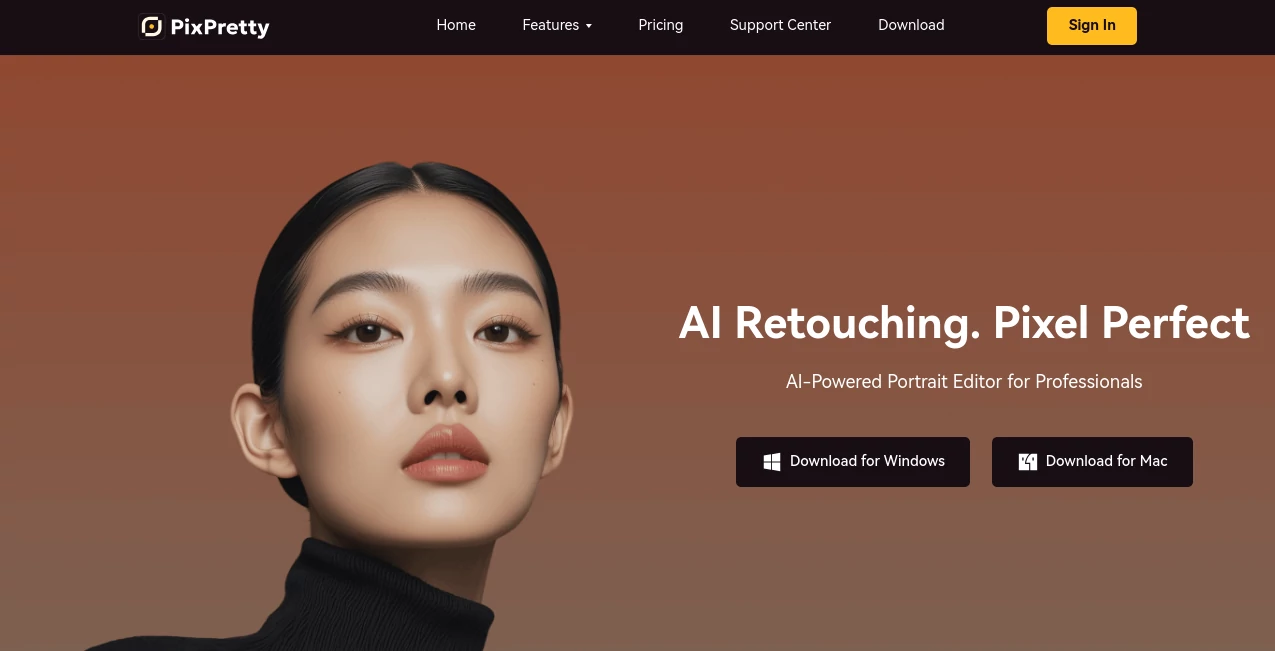
What is PixPretty?
Imagine turning a stack of raw portraits into polished gems that look like they came straight from a high-end studio, all with a few clicks on your desktop. That's the quiet thrill this app delivers, blending smart tech with real artistry to make retouching feel almost effortless. I've watched friends in photography go from dreading post-production marathons to breezing through them, emerging with results that wow clients and boost bookings—it's that kind of tool that quietly elevates your whole game.
Introduction
In the hustle of commercial shoots—weddings, family sessions, or product close-ups—time spent fiddling with edits can eat away at creativity. This desktop standout steps in as a thoughtful partner, harnessing years of aesthetic data and cutting-edge algorithms to handle the heavy lifting on portraits. Pros in studios swear by how it preserves that 'born beautiful' glow while smoothing flaws, and beginners find themselves producing work they'd only dreamed of. From my own trials with a batch of travel shots, it shaved hours off what used to be a tedious evening, leaving skin radiant and tones balanced without ever looking overdone. It's built for the real world of photography, where efficiency meets excellence, and the results speak louder than any sales pitch.
Key Features
User Interface
Opening it up feels like settling into a well-organized workspace—toolbar up top for imports and overviews, a clean panel for tweaks, and everything laid out so intuitively that even on a first spin, you're navigating like an old hand. Sliders glide smooth for skin or shape adjustments, presets line up for quick picks, and the preview updates in real time, making experimentation a joy rather than a chore. One photographer I know calls it 'puzzle-like fun,' where poking buttons yields pro finishes without the overwhelm.
Accuracy & Performance
It dives deep into each frame, catching subtle textures and tones that lesser tools gloss over, delivering naturals that retain personality while erasing distractions. Batch runs fly—hundreds of images processed while you sip tea—and the smart exposure tweaks nail lighting without washing out details. In tests with tricky outdoor shots, it consistently turned good into great, proving reliable even under varied conditions that trip up competitors.
Capabilities
Core strengths lie in portrait magic: flawless skin smoothing, precise facial reshaping, body refinements that look authentic, and a library of style filters from vintage warmth to modern edge. Bulk apply presets across folders, handle RAW files straight from the camera, and fine-tune colors or curves for that signature look. It's versatile enough for wedding albums, kid snaps, or commercial headshots, always aiming for that studio polish with minimal fuss.
Security & Privacy
Running locally on your machine keeps everything close to home, with no cloud uploads required for core work, giving peace of mind on client files. Updates and features roll out securely, and the focus stays on your creations without unnecessary data trails. For pros handling sensitive sessions, this grounded approach feels reassuring, like a locked darkroom in digital form.
Use Cases
Wedding shooters batch entire galleries, applying consistent beauty across hundreds while freeing evenings for family. Studio owners revamp product portraits for online shops, ensuring every face shines uniformly. Travel enthusiasts polish vacation candids into keepsakes, while family photographers turn casual snaps into framed heirlooms. Even hobbyists experimenting with self-portraits find it addictive, crafting looks that boost confidence without the fake sheen.
Pros and Cons
Pros:
- Efficiency boost that cuts retouch time in half—or more—for busy schedules.
- Natural outcomes that clients rave about, preserving real beauty over plastic perfection.
- Batch power for volume work, turning daunting piles into done deals.
- Rich filters and tools that spark creativity without complicating the flow.
Cons:
- Desktop-only for now, so no quick mobile tweaks on the go.
- Best with solid starting shots—very challenging lighting might need manual nudges.
Pricing Plans
It offers flexible options with monthly or yearly subscriptions that unlock full potential, often with trials to test the fit. Packages scale for individuals or studios, including support and updates that keep things fresh. Many find the value shines through quickly, especially when taller sales or happier clients start rolling in from those upgraded images.
How to Use PixPretty
Download and install—simple as that—then import your folder of shots. Select a preset or slide adjustments for skin, shape, or tone till it clicks. Preview side-by-side, apply to the batch with one go, and export in your needed formats. A friend tackling a wedding album started skeptical but ended grinning as the whole set transformed over a single session, ready for delivery.
Comparison with Similar Tools
While online quick-fixes handle basics fast, this one digs deeper for portrait nuance that pros demand, without the upload waits or privacy trade-offs. Against heavyweight suites, it streamlines without the bloat, focusing on what photographers actually need day-to-day. It strikes that sweet balance—powerful yet approachable—leaving broader editors feeling scattered and lighter ones falling short on finesse.
Conclusion
For anyone knee-deep in portraits, this app feels like the upgrade you've been waiting for—reliable, refined, and ready to make your work shine brighter. It honors the craft by handling the tedium, freeing you to chase the shots that matter. Dive in, and watch ordinary edits turn extraordinary; it's the kind of quiet powerhouse that earns its spot on your desktop forever.
Frequently Asked Questions (FAQ)
Does it work on Mac too?
Yes, downloads cover both Windows and Mac for seamless setups.
How natural do the retouches look?
Incredibly—trained on vast aesthetics, it keeps details authentic and glowing.
Can I create custom presets?
Absolutely, save your favorites for one-click repeats across projects.
Is batch processing really that fast?
Users clock hundreds in minutes, perfect for tight deadlines.
What file types does it support?
RAW from cameras, plus all common formats for flexible workflows.
Photo & Image Editor , AI Photo Enhancer , AI Selfie & Portrait .
These classifications represent its core capabilities and areas of application. For related tools, explore the linked categories above.
PixPretty details
This tool is no longer available on submitaitools.org; find alternatives on Alternative to PixPretty.
Pricing
- Free
Apps
- Web Tools
Categories

PixPretty Alternatives Product
free ai face…

ai banana
Sora Waterma…

Gualele

Retro Image …

gemini water…

Picnana

KOOX AI

AI Hairstyle
