🧠 AI Quiz
Think you really understand Artificial Intelligence?
Test yourself and see how well you know the world of AI.
Answer AI-related questions, compete with other users, and prove that
you’re among the best when it comes to AI knowledge.
Reach the top of our leaderboard.


















Pixwith.AI

What is Pixwith.AI?
Pixwith opens the door to stunning video creation, where a handful of words or a single snapshot can unfold into captivating clips that draw eyes and hold attention. This platform gathers the best of modern tech to let anyone craft polished scenes without the usual hassle of gear or endless edits. Folks who've dipped in often come away with stories of how it turned a hazy notion into something shareable in minutes, making it a go-to for those who want quick wins without the heavy lift.
Introduction
Pixwith came together a short while back, sparked by a group of creators who'd grown weary of juggling multiple apps and subscriptions just to get a decent clip off the ground. They set out to bundle the sharpest tools into one spot, and it didn't take long for word to spread among YouTubers, shop owners, and teachers swapping tips on tight deadlines. What began as a streamlined way to test ideas has grown into a full-fledged hub, with users sharing how it shaved hours off projects that once dragged on. At its heart, it's about handing over the reins to smart systems that grasp your vision, letting the focus stay on the story rather than the setup.
Key Features
User Interface
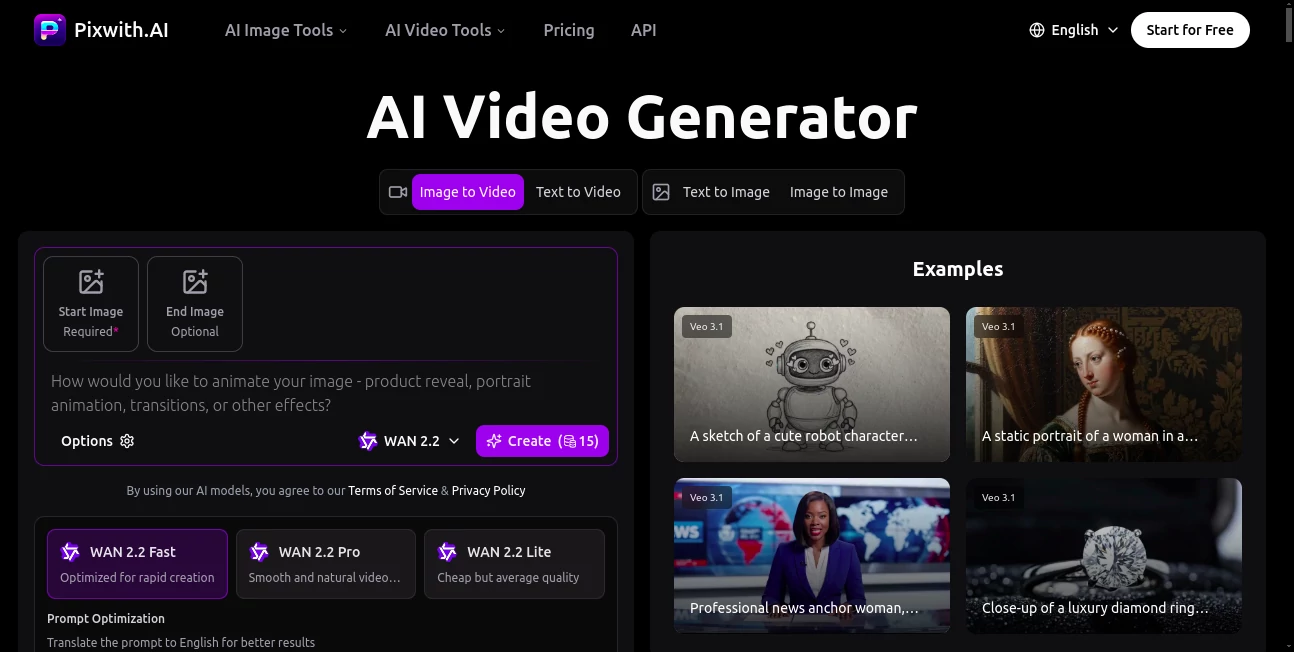
The main setup feels welcoming right away, with a central spot to jot your thoughts or drop in a picture, and clean picks for how long or sharp you want the end result. As you tweak, a quick view pops up to show the progress, keeping everything in one glance without flipping screens. It's the kind of flow that clicks after a single try, like sketching out a plan with a buddy who fills in the blanks on the spot, smooth and without the usual tech tangles.
Accuracy & Performance
When you lay out a scene with twists or tones, it captures the flow just right, blending parts into a whole that matches what you had in mind without odd slips. Renders come back fast, often in a couple minutes even for fuller pieces, holding steady on any connection. Those who've run it through real tests point to how it keeps the details crisp, turning rough drafts into something that stands tall on its own.
Capabilities
From breathing life into still shots to spinning full narratives from notes, it covers a wide sweep, layering in sounds or stand-ins that fit the mood. You can scale from quick bursts for feeds to longer takes for lessons, with options to match styles from lively ads to thoughtful guides. The real draw lies in how it pulls together inputs like words or frames into seamless runs, opening doors for everything from shop showcases to story shorts.
Security & Privacy
Your rough cuts and ideas stay tucked away during the build, handled on locked paths and cleared out after a quiet spell, giving you full say on what lingers. It sticks to solid rules on keeping things close, so shared projects only go where you point them. Users lean on that steady backdrop, freeing them to experiment without a second glance over their shoulder.
Use Cases
Content makers whip up feed fillers that hook scrolls, testing hooks before the crowd tunes in. Shop keepers stage item spins that spotlight details, lifting looks without hauling lights. Lesson planners turn slides into moving moments, drawing students in deeper than static sheets. Even team leads craft quick guides for new hands, blending faces and facts to make the message stick.
Pros and Cons
Pros:
- Bundles top picks into one easy reach, skipping the sub shuffle.
- Clean runs from the start, no marks to mar the mix.
- Grabs tones and twists true, keeping the heart of your hint.
- Quick turns that fit tight spots, from desk to done in a dash.
Cons:
- Shorter clips shine; longer tales might need a stitch or two.
- Pay-per-play adds up for heavy hauls.
- Best on clear cues—fuzzy ones call for a sharpen.
Pricing Plans
New faces get a free handful to try the waters, enough for a few full swings without a dime. From there, it's credits you grab as needed, no strings or repeats, scaling with your pace. Packs fit light dips or deep dives, keeping the door open for casual kicks or steady streams alike.
How to Use Pixwith
Start by spilling your scene in the box or slipping in a snap, then pick your length and look. Let it churn the charm, peek at the preview for a polish, and pull the piece when it pops. Tweak if the tide turns, share straight to spots, or stash for a later layer.
Comparison with Similar Tools
Where some lock clean cuts behind walls, Pixwith hands them over from the gate, though those might edge in extra bells for big crews. Against single-model spots, it spreads the net wide for varied vibes, skipping the switch but perhaps missing deep tweaks in one lane. It hits home for those craving quick, all-in-one sparks over scattered setups.
Conclusion
Pixwith wraps the wild world of video into neat, nimble packages that ignite the imagination without the ignition fuss. It turns 'someday clip' into 'share now,' blending brains with beauty to craft moments worth the watch. As screens keep calling for more, this corner stays a steadfast spark, whispering ways to make every frame feel fresh and full.
Frequently Asked Questions (FAQ)
What sparks the best starts?
Clear words with mood and motion hints pull the strongest scenes.
How long do pieces run?
From quick five-second hooks to fuller fifteen-second flows.
Can I add my voice?
Yep, layer in sounds or stand-ins for a fuller feel.
What's the wait like?
A minute or three, depending on the depth you dive.
Own what I make?
All yours to use or share, no strings attached.
AI Animated Video , AI Image to Video , AI Text to Video , AI Video Generator .
These classifications represent its core capabilities and areas of application. For related tools, explore the linked categories above.
Pixwith.AI details
This tool is no longer available on submitaitools.org; find alternatives on Alternative to Pixwith.AI.
Pricing
- Free
Apps
- Web Tools
Categories

Pixwith.AI Alternatives Product

RenderFlow AI

vei4 ai
Veo 3.2 AI V…
Fuser Studio

Runway Gen-4…

Omnigen Stud…

Quso AI

Sora 2

Sora 2 AI