
🧠 AI Quiz
Think you really understand Artificial Intelligence?
Test yourself and see how well you know the world of AI.
Answer AI-related questions, compete with other users, and prove that
you’re among the best when it comes to AI knowledge.
Reach the top of our leaderboard.


















POSUSA

What is POSUSA?
Running a business means juggling a hundred things at once—taking orders, processing payments, tracking inventory, keeping customers happy—all while the line grows and the clock keeps ticking. This platform steps in as a quiet partner that handles the transaction side so you can focus on the people side. It’s fast, reliable, and designed specifically for how American businesses actually operate: from small coffee shops to busy retail floors. I’ve talked to owners who say switching to this system felt like finally getting the right tool after years of making do with clunky alternatives. The difference shows up in shorter lines, happier staff, and fewer “card declined” headaches.
Introduction
Payment systems are often an afterthought until they break—slow terminals, hidden fees, poor support, or worse, downtime during peak hours. This solution flips that script. It’s built from the ground up for U.S. merchants: full EMV compliance, contactless acceptance, competitive processing rates, and hardware that doesn’t feel like it’s from the early 2000s. Whether you run a boutique, a food truck, a salon, or a quick-service restaurant, it adapts to your workflow instead of forcing you to adapt to it. Owners consistently mention the same thing: it just works, every day, without drama. In an industry full of fine print and frustration, that reliability is worth more than any flashy feature.
Key Features
User Interface
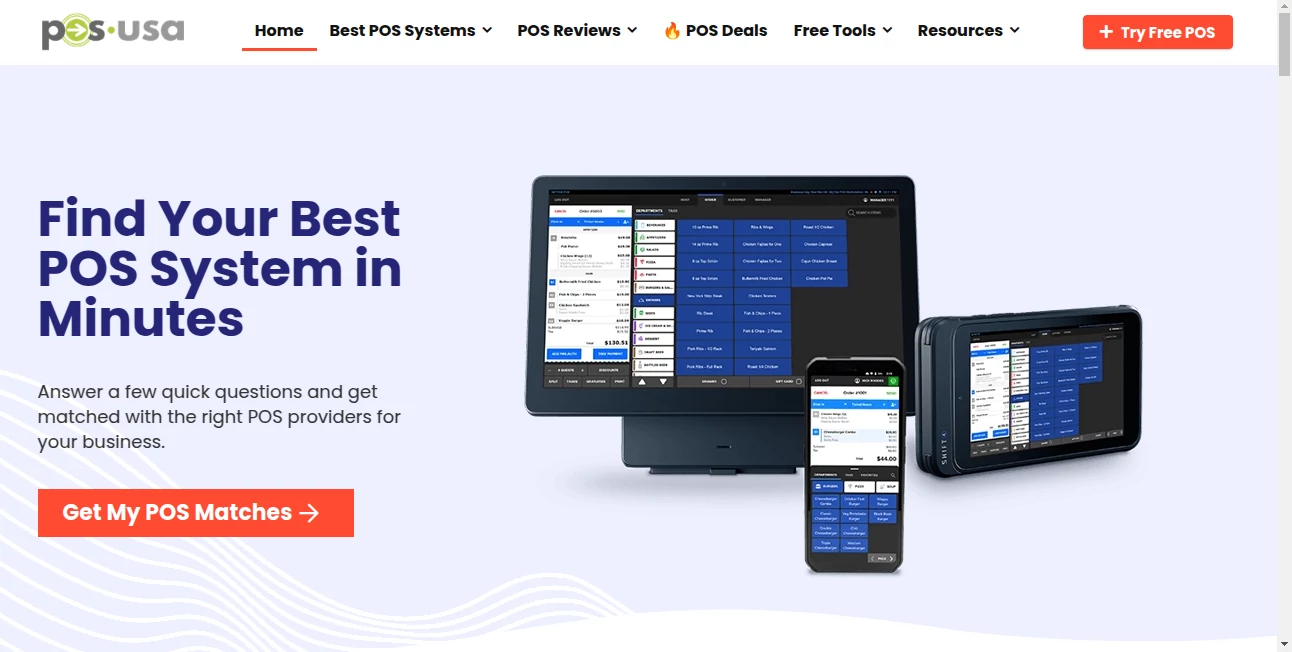
The POS app is clean and intuitive—big, tappable buttons for common items, customizable grids so your most-sold products are always front and center, and a simple checkout flow that even first-time staff can learn in minutes. Split payments, discounts, tips, refunds—all handled with a few taps. On the customer-facing side, the display is clear: order total, tip suggestions, payment options, and a smooth digital receipt. It feels modern without being complicated—exactly what busy teams need when the lunch rush hits.
Accuracy & Performance
Transactions process quickly and reliably—contactless taps, chip inserts, and swipes all go through without the dreaded “processing failed” moments. Inventory updates in real time, so you’re never selling something that’s already out of stock. Receipts match orders perfectly, taxes calculate correctly per location, and end-of-day reports are accurate down to the penny. In practice, it handles high-volume shifts without slowing down or dropping data, which is more than many legacy systems can claim.
Capabilities
Full POS with inventory management, employee time tracking, customer loyalty programs, gift cards, online ordering integration, and multi-location support. Accepts every major payment type (EMV chip, contactless, Apple Pay, Google Pay, debit/credit cards) with transparent, competitive rates. Built-in reporting gives you sales trends, top items, peak hours, and staff performance at a glance. It’s flexible enough for retail, restaurants, service businesses, and pop-ups alike—without charging you for features you don’t use.
Security & Privacy
PCI-DSS compliant from end to end, with end-to-end encryption on every transaction. No sensitive card data touches your device or network—tokenization handles that. Regular security audits and updates keep everything current. For owners, that means sleeping better knowing breaches or compliance fines aren’t a lurking risk. For customers, it means their card info is handled with the highest standard—quiet confidence on both sides of the counter.
Use Cases
A coffee shop owner cuts checkout time in half during morning rush, reducing lines and increasing throughput. A boutique retailer tracks best-sellers in real time and reorders before stockouts happen. A food truck operator accepts contactless payments in seconds, even in spotty signal areas, and reconciles sales instantly at close. A salon uses the loyalty program to bring repeat clients back more often. Across the board, businesses see the same results: happier customers, smoother operations, and more time focusing on what actually grows the business.
Pros and Cons
Pros:
- Fast, stable performance even during peak hours—no crashes, no freezes.
- Transparent pricing—no hidden fees or surprise rate hikes.
- Modern hardware that looks good and feels good to use.
- Excellent support—real people who answer quickly and actually solve problems.
- Built for U.S. businesses—taxes, compliance, and payment methods all handled correctly out of the box.
Cons:
- Initial hardware cost can be noticeable for very small startups.
- Advanced reporting features live in higher tiers.
- Not the cheapest processing rates if you have extremely high volume (though competitive for most).
Pricing Plans
Pricing is straightforward and transparent—no long-term contracts, no early termination fees. Flat monthly software fee (or per-terminal depending on plan) plus interchange-plus processing rates that are clearly listed upfront. Hardware bundles are available at competitive prices, with options to buy outright or finance. Many owners say the total cost is lower than legacy providers once you factor in reliability and support. Free trial or demo lets you test the full system risk-free.
How to Use POS USA
Sign up online, choose your hardware bundle (or bring your own compatible devices), and get set up in a day or two. Customize your menu/grid with items and prices, set up employees with access levels, and train staff in under an hour. When a customer orders, ring it up, accept payment (tap, insert, swipe), hand over the receipt or email it. End of day: one-tap close-out gives sales summary, cash drawer reconciliation, and reports. It’s designed so the tech disappears—you focus on customers, not troubleshooting.
Comparison with Similar Tools
Big-name providers often lock you into long contracts with opaque pricing and mediocre support. Free or low-cost apps can be buggy or limited in features. This one sits in the sweet spot: modern, reliable, U.S.-focused, and priced fairly without sacrificing essentials like security, speed, or support. It’s less about being the cheapest and more about being the most dependable partner for American merchants who want to grow without headaches.
Conclusion
At the end of a long day, the last thing a business owner wants is payment problems. This platform takes that worry off the table—fast transactions, clear reporting, strong security, and support that actually helps when you need it. It’s not trying to be everything to everyone; it’s focused on being excellent for the businesses it serves. When your POS system works so smoothly you barely notice it, that’s when you know you’ve got the right one. For many, this is that one.
Frequently Asked Questions (FAQ)
How long does setup take?
Usually 1–3 business days from order to live—hardware ships fast, software setup is guided.
Do I need a contract?
No long-term contracts or early termination fees—month-to-month flexibility.
What payment types do you accept?
EMV chip, contactless (Apple Pay, Google Pay, Samsung Pay), debit/credit cards, gift cards.
Is it good for restaurants or retail?
Excellent for both—table management, kitchen display, inventory, loyalty, and more.
What if I have questions after setup?
U.S.-based support team is available by phone, email, or chat—real people, real answers.
AI Business Ideas Generator , AI E-commerce Assistant , Other .
These classifications represent its core capabilities and areas of application. For related tools, explore the linked categories above.
POSUSA details
This tool is no longer available on submitaitools.org; find alternatives on Alternative to POSUSA.
Pricing
- Free
Apps
- Web Tools
Categories

POSUSA Alternatives Product

Vmake AI

AlphaTax

Nano Banana …

TwitterXVideo

Hirescope.te…

pixel flow g…

Aback Tools

Sleepless Tr…

Suno top
