
🧠 AI Quiz
Think you really understand Artificial Intelligence?
Test yourself and see how well you know the world of AI.
Answer AI-related questions, compete with other users, and prove that
you’re among the best when it comes to AI knowledge.
Reach the top of our leaderboard.


















Merlin Project

What is Merlin Project?
If you've ever juggled a project that felt like herding cats—deadlines slipping, team members overloaded, ideas scattered—this software steps in like a calm, capable friend who's seen it all. It's built specifically for Apple users who want serious project management without the clunky feel of cross-platform compromises. Over two decades in the game, it's earned quiet loyalty from folks in architecture firms, creative agencies, research labs, and classrooms, helping them turn chaos into clear, achievable plans they can actually stick to.
Introduction
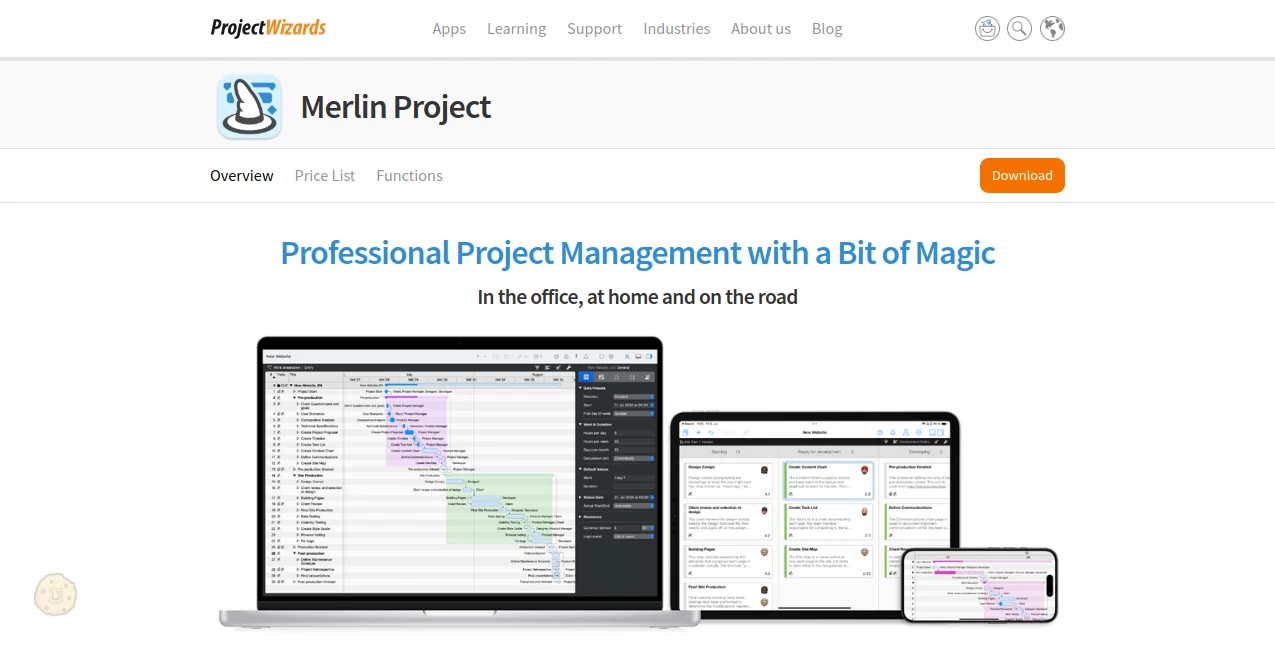
I first stumbled across this tool when a designer friend swore it saved her sanity during a hectic branding rollout. What hooked me was how naturally it fits into the Apple ecosystem—running smoothly on Mac, iPad, even iPhone when you're checking progress on the go. No more wrestling with files that won't sync or views that look wrong on your device. Instead, you get a thoughtful setup that lets you brainstorm in mind maps, switch to Kanban for agile sprints, or lean on classic Gantt charts, all updating in real time across your gadgets. It's the kind of software that grows with you, whether you're mapping a small personal venture or orchestrating a multi-team push across continents.
Key Features
User Interface
Everything feels polished and intuitive, like Apple intended it to be there. Pinch and zoom on the iPad to navigate timelines effortlessly, drag cards across a Kanban board, or sketch ideas in a mind map that flows straight into your structured plan. On iPhone, it shrinks down without losing usefulness—perfect for quick checks or minor tweaks during a commute. Long-time users often mention how the clean layout cuts down mental clutter, letting you focus on the work instead of fighting the tool.
Accuracy & Performance
Dependencies lock in reliably, resources show overloads in clear highlights, and changes ripple through the plan instantly without lag, even on complex files with hundreds of tasks. The patented sync across iCloud or Dropbox means no more version conflicts when team members work offline—everyone picks up right where they left off. It's rock-solid in ways that make you trust it with real stakes, from budget tracking to milestone alerts.
Capabilities
You can attach files, checklists, risks, and comments directly to tasks, turning each item into a mini-hub for discussion. Import from Microsoft Project if you're migrating, export clean PDFs or images for stakeholder reports, and blend traditional waterfall with agile via Kanban that keeps your Gantt in sync. The resource view helps spot bottlenecks early, redistributing work with a few clicks. It's flexible enough for pure creative flows yet structured for regulated industries needing audit trails.
Security & Privacy
Your data stays under your control, syncing through trusted cloud services you already use, with no forced online account tying you down. Offline mode keeps everything local when needed, and the conflict-free merge means sensitive updates never get lost or exposed accidentally. For teams handling proprietary info, that reliability feels like a safety net worth having.
Use Cases
An architecture studio maps out construction phases, attaching site photos and risk logs while the team reviews on iPads during walks. A marketing agency runs hybrid campaigns, brainstorming in mind maps then tracking sprints on Kanban boards that update the master timeline. Researchers coordinate grants across institutions, sharing secure files and tracking budgets without version nightmares. Even educators plan curricula, assigning tasks to staff and visualizing semesters in ways that make adjustments painless.
Pros and Cons
Pros:
- Seamless Apple integration that feels native on every device.
- Smart sync that handles offline work without drama.
- Flexible views—mind maps, Kanban, Gantt—all talking to each other.
- Rich attachments and comments keep context close.
Cons:
- Exclusive to Apple ecosystem, so mixed-platform teams need workarounds.
- Advanced features take a little time to master fully.
Pricing Plans
A full 30-day trial lets you dive deep without commitment, long enough to run a real project and feel the difference. After that, subscription options keep costs predictable, scaling with your needs—single user or larger teams—while updates flow regularly. It's priced like a professional tool should be: fair for the depth you get, especially when it saves hours of frustration elsewhere.
How to Use Merlin Project
Download the trial, open a new canvas, and start with a mind map if ideas are swirling—or jump straight to a work breakdown if you know the structure. Add tasks, set dependencies with simple drags, assign resources, and watch the timeline build itself. Attach files or risks as you go, invite team members via cloud sync, and switch views whenever the mood strikes. Export reports for clients, tweak on your iPad during meetings, check status on your phone—it's designed to fit wherever work finds you.
Comparison with Similar Tools
Against heavier enterprise suites, it feels lighter and more responsive, especially on iPad where gestures make navigation joyful instead of fiddly. Many who've switched from older standards mention leaving frustration behind—no more clunky interfaces or sync headaches. It strikes a sweet spot: powerful enough for demanding industries, yet approachable for smaller teams who don't want overkill.
Conclusion
In the end, it's the rare project tool that respects your time and platform of choice, delivering clarity without unnecessary noise. Whether you're steering a big build or simply getting organized, it becomes that reliable partner you didn't know you needed—one that grows with your ambitions and keeps the focus on getting things done well.
Frequently Asked Questions (FAQ)
Does it work fully on iPhone?
Yes—compact but capable for checking plans, making small edits, and viewing graphics in landscape.
Can I import from other tools?
Absolutely, including direct support for Microsoft Project files.
How does team collaboration work?
Sync via iCloud, Dropbox, or similar—no central server required, just smooth merges.
Is there a free version?
A generous 30-day trial covers everything; after that, subscription unlocks ongoing use.
What about Apple Vision Pro?
Full support, bringing spatial views to your projects in exciting ways.
AI Productivity Tools , AI Task Management , AI Workflow Management , AI Project Management .
These classifications represent its core capabilities and areas of application. For related tools, explore the linked categories above.
Merlin Project details
This tool is no longer available on submitaitools.org; find alternatives on Alternative to Merlin Project.
Pricing
- Free
Apps
- Web Tools
Categories

Merlin Project Alternatives Product

Sourcetable

Workik

Notion

Overlap

Rierino

ChatGPT

Nifty

Tate-A-Tate

Unix Timesta…
