🧠 AI Quiz
Think you really understand Artificial Intelligence?
Test yourself and see how well you know the world of AI.
Answer AI-related questions, compete with other users, and prove that
you’re among the best when it comes to AI knowledge.
Reach the top of our leaderboard.


















PromptFix
Verified Blue CheckMark
Verified Blue CheckMark products are featured above free or unverified listings.
This badge indicates authenticity and builds trust, giving your product higher visibility across the platform.
Upgrade to get verified
Verified Blue CheckMark products are featured above free or unverified listings. This badge indicates authenticity and builds trust, giving your product higher visibility across the platform.
Upgrade to get verified
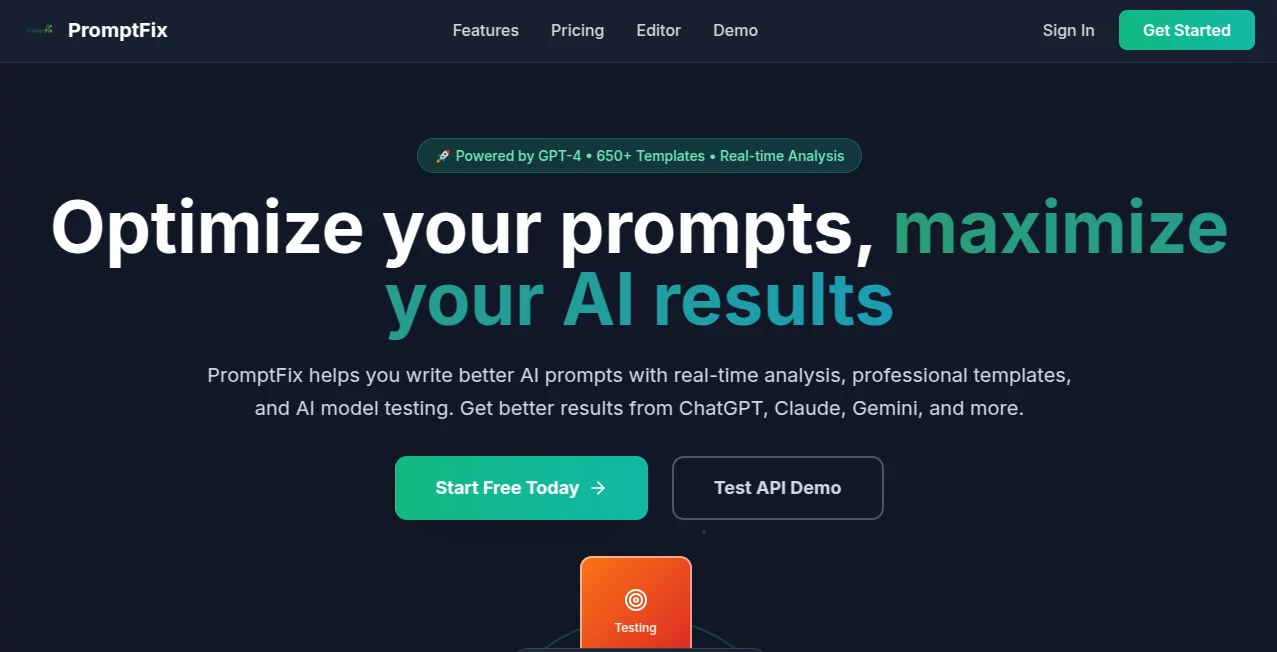
What is PromptFix?
You know those moments when your prompt feels almost right but the output is just… off? This little gem takes that frustration and turns it into something almost magical. You paste your messy, half-baked prompt in, click one button, and suddenly you’re looking at a cleaner, sharper, more effective version that actually gets the results you were hoping for. I’ve had days where I was stuck rewriting the same sentence ten times—now I just run it through this and move on with my life. It’s the kind of simple tool that quietly becomes indispensable.
Introduction
Most of us have been there: you spend twenty minutes tweaking a prompt, run it, and the AI spits out something that’s close but not quite. PromptFix was built for exactly that pain point. It’s a no-nonsense online tool that analyzes your prompt and rewrites it for clarity, specificity, structure, and better AI understanding—without changing your original intent. The interface is dead simple, the results are fast, and it works across all major models. What started as a personal hack for a few frustrated creators has quietly grown into a favorite among writers, designers, marketers, and prompt nerds who just want better outputs without the hassle.
Key Features
User Interface
The whole thing feels like a breath of fresh air. You get two side-by-side boxes: one for your original prompt, one for the improved version. Paste, click “Fix Prompt,” and it’s done in seconds. No sign-up, no fluff, no distracting side menus. It’s the kind of design that makes you wonder why more tools don’t just get out of the way like this. I’ve used it on my phone in a coffee shop and it still feels effortless.
Accuracy & Performance
It consistently takes vague or overly wordy prompts and sharpens them into something the AI can actually understand. Whether you’re writing for Midjourney, Claude, ChatGPT, or anything else, the fixes are spot-on. It adds structure, removes ambiguity, and keeps the tone you want. Best part? It’s lightning fast—usually under three seconds—and the improvements are noticeable right away. I’ve seen outputs jump from “meh” to “damn, that’s good” after a single pass.
Capabilities
It doesn’t just rewrite—it optimizes. It can add role-playing instructions, specify output format, improve detail levels, remove contradictions, or even suggest better phrasing for creative tasks. Works beautifully for image generation, long-form writing, coding prompts, and even technical queries. The team behind it clearly understands how different models think, so the suggestions feel tailored, not generic.
Security & Privacy
Your prompts never leave your browser. Everything happens client-side—no data is stored, no logs are kept. It’s completely free and doesn’t ask for your email or track your usage. In a world where every tool seems to want your data, this one just lets you work in peace. That alone makes it feel trustworthy.
Use Cases
Graphic designers use it to turn vague style descriptions into prompts that actually match their vision. Copywriters fix rambling brand guidelines into concise, powerful inputs. Developers clean up messy code-generation prompts so they get usable snippets on the first try. Students turn research questions into clear, focused instructions. And hobbyists experimenting with AI art or writing finally stop wasting time on bad prompts. It’s the Swiss Army knife for anyone who talks to AI regularly.
Pros and Cons
Pros:
- Dead simple and blazing fast—no learning curve.
- Improvements are genuinely helpful and model-aware.
- 100% client-side, zero data collection.
- Completely free with no limits or sign-up.
Cons:
- No option to save favorite fixed prompts (yet).
- Doesn’t offer multiple variations—just one solid rewrite.
Pricing Plans
It’s completely free. No tiers, no credits, no hidden upsells. Just open the site, use it as much as you want, and walk away. In a sea of freemium tools that eventually nudge you to pay, this one stays true to the promise of being free forever. That alone makes it feel like a gift to the community.
How to Use PromptFix
Head to the site, paste your prompt into the left box. Click the big “Fix Prompt” button. Read the improved version on the right. Copy it and paste it into your AI tool of choice. That’s it. Takes about five seconds. I usually run my prompts through it before hitting generate—it’s become muscle memory now.
Comparison with Similar Tools
Most prompt enhancers either require sign-up, limit free use, or feel overly complicated. This one stands out by being completely free, instant, and privacy-first. It’s not trying to be everything—just really good at one thing: making your prompts better. And it does that better than most of the paid alternatives I’ve tried.
Conclusion
If you use AI tools regularly and ever feel like your prompts aren’t quite hitting the mark, this is the tool you didn’t know you needed. It’s fast, free, private, and genuinely improves your results without any fanfare. It’s the kind of quiet innovation that makes you smile every time you use it—because it just works, and it works well.
Frequently Asked Questions (FAQ)
Is it really free forever?
Yes, no limits, no sign-up, no catch.
Does it work with all AI models?
Yes, it’s model-agnostic and improves prompts for text, image, and code generation.
Do you store my prompts?
No, everything stays in your browser.
Can I suggest improvements?
Absolutely—there’s a feedback link right on the page.
Will there be a paid version?
Not planned. The goal is to keep it free and focused.
AI Writing Assistants , AI Creative Writing , AI Content Generator , Prompt .
These classifications represent its core capabilities and areas of application. For related tools, explore the linked categories above.
PromptFix details
Pricing
- Free
Apps
- Web Tools
Categories

PromptFix Alternatives Product
RewriteBar

Prompt Sloth

Banana Promp…

Manus

wu tang name…

Trending AI …

Touchpoint

RankPeak

FinalLayer