
🧠 AI Quiz
Think you really understand Artificial Intelligence?
Test yourself and see how well you know the world of AI.
Answer AI-related questions, compete with other users, and prove that
you’re among the best when it comes to AI knowledge.
Reach the top of our leaderboard.


















Read PDF Aloud
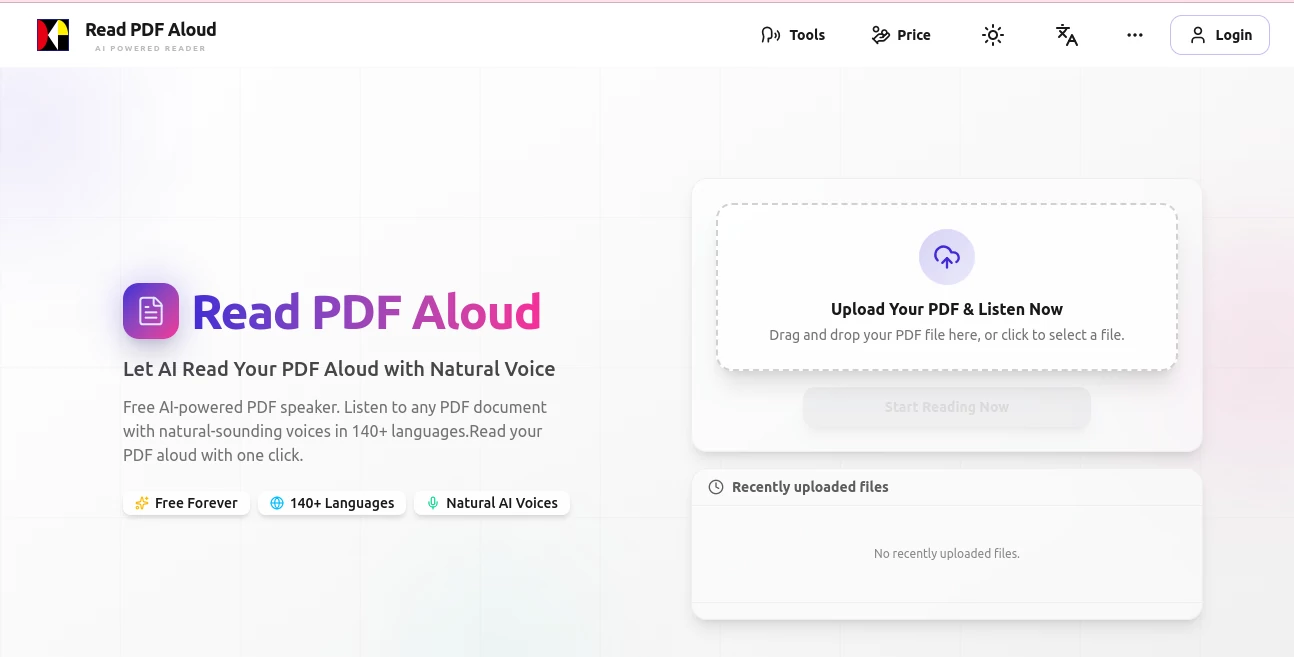
What is Read PDF Aloud?
There are days when your eyes are tired, the screen feels too bright, or you just want to move around while still absorbing that long report, research paper, or novel chapter. This little gem turns those moments into something surprisingly pleasant. Upload a PDF—or paste a link—and it starts reading in a voice so natural you almost forget there’s no person sitting across from you. I’ve caught myself walking the dog, listening to a 40-page whitepaper, and actually enjoying it. That’s the kind of quiet win that makes you wonder how you managed without it before.
Introduction
Reading long documents silently can feel like a chore, especially when time is short or concentration is slipping. This tool quietly changes the game by bringing PDFs to life with voices that carry real inflection and warmth. No robotic monotone here—just clear, expressive narration that makes dense text feel more human. It’s become a favorite for students reviewing lecture notes on the bus, professionals digesting contracts during a commute, and lifelong learners who simply prefer listening over staring at pages. The best part? It respects your pace and your privacy while delivering surprisingly high-quality audio every single time.
Key Features
User Interface
The layout is refreshingly minimal. Drag your PDF in, or paste a URL, and the player appears almost instantly. Big play/pause button, speed slider, voice selector, and a clean progress bar—no cluttered side panels or confusing menus. You can jump to any page with one click, highlight text as it reads, or even pause and resume days later. It’s the kind of interface that disappears after you start listening, letting the content take center stage.
Accuracy & Performance
The voices handle complex documents with impressive fluency—technical terms, acronyms, foreign names, even mathematical symbols come through clearly and naturally. Pronunciation is remarkably accurate across languages, and the flow rarely stumbles. Processing starts almost immediately, even on larger files, and playback remains smooth without buffering hiccups. In practice, it turns what could be a frustrating read-aloud experience into something reliable and pleasant.
Capabilities
It reads pretty much any PDF you throw at it—articles, textbooks, scanned documents, research papers, ebooks, legal contracts. You can adjust reading speed from very slow to quite brisk, choose from a variety of male and female voices in multiple languages, and decide whether to include headers, footers, or footnotes. The audio can be downloaded as MP3 for offline listening, which is perfect for long commutes or gym sessions. It even preserves document structure so tables and lists are read in a logical order.
Security & Privacy
Your files are processed quickly and then deleted from their servers—no permanent storage, no sharing, no funny business. Everything happens over encrypted connections, and there’s no account required for basic use. That level of care makes it easy to trust with sensitive documents like contracts, medical reports, or personal writing without second-guessing.
Use Cases
A graduate student listens to journal articles while taking notes during a walk. A lawyer reviews deposition transcripts on the train without eye strain. Someone learning English uses it to follow along with novels, improving both comprehension and pronunciation. Busy parents read bedtime stories from picture books to kids while folding laundry. Professionals turn quarterly reports into audio so they can absorb them during a run. It quietly fits into dozens of routines where traditional reading just doesn’t work.
Pros and Cons
Pros:
- Voices sound warm and human, not robotic.
- Handles complex documents with excellent pronunciation and flow.
- No login needed for basic use—very frictionless.
- MP3 downloads mean you can listen anywhere, anytime.
Cons:
- Free tier limits daily usage (but still generous for light use).
- Scanned PDFs with poor OCR may need minor cleanup first.
Pricing Plans
You can start right away with a solid free allowance each day—no card, no tricks. When you need more listening time or want to remove any restrictions, the paid plans are straightforward and reasonably priced. Monthly or yearly options unlock unlimited usage, priority processing, and access to premium voices. It’s built so casual users stay comfortable for free, while heavy listeners get exactly what they need without feeling gouged.
How to Use Read PDF Aloud
Drop your PDF file onto the page or paste a direct link. Wait a few seconds for it to load and analyze the layout. Choose your preferred voice and speed from the dropdowns. Hit play and adjust volume or skip ahead as needed. If you like what you hear, download the MP3 for offline use. That’s it—no complicated setup, no tutorials required. You’ll be listening comfortably within a minute of arriving.
Comparison with Similar Tools
Plenty of PDF readers have text-to-speech, but most use dated, mechanical voices that make long sessions tiring. This one stands apart with modern, expressive narration that actually sounds like a real person reading thoughtfully. Where others stumble on formatting, tables, or foreign words, it handles them gracefully. It’s lighter, faster, and far more pleasant for extended listening—exactly what you want when you’re trying to absorb rather than endure.
Conclusion
Sometimes the best way to understand something deeply is to hear it instead of staring at it. This tool makes that shift feel natural and enjoyable, turning walls of text into spoken stories you can take anywhere. It’s one of those rare utilities that quietly improves your day—whether you’re studying, working, or simply unwinding with a book. Once you start listening instead of reading, it’s hard to go back.
Frequently Asked Questions (FAQ)
What kinds of PDFs work best?
Text-based PDFs give the smoothest experience, but it does a surprisingly good job with scanned documents too.
Can I choose different voices?
Yes—multiple natural-sounding options in several languages and accents.
Do I need an account to start?
No account required for basic use—just upload and listen.
Can I download the audio?
Absolutely—MP3 export is available so you can listen offline.
Is my document stored anywhere?
No—files are processed temporarily and removed shortly after you’re done.
AI Text to Speech , AI Speech Synthesis , AI Voice Assistants , AI Documents Assistant .
These classifications represent its core capabilities and areas of application. For related tools, explore the linked categories above.
Read PDF Aloud details
Pricing
- Free
Apps
- Web Tools
Categories

Read PDF Aloud Alternatives Product

Ryne AI
Sonicker
Qwen3 TTS

VideoDubber

PolyBuzz

SuperAI

VoiceAILabs

Qwen3 TTS

Flowmata AI
