🧠 AI Quiz
Think you really understand Artificial Intelligence?
Test yourself and see how well you know the world of AI.
Answer AI-related questions, compete with other users, and prove that
you’re among the best when it comes to AI knowledge.
Reach the top of our leaderboard.


















RGB to CMYK Converter
What is RGB to CMYK Converter?
RGBtoCMYK stands as a go-to resource for anyone bridging the gap between screen and page, transforming digital hues into print-ready shades with a touch that's both swift and sure. This handy spot has earned nods from creators who once wrestled with mismatched tones, now finding a straightforward path to outputs that hold true under ink. It's the kind of quiet essential that saves headaches down the line, letting folks pour energy into designs rather than dodging disasters.
Introduction
RGBtoCMYK came along when a few sharp minds in the design world grew tired of the all-too-common tale of colors shifting from vibrant on-screen to dull off the press. They built it as a no-fuss fix, drawing on the same tricks that big-name programs rely on, and it didn't take long for word to spread among photographers and layout pros swapping stories of smoother workflows. What started as a simple swap tool has settled in as a staple for those prepping files for the printer, with users often recalling that first conversion where everything just clicked into place. Over time, little touches like profile picks have kept it feeling fresh, turning potential pitfalls into passing thoughts for anyone chasing that flawless finish.
Key Features
User Interface
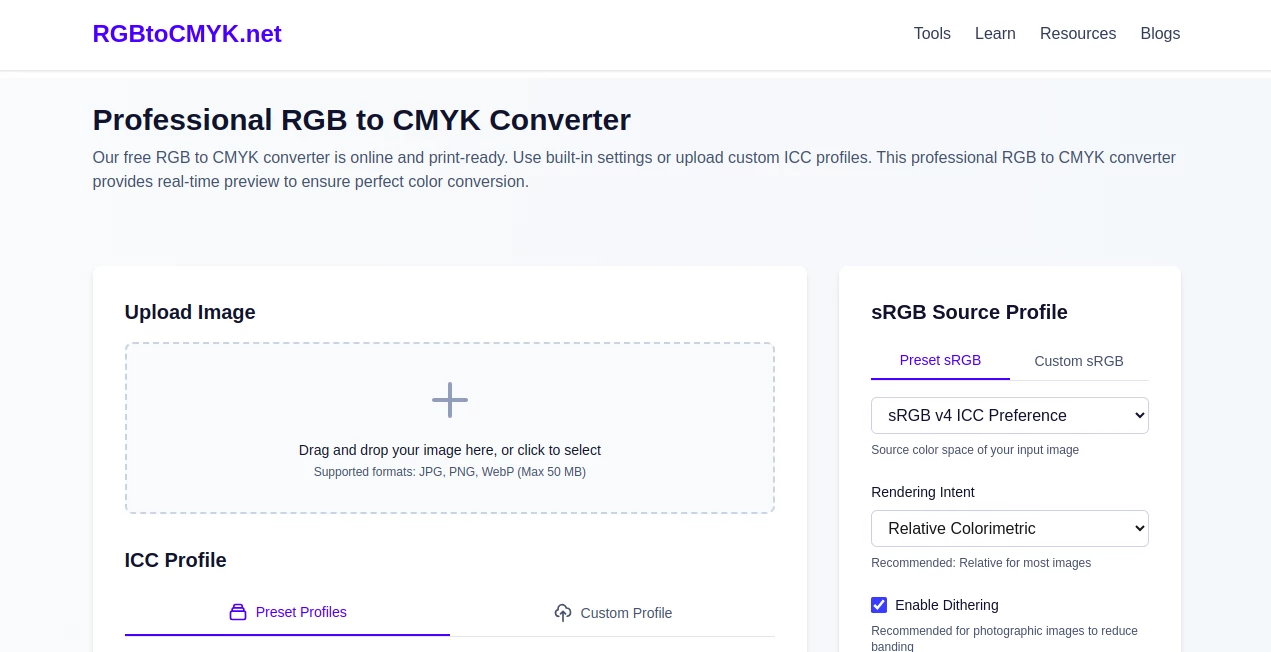
The setup greets you with an open invitation to drop in your file or browse for it, all wrapped in a layout that wastes no space on extras. Dropdowns for profile choices sit right where you need them, paired with sliders that let you peek at changes side by side, making the whole flow feel like a quick back-and-forth with a knowledgeable pal. No sign-ups or side trips—just straight to the good stuff, even on a smaller screen during a coffee break.
Accuracy & Performance
It leans on the exact methods that power heavy-hitters in the field, so results line up close enough to fool the experts, keeping tones true from upload to output. Jobs wrap up in a snap, handling hefty files without a hitch, and the previews match what lands in your download folder down to the last shade. Those who've run tests side by side with their usual setups often come away impressed by how it holds the line, especially on those finicky gradients that trip up lesser tries.
Capabilities
At its heart, it shifts colors from one space to another with options for built-in setups or your own tweaks, covering everything from quick snaps to detailed spreads. You can dial in how it handles the tricky bits, like blending overflows or smoothing edges, and pull out files in formats that play nice with print shops. It's geared for the real work of getting things press-ready, with a nod to those extra steps that keep surprises at bay.
Security & Privacy
Files you send over get the once-over they need, then slip away fast—gone in minutes if untouched, or right away once you grab your copy. It's all handled with an eye toward keeping things yours alone, no lingering looks or shares unless you say otherwise. Users in tight-knit creative circles appreciate that clean approach, letting them tinker without the nagging doubt about where their work might wander next.
Use Cases
Photographers prepping portfolios for gallery walls run their shots through to ensure the warmth carries over without washing out. Ad teams mock up brochures, tweaking profiles to match client specs before the proofs go out. Book cover artists blend images that need to pop on shelves, dodging the dull spots that come from skipping the swap. Even small shop owners freshen up packaging designs, landing colors that draw eyes in the store without a reprint rush.
Pros and Cons
Pros:
- Matches the output of pro setups, saving time on double-checks.
- Handles custom tweaks without the usual learning curve.
- Quick previews cut the guesswork from the get-go.
- Stays open to all without a single signup snag.
Cons:
- Caps at one file a pop, so batches need a bit of patience.
- Big uploads push toward the upper limit quick.
- Lacks bells for deeper edits beyond the basics.
Pricing Plans
Everything here comes without a tab, from the first upload to the endless runs, keeping the door wide for anyone dipping in. No tiers or traps—just free access to the full kit, with a promise to stay that way, so you can lean on it for projects big or small without watching the wallet.
How to Use RGBtoCMYK
Start by sliding your image into the spot or clicking to pick it, then nudge the dropdowns toward your preferred profiles and intent. Flip the slider to spy the shift, tweak any extras like smoothing if the scene calls for it, and tap convert to see it seal. Snag the file in your choice of wrap, ready to roll into your next step without a backward glance.
Comparison with Similar Tools
Where some free swaps skim the surface with rough edges, RGBtoCMYK digs into the details with pro-level poise, though those might offer quicker drags for the bare-bones crowd. Against full-suite editors that bundle a bunch, it zeros in on the swap without the sprawl, trading extras for that laser focus on getting colors right. It shines for folks who want reliable results without the roundup of options that can overwhelm.
Conclusion
RGBtoCMYK wraps up the worry of color drifts, handing creators a steady hand for shifts that stick. It turns the tricky transition from glow to gloss into a graceful glide, proving that spot-on tools don't need to come with strings. As presses keep humming and designs keep dreaming bigger, this one's poised to stay a steadfast sidekick, ensuring every hue hits home just as intended.
Frequently Asked Questions (FAQ)
Why bother with this swap at all?
Screens love one set of shades, but presses crave another—skipping it often means tones that fall flat when the ink dries.
Does it play nice with my usual files?
Sure, it takes common formats like JPG or PNG, spitting back ones that printers favor most.
How true are the previews to the final grab?
What you see is what you get, down to the subtle shifts, so no shocks when you unpack.
Can I bring my own tweaks to the table?
Absolutely, upload your custom profiles to tailor the turn just how you like it.
What if my file's a bit hefty?
It handles up to fifty megs smooth, but trim if you're pushing the edge for speed.
Photo & Image Editor , AI Photo Enhancer , AI Colorize , AI Design Generator .
These classifications represent its core capabilities and areas of application. For related tools, explore the linked categories above.
RGB to CMYK Converter details
Pricing
- Free
Apps
- Web Tools
Categories

RGB to CMYK Converter Alternatives Product

Upscale image

Tryonr

svgstud.io

Ultra Face S…

Flux 2 Cloud

JPG to Small

deck cleaner

insMind

Nano Banana 2