
🧠 AI Quiz
Think you really understand Artificial Intelligence?
Test yourself and see how well you know the world of AI.
Answer AI-related questions, compete with other users, and prove that
you’re among the best when it comes to AI knowledge.
Reach the top of our leaderboard.


















Roomika

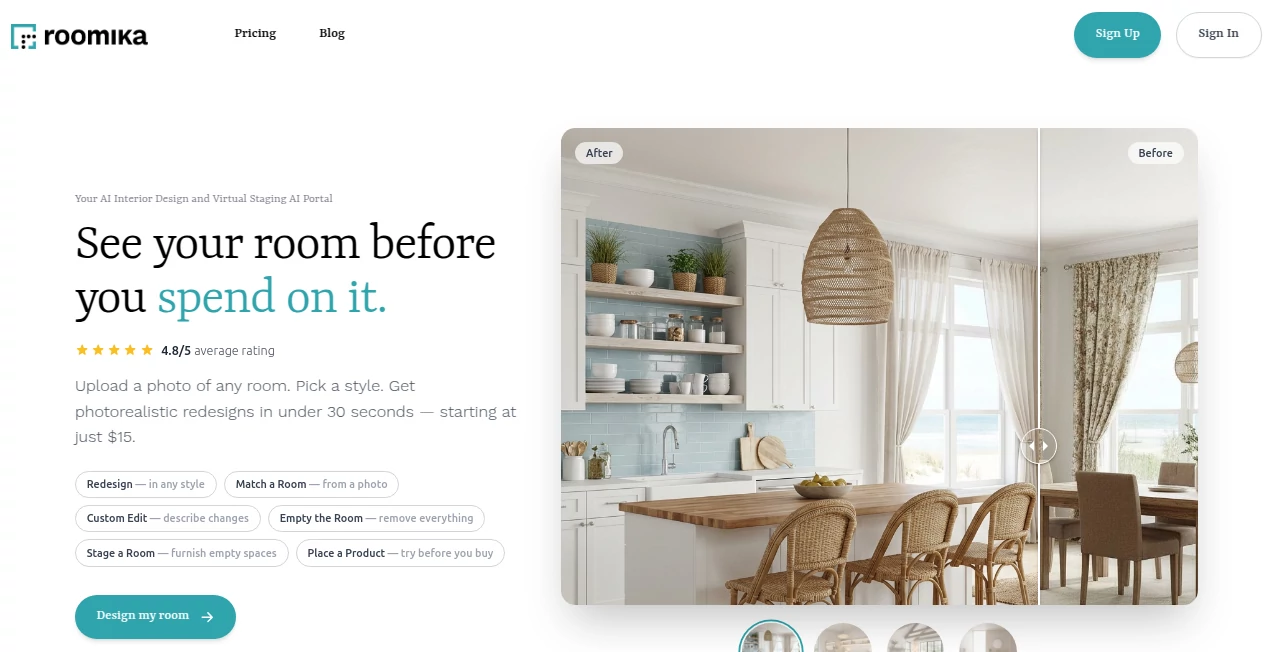
What is Roomika?
There’s something quietly satisfying about seeing an empty room in your mind suddenly fill with furniture, colors, and light that actually work together. This tool makes that happen in seconds. Upload a photo of your space—or start from scratch—and describe what you want: “cozy Scandinavian living room with lots of plants” or “minimalist home office in dark tones.” Moments later you get realistic renderings that feel thoughtful, not thrown together. I’ve watched people go from “I have no idea where to start” to “this actually looks like my dream space” after one or two tries. It’s the kind of help that turns overwhelm into excitement.
Introduction
Most people know what they like but freeze when it’s time to arrange furniture, pick colors, or imagine lighting. Hiring a designer is expensive and slow; scrolling Pinterest for hours leaves you inspired but still stuck. This platform bridges that gap beautifully. It combines image understanding, smart layout suggestions, and high-quality rendering so you can experiment freely and see realistic results instantly. It’s become a favorite for renters testing new vibes, homeowners planning renovations, realtors staging virtually, and even interior pros looking for quick mood boards. The joy is in how fast it turns vague ideas into something you can actually picture living in.
Key Features
User Interface
The workspace feels open and calm. Upload your room photo (or choose an empty template), type or speak your vision, pick style keywords if you want, and hit generate. Results appear in a clean grid with before/after views and easy re-generate buttons. Sliders for lighting mood, furniture density, and color warmth appear only when you need them. It never feels cluttered—everything is intuitive, so you spend time dreaming, not clicking around.
Accuracy & Performance
It reads real rooms remarkably well: recognizes windows, doors, existing furniture scale, lighting direction. Generated furniture fits naturally—nothing floating or clipping through walls. Renders look photorealistic with proper shadows, reflections, and material feel. Processing is quick (usually 10–30 seconds per variation), and the model rarely produces impossible layouts or mismatched scales. Consistency across re-generations is strong—you can iterate without losing the overall vibe.
Capabilities
Room redesign from photo, empty-room planning, style transfer (Scandinavian, boho, industrial, etc.), furniture suggestion and placement, color palette generation, lighting adjustments (day/night, warm/cool), virtual staging for realtors, mood-board style renders, and multiple variations per prompt. It handles small apartments, large living rooms, bedrooms, kitchens, offices—pretty much any interior space. Outputs are high-res and downloadable for sharing with partners, contractors, or clients.
Security & Privacy
Your room photos are processed temporarily and deleted after generation—no permanent storage unless you explicitly save the project. No forced account for basic use, so your home’s interior stays private. Paid plans add secure project saving with encryption. For homeowners or realtors handling sensitive spaces, that respect for privacy feels essential.
Use Cases
A young couple renovating their first apartment uploads living-room photos and tests three completely different styles before committing to paint and furniture. A realtor stages vacant listings virtually, showing buyers furnished versions that help close faster. An interior designer uses it to create quick client mood boards during consultations. A renter experiments with layouts to maximize a small space without buying anything yet. Wherever imagination meets real walls, it quietly removes the guesswork.
Pros and Cons
Pros:
- Results look photorealistic and spatially accurate—no floating objects or broken perspective.
- Extremely fast iteration—see multiple styles in minutes, not hours.
- Understands real rooms from photos, not just generic templates.
- Style variety covers modern, classic, cozy, minimalist, and more.
- Free tier is generous—enough to test seriously before upgrading.
Cons:
- Very cluttered or poorly lit source photos can reduce accuracy (garbage in, garbage out).
- Unlimited generations and project saving require paid plan.
- Complex custom furniture requests sometimes need prompt refinement.
Pricing Plans
Free plan gives several high-quality generations per day—perfect for trying ideas or small projects. Paid tiers unlock unlimited renders, higher resolutions, project saving, faster priority queue, and commercial use for realtors or designers. Pricing is reasonable—many users say one month saves them more in avoided designer fees or wrong furniture purchases.
How to Use Roomika
Upload a photo of your room (or start empty). Write a clear description: style, mood, colors, key furniture pieces. Adjust any quick toggles (lighting, density). Hit generate. Scroll through variations, use the before/after slider, regenerate with tweaks if needed. Download favorites in high resolution. For bigger projects, paid users save multiple rooms and iterations in one place. It’s fast enough to experiment wildly in one sitting.
Comparison with Similar Tools
Many interior AI tools produce cartoonish or overly generic renders. This one keeps things realistic and spatially accurate, with better understanding of real photos and more usable outputs. Where others force templates, this lets your existing space guide the design. The speed, quality, and natural-looking results make it a clear step ahead for anyone who wants professional inspiration without the professional price tag.
Conclusion
Designing a room should feel exciting, not paralyzing. This tool takes the fear out of the process and replaces it with possibility. It lets you see what could be—quickly, beautifully, realistically—without spending a fortune or making permanent mistakes. Whether you’re moving in, moving out, staging, or simply dreaming, it meets you where you are and helps you visualize where you want to go. Sometimes the best design decisions start with seeing the finished space before you buy a single thing.
Frequently Asked Questions (FAQ)
How many free generations do I get?
Several high-quality renders per day—enough to explore multiple rooms or styles.
Does it work with messy or poorly lit photos?
Yes, but cleaner, brighter shots give the most accurate furniture placement and lighting.
Can I use it commercially (e.g., real estate staging)?
Paid plans include full commercial rights; free tier is personal use only.
What if I want to keep my projects?
Paid plans let you save rooms, iterations, and notes for later.
Can I specify exact furniture brands or pieces?
Yes—mention them in the prompt; results are best when described clearly.
AI Design Assistant , AI Design Generator , AI Image to Image , AI Interior & Room Design .
These classifications represent its core capabilities and areas of application. For related tools, explore the linked categories above.
Roomika details
This tool is no longer available on submitaitools.org; find alternatives on Alternative to Roomika.
Pricing
- Free
Apps
- Web Tools
Categories

Roomika Alternatives Product

nano banana

Z image AI

X Grok Imagi…

Ai Home Desi…

UNi-1 AI

EaseMaker

Picture to L…

AI Raphael

meta ai image
