🧠 AI Quiz
Think you really understand Artificial Intelligence?
Test yourself and see how well you know the world of AI.
Answer AI-related questions, compete with other users, and prove that
you’re among the best when it comes to AI knowledge.
Reach the top of our leaderboard.


















Roomstage AI

What is Roomstage AI?
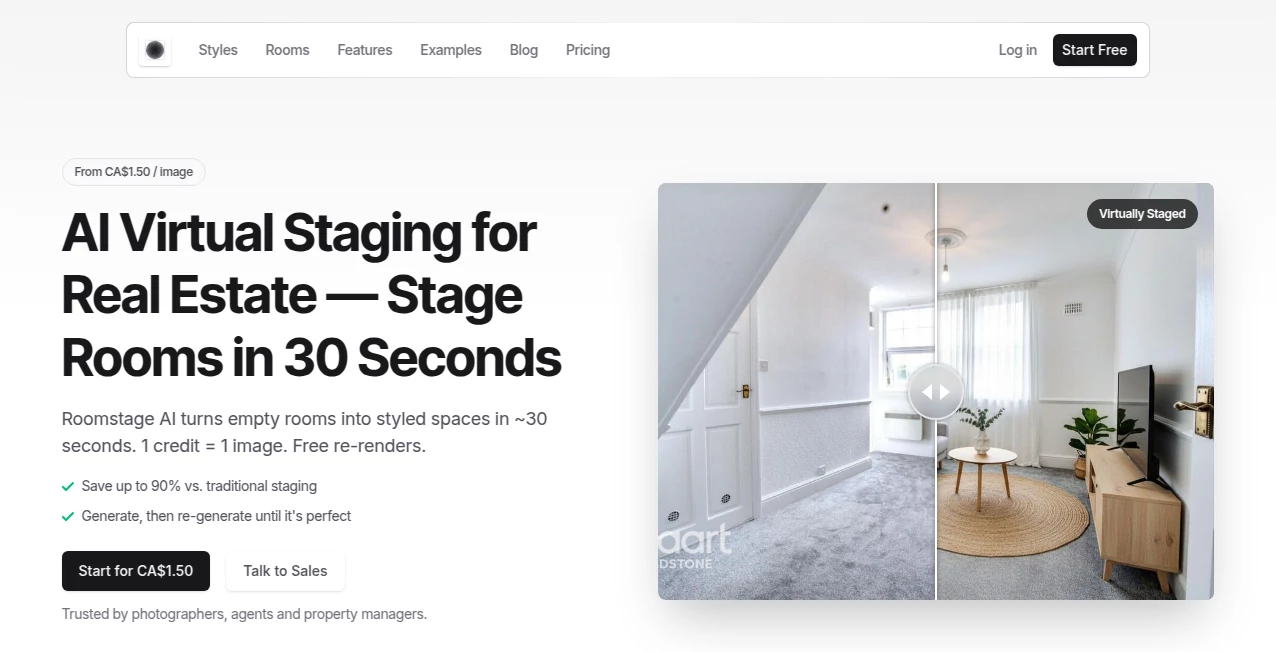
There’s something quietly satisfying about seeing a blank or tired room transformed into something that actually feels like *you*—without months of mood boards, endless scrolling, or hiring a designer. This tool does exactly that: snap a photo of your space (or start from scratch), describe what you want, and watch realistic, beautifully lit room designs appear in moments. The results often feel like someone walked in, understood your taste, and rearranged everything perfectly. I’ve watched friends go from “this room depresses me” to “I need to buy that couch right now” after one quick generation. It’s fast, it’s inspiring, and it makes interior design feel approachable instead of intimidating.
Introduction
Most people dream of beautiful spaces but get stuck at the “how” part—budgets, decisions, fear of choosing wrong. This platform cuts straight through that hesitation. Upload your room photo or pick an empty template, type what you’re feeling (cozy Scandinavian, modern minimalist, boho maximalist, moody dark academia…), and it generates multiple thoughtful redesigns complete with furniture, lighting, colors, and textures that actually work together. It’s become a favorite late-night scroll for homeowners, renters, real-estate stagers, and even designers looking for fresh inspiration. The magic isn’t just the pretty pictures—it’s how quickly it turns vague “I want something nice” into concrete, shoppable ideas you can act on today.
Key Features
User Interface
The experience is deliberately calm and focused. A large upload area welcomes your photo, a clear text box invites your style description, and a few friendly presets (cozy, minimalist, luxury, etc.) give you a starting point if words fail you. Generate button sits prominently—hit it and watch variations appear in a clean grid. Before/after sliders, zoomable previews, and one-click “try this style again with tweaks” keep iteration effortless. It never feels like software—it feels like chatting with a very talented, very fast interior designer friend.
Accuracy & Performance
It reads your room photo with surprising intelligence—understands existing furniture scale, window placement, lighting direction, and architectural quirks—then builds redesigns that respect reality instead of ignoring it. Generations arrive in 10–30 seconds, and the lighting/shadows feel physically believable (no floating lamps or impossible reflections). The consistency across styles is impressive: a Scandinavian redesign won’t suddenly look like a Vegas penthouse unless you asked for it. It rarely hallucinates impossible furniture or breaks perspective.
Capabilities
Photo-based redesign (upload your room), empty-room starting point, style presets + custom text prompts, multiple variations per generation, realistic lighting and shadows, furniture/object replacement suggestions, color palette extraction, and high-res exports. It handles small apartments, large living rooms, bedrooms, kitchens, offices—even tricky spaces like attic conversions or narrow hallways. Outputs include shoppable links for featured items in some cases, turning inspiration directly into action.
Security & Privacy
Your room photos are processed ephemerally—deleted from servers shortly after generation. No mandatory account for basic use means no profile tied to your private spaces unless you choose to save designs. For renters, homeowners, or real-estate pros sharing client photos, that low-retention, no-storage approach feels genuinely respectful.
Use Cases
A young couple in a rental apartment uploads their dated living room and gets three modern-cozy redesigns they can actually afford—suddenly the space feels like theirs. A real-estate agent stages empty listings virtually and shows buyers potential layouts without moving a single piece of furniture. A designer uses it to quickly test client ideas (“more boho,” “less beige”) during consults. A homeowner facing renovation overwhelm generates dozens of kitchen options in an afternoon and finally decides on cabinets. Wherever someone needs to *see* possibilities fast, it quietly removes the paralysis.
Pros and Cons
Pros:
- Results feel thoughtfully designed, not randomly generated.
- Respects your actual room layout instead of ignoring it.
- Fast enough to iterate several ideas in one coffee break.
- Style variety covers everything from minimalist to eclectic.
- Free tier is generous—real redesigns without paying first.
Cons:
- Very cluttered or poorly lit photos can confuse it (clear shots work best).
- Unlimited generations and highest resolutions require paid plan.
- Shoppable links are limited to certain styles/partners (not every item).
Pricing Plans
Free tier gives several high-quality generations per day—enough to explore seriously or redesign a room or two. Paid plans unlock unlimited redesigns, 4K exports, faster queue times during peak hours, and priority access to new style models. Pricing stays reasonable—many users say one month covers what they’d spend on a single consultation with a human designer, with far more ideas generated.
How to Use RoomStage
Upload a clear photo of your room (or start with an empty template). Describe your desired style in plain language (“warm modern boho with lots of plants and wood tones” or “minimalist Scandinavian black-and-white”). Optionally select a preset mood. Hit generate—watch variations appear in a neat grid. Swipe through, zoom in on details, use before/after slider to compare. Download favorites in high-res or share directly. Tweak the prompt and regenerate as many times as needed until it feels right. The whole flow can take 5–15 minutes for a full room rethink.
Comparison with Similar Tools
Many interior AI tools either produce impossible layouts, ignore your existing furniture, or generate cartoonish results. This one keeps architectural reality intact, respects scale and lighting, and delivers designs that look like they could actually be built. Speed, realism, and creative control put it ahead of most competitors—especially for people who want practical inspiration, not just fantasy renders.
Conclusion
Redesigning a space should feel exciting, not stressful. This tool takes the intimidation out of the process and replaces it with possibility. It turns “I wish my room looked better” into “here are five ways it could look amazing—pick one.” For renters, homeowners, real-estate pros, or anyone who loves beautiful spaces but dreads the planning part, it’s a quiet, powerful ally. Sometimes the best design help doesn’t come from a person—it comes from a tool that understands both your room and your taste.
Frequently Asked Questions (FAQ)
How many free generations do I get?
Several high-quality redesigns per day—enough to seriously explore options.
Does it work with my existing furniture?
Yes—it keeps your current pieces and builds around them when you upload a real room photo.
Can I use it for commercial work (real estate, staging)?
Absolutely—paid plans include commercial rights; great for agents and stagers.
What if my room photo is dark or messy?
Brighter, clearer shots work best; very low-light or cluttered rooms may need a retake for optimal results.
Are the suggestions shoppable?
Some styles include direct links to similar furniture; others focus on pure inspiration.
AI Design Assistant , AI Design Generator , AI Image to Image , AI Interior & Room Design .
These classifications represent its core capabilities and areas of application. For related tools, explore the linked categories above.
Roomstage AI details
This tool is no longer available on submitaitools.org; find alternatives on Alternative to Roomstage AI.
Pricing
- Free
Apps
- Web Tools
Categories

Roomstage AI Alternatives Product

picremake

Niji V7

Tryonr

Flux.2 AI

Pixelied

Nano Banana …

Undertale Te…

qwen image 2…

HD Photo Con…