🧠 AI Quiz
Think you really understand Artificial Intelligence?
Test yourself and see how well you know the world of AI.
Answer AI-related questions, compete with other users, and prove that
you’re among the best when it comes to AI knowledge.
Reach the top of our leaderboard.


















SAM Audio
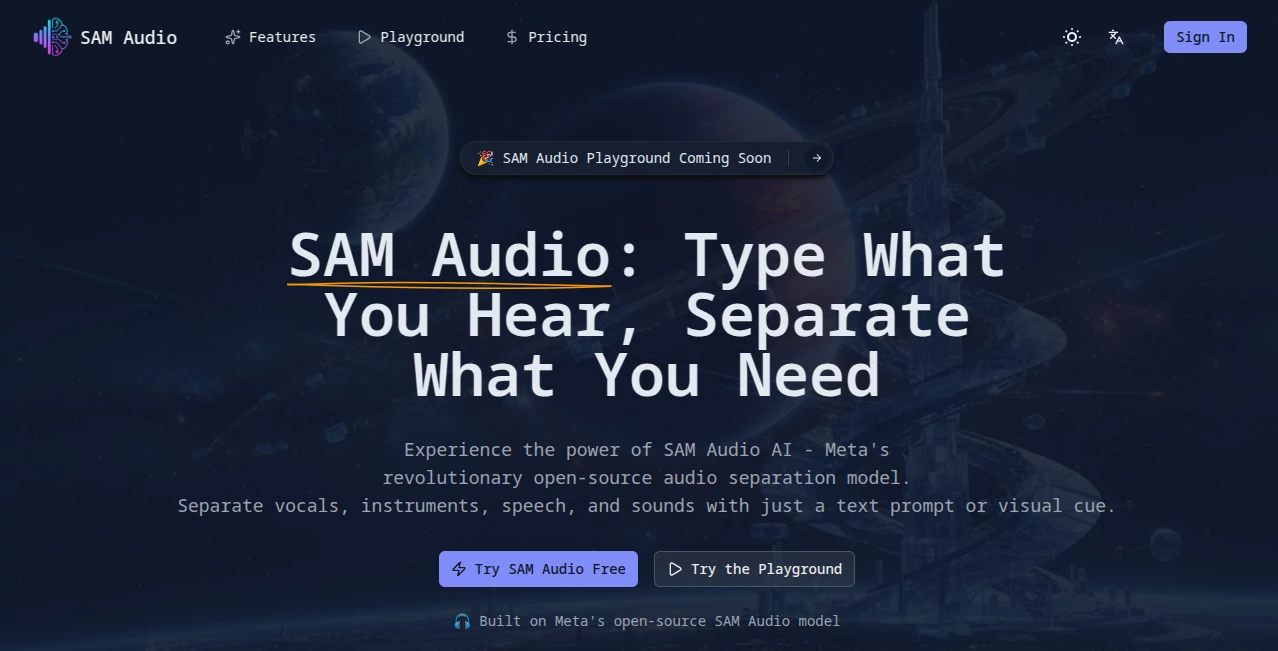
What is SAM Audio?
There's something downright satisfying about pulling apart a messy audio track and ending up with clean, isolated pieces—like uncovering hidden layers in a favorite song or finally silencing that annoying background hum in a recording. This playground makes it happen with surprising ease, letting you describe what you want in plain words and watching the magic unfold. I've tinkered with it on a noisy podcast clip, and pulling out just the voice felt like a pro edit without the pro hassle.
Introduction
Built around Meta's clever open-source model, this spot turns audio separation into something anyone can play with, no fancy gear required. Upload a file, toss in a description like "isolate the drums" or "remove the crowd noise," and it hands back separated tracks that sound remarkably crisp. It's caught on quick among music fans pulling stems for remixes, podcasters cleaning up chats, and even video folks grabbing clean dialogue. What stands out is how it handles everything from tunes to talk to random sounds in one go, making those specialized tools feel a bit old-school. Free to jump in, it's the kind of straightforward setup that gets you results fast and leaves you grinning at how well it listens to your words.
Key Features
User Interface
It keeps things delightfully simple: a big drop zone for your file, a box to type your request, and picks for modes like music or speech to nudge it right. No sign-ups or clutter—just upload, describe, and go. The results pop up quick with clear downloads, and it's all browser-based, so it works smooth on whatever device you've got handy.
Accuracy & Performance
Feed it a clear prompt, and it nails the split with impressive precision, grabbing vocals or instruments without bleeding in extras or losing punch. Processing zips along in seconds for most clips, turning out studio-grade waves that hold their own. From what I've seen, it outshines older methods on tricky mixes, delivering that clean pull you chase without endless retries.
Capabilities
Text prompts drive the show, letting you name exactly what to grab or ditch, with modes tailored for general sounds, tunes, or talk. It chews through common formats like MP3 or WAV, spitting back separated bits ready for your next step—think acapellas, instrumentals, or noise-free speech. The universal approach means one tool covers a ton, from remixing hits to polishing field recordings.
Security & Privacy
As a quick-play demo, it handles uploads on the fly without hanging onto them longer than needed, keeping things light and focused on the task. It's the straightforward kind of setup that lets you experiment freely, especially for personal tweaks, without overthinking the backend.
Use Cases
A bedroom producer grabs drums from a fave track for practice loops, no guilt or grind. Podcasters strip out cafe chatter from interviews, leaving voices clear and engaging. Video editors pull dialogue from noisy shoots for smoother cuts. Even sound hunters isolate bird calls from nature recordings, building clean libraries for projects that pop.
Pros and Cons
Pros:
- Dead simple words get pro results, no tech barriers.
- Quick turns that fit into busy flows.
- Versatile across music, speech, and sounds.
- Free access opens it to everyone curious.
Cons:
- Best with precise descriptions—vague ones might need a redo.
- No extra bells like batching in the basic play.
Pricing Plans
It's all free for the taking, no cards or commitments—just dive in and separate away. Perfect for trying ideas or regular tweaks without watching the wallet.
How to Use SAM Audio
Drag your track into the spot, type something straightforward like "extract the guitar" or "keep only the voice," pick a mode if it helps, and let it run. Downloads appear fast with the target and the rest separated neat. Experiment with wording for finer pulls, and you're sorting audio like it's second nature.
Comparison with Similar Tools
Older splitters often lock into one job, like vocals only, but this one flexes across the board with smarter prompt listening that feels more intuitive. It's lighter and quicker than heavy downloads, delivering comparable cleans without the setup sag, making it the everyday pick for varied needs.
Conclusion
This playground opens up audio tinkering in a way that's genuinely fun and useful, handing clean separations that spark all sorts of projects. It's the gentle push toward better sound without the fuss, proving smart ideas can make creative hurdles vanish. Give it a spin with a tricky track—you'll likely walk away impressed and inspired.
Frequently Asked Questions (FAQ)
What files work best?
Most common ones like MP3, WAV, or FLAC—keep them reasonable size for smooth runs.
How good are the splits?
Studio-level clean, especially with spot-on descriptions.
Any cost to try?
None at all—free and open for all.
Limits on uses?
Basic play is unlimited in spirit, just fair for everyone.
Tips for better results?
Be specific in prompts, like "lead vocals" over just "voice."
AI Audio Enhancer , AI Music Generator , AI Speech to Text , AI Voice & Audio Editing .
These classifications represent its core capabilities and areas of application. For related tools, explore the linked categories above.
SAM Audio details
Pricing
- Free
Apps
- Web Tools
Categories

SAM Audio Alternatives Product
AI Makes Song

Inpodcast AI

MakeBestMusic

Sonicker

WhispriNote

AI ASMR Gene…

Krisp

ModelsLab

AI Describe …