
🧠 AI Quiz
Think you really understand Artificial Intelligence?
Test yourself and see how well you know the world of AI.
Answer AI-related questions, compete with other users, and prove that
you’re among the best when it comes to AI knowledge.
Reach the top of our leaderboard.


















Scanned.to

What is Scanned.to?
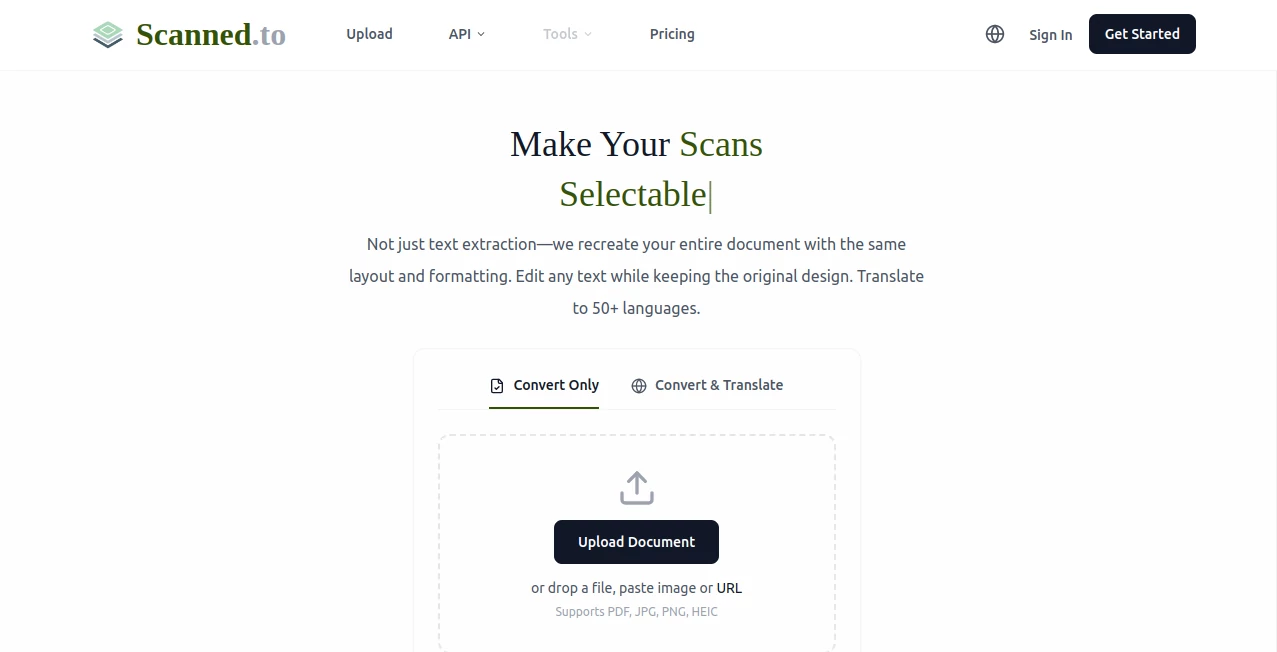
There's something incredibly satisfying about turning a messy stack of paper into a crisp, searchable digital file in one go. This tool does exactly that, and it does it beautifully. Upload a scanned PDF, a photo of a receipt, or even a handwritten note, and it rebuilds the document with the original layout intact—tables, columns, headers, all preserved—so you can actually edit the text like it was born digital. I've thrown at it everything from faded old letters to dense legal contracts, and the results have been impressively clean every time. It's one of those rare finds that saves hours without any of the usual frustration.
Introduction
Anyone who's ever dealt with a mountain of paper knows the dread of trying to make sense of it digitally. This platform changes the game by going far beyond basic OCR—it actually reconstructs the entire document, keeping the design and formatting exactly as it was, while giving you full editability. What started as a smart way to digitize the chaos of everyday paperwork has become a lifesaver for people who need reliable results fast. The real joy is in the details: it handles handwriting, preserves complex layouts, and even translates accurately across 50+ languages without breaking a sweat. It's the kind of tool you wish you'd had years ago, quietly making life a little less cluttered.
Key Features
User Interface
The whole experience is refreshingly simple. You land on a clean page with a big upload area that accepts files, images, or even URLs. Drag and drop, hit go, and watch it process—no confusing menus or hidden settings. The output appears in a neat viewer where you can read, edit, or download right away. It's one of those interfaces that just gets out of your way so you can focus on the task, and that's exactly what makes it feel so good to use.
Accuracy & Performance
The recognition is sharp—printed text, handwriting, even tricky faded documents come through clearly. It doesn't just pull out words; it understands structure, so tables stay aligned and columns don't wander. Processing is quick, even for larger files, and the results are consistent. I've tested it on everything from old family letters to technical manuals, and it rarely misses a beat, delivering editable files that look and feel professional.
Capabilities
Beyond plain text extraction, it rebuilds documents in editable Word format or searchable PDFs, keeping every visual element in place. Translation is a standout—over 50 languages with context-aware accuracy that's tuned for things like contracts or medical forms. You can also generate shareable web pages with built-in analytics to see who's viewed them. It's versatile enough for personal use, like digitizing recipes, or professional needs, like archiving client files.
Security & Privacy
They take data seriously—end-to-end encryption, no training on your files, and free uploads auto-delete after 24 hours. For sensitive work, it's reassuring to know your documents aren't hanging around or being used for anything else. It's the kind of quiet reliability that lets you upload without a second thought.
Use Cases
Students digitize handwritten notes into searchable study guides, or translate foreign research papers without losing formatting. Businesses turn stacks of invoices into editable spreadsheets for quick accounting. Travelers scan menus and get instant translations that keep the layout intact. Even families preserve old letters or certificates by converting them to digital keepsakes that are easy to share and store.
Pros and Cons
Pros:
- Keeps original formatting perfectly—tables, columns, headers all stay put.
- Handles handwriting and complex layouts with impressive accuracy.
- Translation feels natural and context-aware, not robotic.
- Free tier is generous enough for real work.
Cons:
- Free files delete after 24 hours—fine for quick tasks, but plan ahead for longer use.
- Heavier documents can take a bit longer, though still faster than most.
Pricing Plans
The free plan lets you get started immediately with no card required—uploads are deleted after a day, but the quality is the same. For more volume or permanent storage, paid plans offer higher limits and priority processing. Enterprise options bring API access and custom workflows. It's straightforward and fair, with no hidden catches.
How to Use scanned.to
Head to the main page, drag your file in (PDF, image, or URL), and let it process. Once done, review the reconstructed document—edit text, translate if needed, or export as Word, PDF, or a shareable page. It's that simple, and the results are ready to use right away. I once scanned a stack of old family recipes this way—minutes later, I had editable files I could share with cousins, complete with the original handwritten charm.
Comparison with Similar Tools
Most OCR tools just extract text and leave you with a plain mess. This one rebuilds the document as it should look, making it far more useful for anything beyond simple reading. It's not the cheapest for heavy use, but the formatting preservation and translation quality make it worth every penny compared to the alternatives that force you to fix everything manually.
Conclusion
This tool quietly solves a problem most people didn't even realize was solvable—turning paper chaos into digital order without losing the original look and feel. It's reliable, fast, and surprisingly smart, making everyday document tasks feel effortless. Whether you're a student, professional, or just someone with a drawer full of old papers, it’s the kind of helper that makes you wonder how you managed without it.
Frequently Asked Questions (FAQ)
Does it really preserve formatting?
Yes—tables, columns, headers, everything stays in place, unlike basic OCR that just gives you plain text.
Can it handle handwriting?
It does a great job with both printed and handwritten text, though very messy writing might need a second pass.
How many languages for translation?
Over 50, with special tuning for things like legal or medical documents.
What happens to my files?
Free uploads delete after 24 hours; paid keeps them secure and private.
Is it fast?
Most files process in under a minute, even with complex layouts.
AI Transcriber , AI PDF , AI Documents Assistant , AI Document Extraction .
These classifications represent its core capabilities and areas of application. For related tools, explore the linked categories above.
Scanned.to details
This tool is no longer available on submitaitools.org; find alternatives on Alternative to Scanned.to.
Pricing
- Free
Apps
- Web Tools
Categories

Scanned.to Alternatives Product

TurboScribe

PDF to MD

UPDF AI

GLM-OCR Onli…
AI OCR

Image Descri…
ReportRemarks
Fill PDF fro…

Meet Submind
