
🧠 AI Quiz
Think you really understand Artificial Intelligence?
Test yourself and see how well you know the world of AI.
Answer AI-related questions, compete with other users, and prove that
you’re among the best when it comes to AI knowledge.
Reach the top of our leaderboard.


















Seedance 2.0
What is Seedance 2.0?
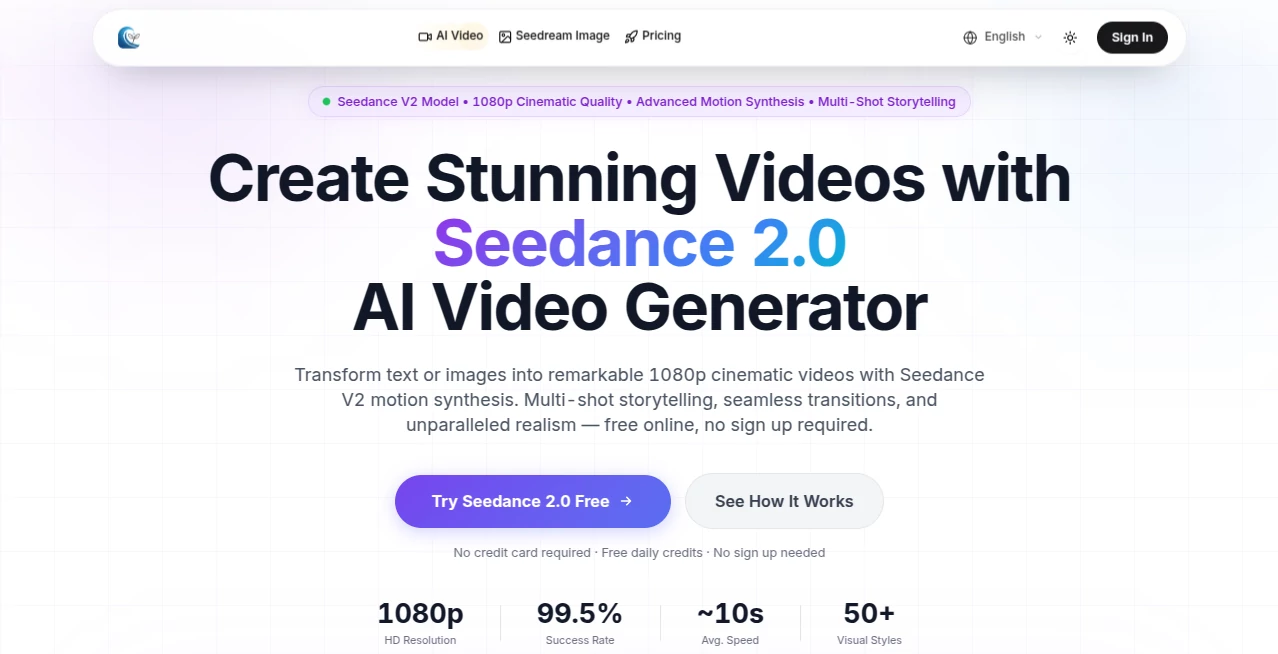
Some tools just click the moment you try them. You type a prompt, maybe drop in a photo for style, and suddenly a smooth, multi-shot video unfolds—characters stay consistent, scenes transition naturally, and the motion feels alive, not robotic. That's what makes this stand out: it takes the chaos out of video creation and gives you something that looks and moves like real cinematic work, right in your browser. I've seen creators go from rough ideas scribbled on a napkin to share-ready clips in under a minute, and the quality holds up on big screens. It's the kind of leap that makes you wonder how you ever managed without it.
Introduction
Video has become the language everyone speaks online, but actually producing it still feels like a heavy lift for most. This platform quietly shifts that reality. Powered by the latest V2 model, it turns simple text descriptions or still images into full 1080p clips with coherent storytelling across multiple shots. No downloads, no complicated setups—just enter your idea, choose a look from dozens of styles, and watch it come together. The speed is impressive, the realism surprising, and the fact that you can start for free without even signing up makes it hard to ignore. People are already using it for everything from quick social posts to professional-grade teasers, and the results speak louder than any marketing copy.
Key Features
User Interface
It keeps things dead simple in the best way. A wide prompt box waits for your words, with easy buttons to pick aspect ratio, style, or resolution. Upload an image if you want to guide the look, hit generate, and the preview loads fast enough to keep momentum going. No maze of menus or hidden toggles—just a clean flow that lets you focus on the idea instead of the interface. Even on mobile it feels natural, which is more than most video tools can claim.
Accuracy & Performance
The motion is where it really shines—fluid, natural, and surprisingly lifelike, especially in multi-shot sequences where characters and environments stay locked in place across cuts. Prompt adherence is tight; what you describe is what you get, without the usual weird drifts or style mismatches. Generations clock in around ten seconds on average, and the 99.5% success rate means you spend less time retrying and more time refining. It's the kind of reliability that turns "let's see what happens" into "this is exactly what I needed."
Capabilities
Text-to-video and image-to-video sit at the core, but the real strength is in building actual narratives—multiple connected shots that feel like one cohesive piece, not stitched-together clips. Fifty-plus styles range from photoreal to anime and watercolor, aspect ratios cover every platform need, and native 1080p output looks crisp on any screen. It's built for creators who want professional polish without the production headache, and it delivers that consistently.
Security & Privacy
Your prompts and uploads stay private, processed securely without lingering on servers longer than necessary. Strict data protection standards are in place, giving peace of mind when you're working on client projects or personal ideas. It's reassuring to know the creative work you pour in doesn't wander off somewhere unexpected.
Use Cases
Social creators crank out eye-catching reels that hook viewers in seconds. Marketers turn product shots into dynamic demos that sell without extra filming. Storytellers sketch quick narratives for concept testing or teasers. Small studios prototype full scenes before committing resources. The speed and quality make it ideal whenever you need video that looks expensive but doesn't cost a fortune in time or budget.
Pros and Cons
Pros:
- Multi-shot coherence turns simple prompts into real stories with smooth flow.
- Native 1080p looks sharp and professional right out of the gate.
- Fast generations keep the creative energy high—no waiting around.
- Free daily credits let you jump in and see the quality without commitment.
Cons:
- Longer or very intricate narratives may need a paid plan for higher limits.
- Free tier includes a watermark, though it's easy to remove with upgrade.
Pricing Plans
Daily free credits mean you can test and create without opening your wallet. When you're ready for more, plans start affordably and scale up sensibly—more credits, priority speed, higher resolutions, and extras like dedicated support. Pay-as-you-go fits if you prefer flexibility. It's structured so the tool grows with you, never feeling like a big upfront gamble.
How to Use Seedance 2.0
Head to the generator page—no login needed at first. Type your scene description, pick an aspect ratio and style that fits your vision, optionally upload an image for reference. Adjust duration if available, then hit generate. Watch the preview appear quickly, download the MP4 when it's ready. For refinements, tweak the prompt and run again. It's fast enough to iterate several versions in one sitting, which is where the real fun begins.
Comparison with Similar Tools
Lots of video generators promise cinematic results, but few deliver multi-shot consistency and native high-def this smoothly at the speed this one manages. Others can feel clunky or inconsistent across scenes; here the transitions and character hold feel deliberate and polished. The free entry point and no-sign-up option make it easier to try than most, while the output quality punches well above entry-level tools. It's the balance of power and approachability that sets it apart.
Conclusion
Creating compelling video shouldn't require a full production team or endless patience. This tool quietly removes those roadblocks, handing you cinematic clips that look and feel expensive without the usual cost in time or frustration. Whether you're building a brand, telling a story, or just experimenting, it gives your ideas motion that matches the vision in your head. Once you see what it can do with a simple prompt, going back to slower methods feels almost unthinkable.
Frequently Asked Questions (FAQ)
Do I need to sign up to start?
No—free daily credits are available right away, no account required.
What resolutions can I get?
Native 1080p for crisp, professional-looking output.
How long are the videos?
Up to 15 seconds, perfect for social, ads, and teasers.
Can I use my own images?
Yes—image-to-video turns stills into dynamic scenes with matching style.
Are the results watermark-free?
Free tier has one, but paid plans remove it completely.
AI Animated Video , AI Image to Video , AI Text to Video , AI Video Generator .
These classifications represent its core capabilities and areas of application. For related tools, explore the linked categories above.
Seedance 2.0 details
Pricing
- Free
Apps
- Web Tools
Categories

Seedance 2.0 Alternatives Product

Seedream 6.0

Seedance 2.0…

AI Animate I…

PostPlus AI

ImagineToVid…

Image to Vid…

Seedance AI …
Seedance 2.0…

Sora AI Vide…
