🧠 AI Quiz
Think you really understand Artificial Intelligence?
Test yourself and see how well you know the world of AI.
Answer AI-related questions, compete with other users, and prove that
you’re among the best when it comes to AI knowledge.
Reach the top of our leaderboard.


















Seedance 2 Video
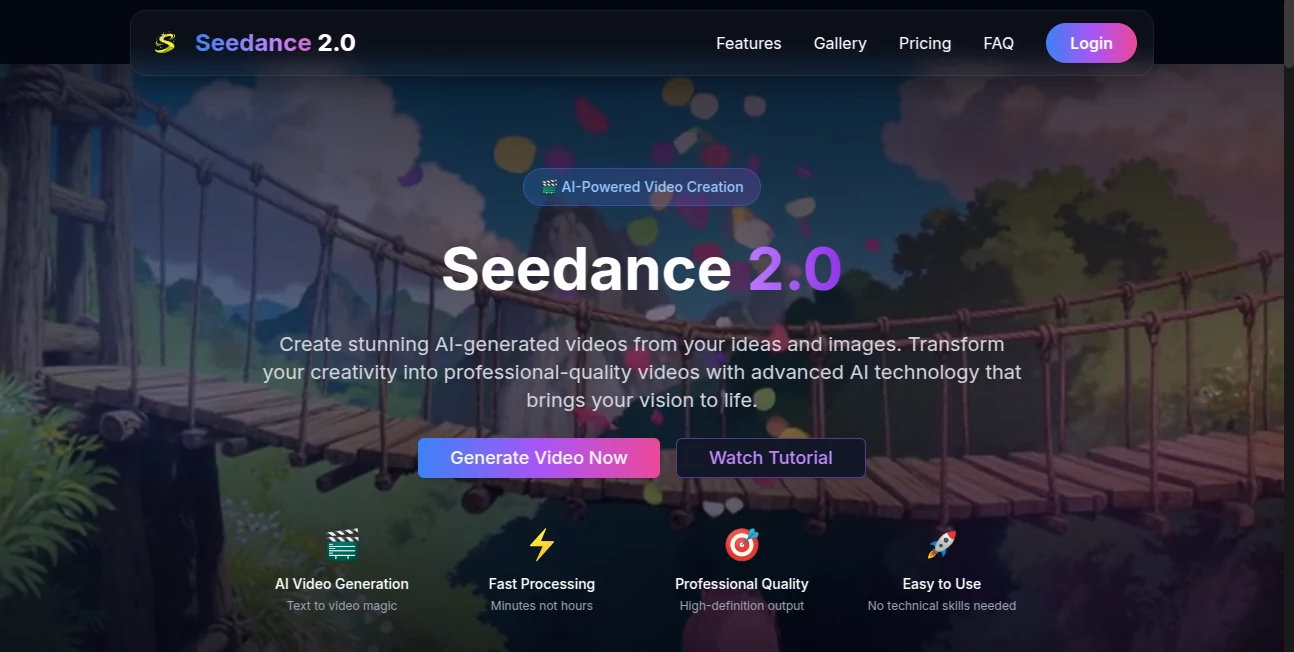
What is Seedance 2 Video?
You type one sentence. Something like “A lone samurai walks through cherry blossom rain at golden hour.” Thirty seconds later the screen fills with sweeping camera moves, delicate petals drifting in slow motion, and lighting that feels almost painterly. That’s the moment most people stop doubting and start smiling. This isn’t another clip generator that spits out jittery loops. It’s closer to a small film crew that never sleeps, never complains, and somehow understands exactly what mood you were chasing.
Introduction
Video creation used to mean storyboards, shooting days, color grading marathons. Now a growing number of creators—marketers, musicians, short-film dreamers—simply describe the scene they see in their head and watch something remarkably close appear. The jump from Seedance 1.0 to this version feels like someone turned up every dial: longer clips, far better motion coherence, richer cinematic language, and a noticeable leap in how human the camera choices feel. People keep posting side-by-side comparisons online and the difference is hard to ignore. What used to look like promising AI experiments now looks like deliberate, directed footage. That shift alone has a lot of people quietly excited about what they can ship next week instead of next quarter.
Key Features
User Interface
You land on a single generous text box with just enough controls visible to feel capable but not buried. Negative prompt field sits nearby if you want to steer clear of certain looks. Resolution, duration, and motion strength sliders are right there—no digging through menus. Generate, preview plays instantly, regenerate button is always in reach. It’s the kind of restraint that makes you trust the tool faster because it clearly respects your time.
Accuracy & Performance
Prompt adherence is unusually tight for this generation of models. Ask for “handheld documentary style following a street musician in 35 mm grain” and you don’t get glossy studio lighting—you get the requested grit and camera shake. Motion stays coherent across the full clip length; characters don’t suddenly morph or drift into another person halfway through. First generations frequently land close enough to use with minimal re-rolls, which saves an enormous amount of waiting.
Capabilities
Up to ten seconds of 1080p output with strong temporal consistency, native support for complex camera directions (“slow dolly zoom on the dancer as confetti falls”), multi-subject scenes, and very natural depth-of-field effects. Text-guided motion lets you describe exactly how the camera should behave. The model handles stylistic transfers well—photoreal, anime, vintage film stock—without losing coherence. For anyone who’s struggled with earlier models fracturing mid-clip, the jump feels liberating.
Security & Privacy
Your prompts and generated clips stay within your account and are not used to train future models unless you explicitly opt in. The team has been vocal about keeping commercial usage safe and watermark-free on paid plans. For creators who worry about IP or brand assets leaking into public datasets, that clarity is worth its weight.
Use Cases
An indie musician drops lyrics into the prompt and gets a moody visualizer that syncs emotion to beat drops. A small marketing agency creates product lifestyle shots in seconds instead of booking a photographer. Short-form creators churn out Reels and TikToks that look directed rather than templated. Filmmakers mock up key story moments to pitch investors before committing to production. The speed lets people test far more ideas than they ever could before.
Pros and Cons
Pros:
- Motion and character consistency that actually holds over ten seconds.
- Camera language is respected—push-in, crane, handheld all feel intentional.
- Generations are fast enough to iterate creatively instead of waiting.
- Commercial usage rights on paid plans open the door to client work.
Cons:
- Ten-second cap still limits longer storytelling (though stitching is viable).
- Very abstract or contradictory prompts can occasionally confuse it.
Pricing Plans
Free tier gives a taste with daily credits—enough to experiment and fall in love. Paid plans start reasonable and scale with usage: more credits, higher priority in the queue, watermark removal, and full commercial rights. Annual billing cuts the cost noticeably. Most creators say the jump from free to paid feels like unlocking the real creative engine.
How to Use It
Sign in, open the generator, write your scene description as vividly as you can (“a cyberpunk fox spirit leaps between neon rooftops under torrential rain, dramatic low-angle tracking shot”). Adjust duration, motion intensity, and aspect ratio if needed. Click generate. Watch the preview. Like the direction? Download. Not quite there? Tweak the prompt or negative prompt and roll again. It rewards descriptive language and specific camera cues more than vague mood words.
Comparison with Similar Tools
Many current video models still fracture on longer takes or lose character identity mid-clip. This one keeps faces, clothing, and lighting far more stable across the full duration. Camera control feels more deliberate than most competitors, and generation speed lets you iterate in a way that feels like real directing rather than lottery-ticket prompting. For anyone serious about cinematic storytelling in short form, it currently sits noticeably ahead.
Conclusion
We’ve waited years for AI video to move past the “impressive demo” phase into something creators can actually rely on day after day. This release quietly crosses that line. It isn’t perfect, but it’s far enough along that the bottleneck is no longer the technology—it’s your imagination. That’s an exciting place to be. If you’ve ever wanted to see your ideas move with real cinematic weight, the wait feels over.
Frequently Asked Questions (FAQ)
How long are the clips?
Up to 10 seconds at 1080p—long enough for hooks, transitions, and complete micro-stories.
Can I use it commercially?
Yes on paid plans—full rights, no watermarks, safe for client work and monetized content.
Does it understand camera terms?
Very well. “Dolly zoom,” “crane up,” “handheld follow,” “slow push-in” all translate naturally.
What if the first result isn’t perfect?
Refine the prompt, add negatives, or adjust motion strength. Most people land something great within 2–4 rolls.
Is there a free way to try it?
Daily free credits let you generate several clips without paying—perfect for testing the feel.
AI Animated Video , AI Image to Video , AI Text to Video , AI Video Generator .
These classifications represent its core capabilities and areas of application. For related tools, explore the linked categories above.
Seedance 2 Video details
Pricing
- Free
Apps
- Web Tools
Categories

Seedance 2 Video Alternatives Product

Sora AI Vide…

Kling 3.0 – …

seedance 3.0

kling 3 AI

ai seedance …
AI Baby Dance

Veo 3.2

Motion Contr…

Seedance 2.0