🧠 AI Quiz
Think you really understand Artificial Intelligence?
Test yourself and see how well you know the world of AI.
Answer AI-related questions, compete with other users, and prove that
you’re among the best when it comes to AI knowledge.
Reach the top of our leaderboard.


















Seedance 2.0
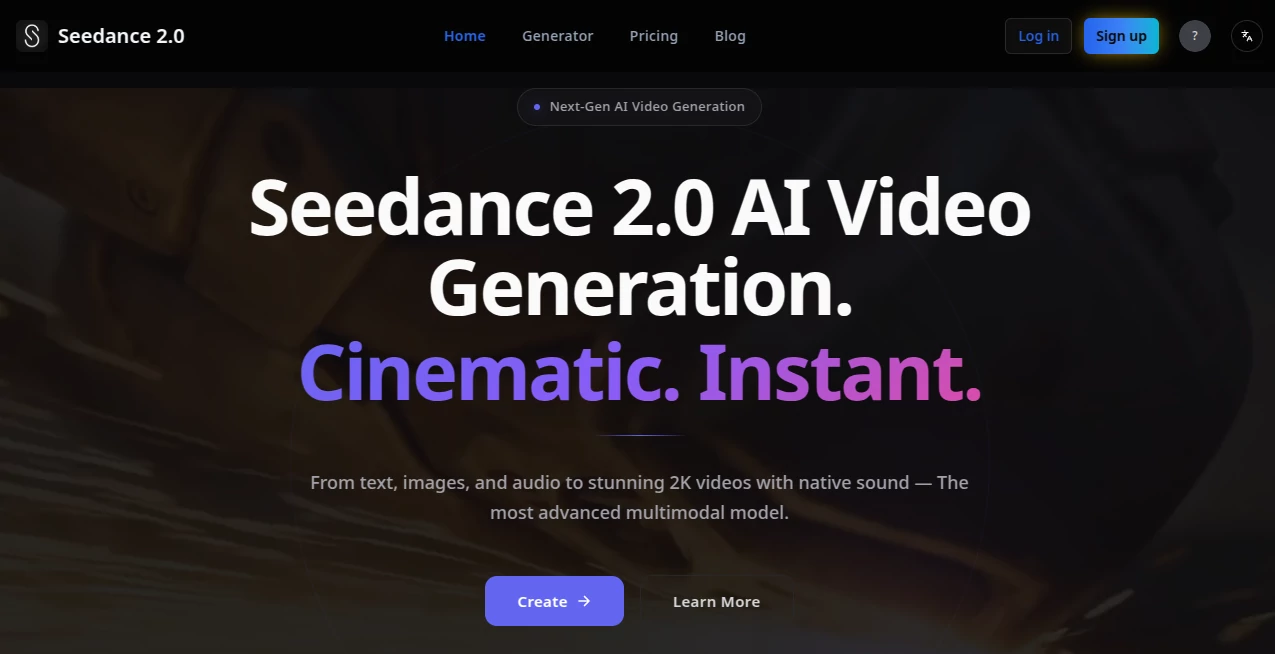
What is Seedance 2.0?
You type a scene, attach a reference clip of someone walking, drop in a moody soundtrack, and a few minutes later there's a smooth, cinematic clip with the character moving exactly as you pictured—same face, same outfit, lighting that matches the mood, even lip-sync if there's dialogue. It's the kind of result that used to demand a team, a schedule, and a budget. Now it's happening in a browser, and the output feels like it belongs on a big screen. Friends who've tried it keep sending me new clips saying "you have to see this one"—and honestly, I get why. The jump from single-shot gimmicks to actual storytelling with control is hard to overstate.
Introduction
Video creation has always been a bottleneck for ideas. You have the concept, the script, maybe even the music, but turning it into moving pictures takes time, money, or skills most people don't have. This model quietly removes a lot of that friction. It thinks in full scenes, not isolated frames. Feed it text, images for style or characters, video clips for motion or camera language, audio for rhythm and voice—and it stitches everything into a coherent, multi-shot narrative with physics that feel real and audio that syncs naturally. What started as an ambitious research push has become a creative shortcut that lets solo makers, marketers, and storytellers produce polished work faster than ever. The first time you see your character walk through a rainy street with raindrops bouncing correctly and background chatter fading in at the right moment, it's hard not to smile.
Key Features
User Interface
The workspace keeps things focused. You have a prompt box, a place to attach up to twelve references (images, short videos, audio), and simple @ tags to assign roles—@char1 for the lead, @cam1 for a tracking shot, @music for the score. Previews load fast enough to iterate without losing momentum, and the timeline view shows how shots connect. It's designed so you spend time directing, not fighting menus.
Accuracy & Performance
Consistency across shots is where it really pulls ahead—same face, same clothing details, same lighting mood even when the camera moves or the action changes. Physics simulation handles water, smoke, fabric, gravity without obvious glitches. Generations are quick for the quality, often finishing in under a minute for shorter clips, and the native audio (dialogue lip-sync, ambient effects, music) lands in sync without post-production tweaks. When you compare it to earlier tools, the gap in realism and coherence is noticeable.
Capabilities
It accepts multimodal inputs—text for story, images for looks, video references for motion and camera work, audio for timing and sound. Outputs reach 2K resolution, run 4–30 seconds, and support multi-shot narratives with smooth transitions. You can extend existing clips, swap characters or backgrounds with simple commands, or refine regions. The physics engine adds believable interactions, and native audio generation includes dialogue, effects, and music that matches the beat.
Security & Privacy
Your references and prompts stay processed securely with no unnecessary retention. Compliance standards are in place to protect creative work, especially important when you're uploading proprietary footage or audio. It gives the confidence to experiment freely without second-guessing where your assets end up.
Use Cases
A small brand creates a 15-second product story with the founder narrating—upload their talking-head clip as reference, add product shots, and get a polished ad with matching voice and motion. A musician turns a track into a visualizer that syncs cuts to the beat perfectly. Filmmakers prototype short scenes before committing to live action, testing camera moves and pacing. Social creators batch Reels with consistent avatars across a series, building recognition fast. It's the shortcut that lets ideas leave the notebook and hit the screen quickly.
Pros and Cons
Pros:
- True multi-shot storytelling with character and style consistency that feels professional.
- Multimodal control—mix text, image, video, audio for precise creative direction.
- Native audio with lip-sync and physics-aware sound makes clips ready to share.
- Fast generations and extensions let you iterate ideas without long waits.
Cons:
- Maximum 30 seconds keeps it focused on shorts rather than full scenes.
- Best results come from clear, intentional references.
Pricing Plans
You can start without a card and get a handful of free generations to feel the quality. Paid plans unlock higher resolutions, longer clips, faster queues, and commercial rights. Options scale from occasional use to heavy production, with yearly billing cutting the monthly cost noticeably. It's structured so you pay for the power you actually need, not an overwhelming suite.
How to Use Seedance 2.0
Start with a clear prompt describing the scene or story. Attach references—images for characters or style, short video clips for motion or camera language, audio for pacing or dialogue. Use @ tags to assign roles (e.g., @char1 for the lead actor). Choose resolution and duration, then generate. Preview the multi-shot result; if something needs adjusting, tweak the prompt or swap a reference and regenerate. Download when it feels right, or extend the clip for a longer version. The loop is fast enough to try variations until the vision clicks.
Comparison with Similar Tools
Many video generators still struggle with consistency across shots or produce silent clips that need separate audio work. This one combines strong character preservation, physics-aware motion, and native sound in a single pass, giving a more finished feel right away. The reference system offers finer control than prompt-only tools, and the multi-shot narrative approach beats single-clip outputs for storytelling. It's less about raw length and more about quality and coherence in the moments that matter.
Conclusion
Creating video that looks and feels cinematic shouldn't require a full crew or endless post-production. This tool brings that level of polish within reach, letting ideas flow from brain to screen with surprising fidelity and speed. Whether you're making ads, music videos, short stories, or social content, it removes barriers and keeps the creative energy alive. Once you experience a clip that moves exactly the way you imagined, it's tough to go back.
Frequently Asked Questions (FAQ)
How long can generated videos be?
Up to 30 seconds, perfect for ads, social clips, and short narratives.
What inputs can I use?
Text prompts, up to 9 images, 3 short videos (15s total), and 3 audio files—combined freely with @ tags for control.
Does it generate audio natively?
Yes—dialogue with lip-sync, ambient effects, and music that matches the rhythm.
What resolution can I get?
Up to 2K (2048×1152), with options down to 480p for faster tests.
Can I extend or edit generated clips?
Yes—extend length, fill gaps, swap elements, or refine with simple commands.
AI Animated Video , AI Image to Video , AI Text to Video , AI Video Generator .
These classifications represent its core capabilities and areas of application. For related tools, explore the linked categories above.
Seedance 2.0 details
Pricing
- Free
Apps
- Web Tools
Categories

Seedance 2.0 Alternatives Product

seedance 3.0

Seedance 2.0…

gpt video

Sora AI Vide…

ai seedance …

Seedance 2.0

vio4 ai video
Seedance 2.0

Veo4