
🧠 AI Quiz
Think you really understand Artificial Intelligence?
Test yourself and see how well you know the world of AI.
Answer AI-related questions, compete with other users, and prove that
you’re among the best when it comes to AI knowledge.
Reach the top of our leaderboard.


















Seedance 3.0
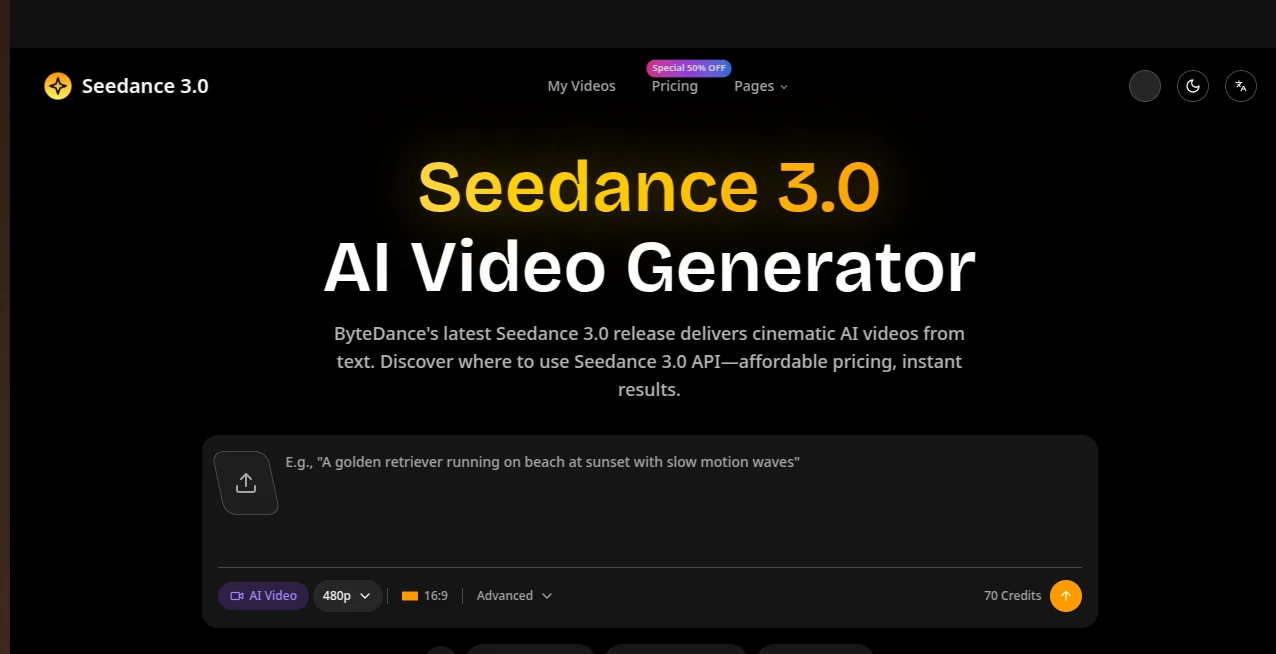
What is Seedance 3.0?
You type a scene—“golden sunlight filtering through autumn leaves as a woman walks slowly along a quiet path, gentle wind in her hair”—and moments later a clip plays that actually feels directed. The light falls naturally, motion has weight, and the atmosphere carries through every frame without the usual AI glitches. I’ve shown these to friends who usually scoff at generated video, and their first reaction is often genuine surprise followed by “wait, that actually looks good.” It’s the kind of tool that turns a passing idea into something shareable and watchable without draining your afternoon or your budget.
Introduction
Creating video has always been time-consuming and expensive, even for short clips. Most AI tools still feel experimental—jerky movement, inconsistent characters, or lighting that changes randomly between frames. Seedance 3.0 quietly raises the bar by focusing on cinematic quality from plain text prompts. No need for complex setups or design skills; you describe what you want in everyday language, and it delivers broadcast-ready visuals that match your vision more closely than you’d expect. It’s become a favorite for marketers, creators, and indie makers who need professional-looking video fast—whether for product showcases, social content, or quick story prototypes. The results often spark that “this could actually work” moment that keeps people experimenting and improving their ideas.
Key Features
User Interface
The interface keeps things simple and focused. A large prompt box invites you to describe your scene in plain words, with optional toggles for aspect ratio, duration, and style. There’s no steep learning curve or hidden menus—just type, choose basic settings if you want, and hit generate. Previews appear quickly, letting you iterate without frustration. It feels designed by someone who actually creates content rather than someone trying to show off every possible option. Beginners get usable results on their first try; experienced users appreciate how little gets in the way of their ideas.
Accuracy & Performance
The model understands context well enough to keep lighting consistent, motion natural, and overall mood intact across the clip. It handles complex descriptions involving people, environments, and subtle actions without the usual melting artifacts or sudden style shifts. Generation speed is practical—most clips finish fast enough to keep creative momentum going. The output quality reaches broadcast levels in many cases, meaning what you generate is often ready to publish with minimal tweaks. That reliability turns experimentation into actual production work.
Capabilities
It turns text prompts into short cinematic videos with strong attention to lighting, camera movement, and emotional tone. You can create product showcases, lifestyle scenes, seasonal campaigns, app demos, or social reels. Styles range from realistic to more artistic interpretations, and the results support commercial use on paid plans. Batch processing helps when you need multiple variations or an entire catalog of visuals. The combination of speed and quality makes it practical for both quick tests and more polished deliverables.
Security & Privacy
Your prompts and generated videos are handled responsibly. Private generation options on paid plans keep work confidential, and the platform follows standard data protection practices. For creators working with client ideas or brand material, that thoughtful approach provides peace of mind without complicating the creative process.
Use Cases
An e-commerce seller creates lifestyle videos for new products in minutes instead of scheduling shoots. A content creator builds cohesive social reels with consistent visual style across posts. An indie maker produces app demo videos or pitch assets quickly for Product Hunt or investor updates. A marketer tests different campaign visuals with A/B variations before committing to full production. In each case, the tool removes the usual barriers of time and cost, letting ideas move from concept to shareable video much faster than traditional methods.
Pros and Cons
Pros:
- High-quality cinematic output that often feels ready to publish.
- Simple text-based workflow that anyone can use without training.
- Fast generation that supports real iteration and experimentation.
- Strong results on product, lifestyle, and storytelling scenes.
Cons:
- Clip length is best suited for short-form content (reels, demos, teasers).
- Very abstract or highly complex scenes may need prompt refinement.
- Advanced features and higher volumes live behind paid plans.
Pricing Plans
A free tier lets you test the quality with limited daily generations—no card required to start. Paid plans (Basic, Pro, Ultra) unlock higher resolutions, faster processing, more generations, priority queue, no watermarks, and commercial use rights. Annual options come with significant savings and extra perks. The structure feels fair: start small to see the difference, then scale as your needs grow. Many users say the time saved on even one project more than covers the cost.
How to Use Seedance 3.0
Go to the generator page, type a clear description of your scene (include mood, lighting, action, and camera hints if you want more control). Choose your preferred aspect ratio and duration. Hit generate and watch the preview. If the result is close but not perfect, tweak the prompt wording or try slight variations. Download the clip when it feels right. For multiple assets, use batch mode on paid plans. The whole process is straightforward enough that you can go from idea to finished video in minutes rather than hours or days.
Comparison with Similar Tools
Many AI video generators still struggle with consistency, unnatural motion, or generic lighting. This one stands out by delivering more cinematic results with better adherence to your described vision. It’s less about raw length and more about usable, polished short clips that feel directed. The balance of quality, speed, and ease of use makes it especially appealing for creators who need reliable output without a steep technical hurdle.
Conclusion
Good video shouldn’t require a full production team or weeks of editing. Seedance 3.0 brings professional-looking results within reach of solo creators, small teams, and businesses that need visuals fast. It turns written ideas into moving stories with surprising quality and consistency. Whether you’re building brand content, testing concepts, or creating quick social assets, it removes many of the usual barriers and lets the creativity shine through. For anyone who has ever wished their ideas could move, this is a tool worth trying.
Frequently Asked Questions (FAQ)
How long are the generated videos?
Best suited for short clips (typically a few seconds to around 10 seconds), ideal for reels, demos, and teasers.
Do I need video editing experience?
No—the tool is designed so anyone can create by simply describing what they want.
Is commercial use allowed?
Yes, paid plans include commercial use rights.
What quality can I expect?
Output aims for broadcast-grade quality, with clear 1080p and higher resolution options on paid plans.
Can I generate multiple videos at once?
Yes, batch processing is available on paid plans for efficiency with larger projects.
AI Animated Video , AI Image to Video , AI Text to Video , AI Video Generator .
These classifications represent its core capabilities and areas of application. For related tools, explore the linked categories above.
Seedance 3.0 details
Pricing
- Free
Apps
- Web Tools
Categories

Seedance 3.0 Alternatives Product

Seedance 2.0…

Seedance 2.0

Seedance 2.0…

Veo 3.1

seedance 2

Wan AI

VIGGLE

Aura AI

Seedance 2.0
