
🧠 AI Quiz
Think you really understand Artificial Intelligence?
Test yourself and see how well you know the world of AI.
Answer AI-related questions, compete with other users, and prove that
you’re among the best when it comes to AI knowledge.
Reach the top of our leaderboard.


















Seedance 3.0 AI
What is Seedance 3.0 AI?
There’s something special about typing a scene description and watching it come to life in full 4K with natural lighting, consistent characters, and even audio that syncs perfectly to the action. This tool makes that moment feel almost effortless. You describe what you want in plain words, add a reference image if you like, and a short cinematic clip appears that looks like it could belong in a real film. I’ve seen creators turn simple ideas into polished videos that get real engagement, and the quality often leaves people asking, “How did it do that so well?” It’s the kind of result that makes you want to keep experimenting because the output actually matches the vision in your head.
Introduction
Creating high-quality video has always been time-consuming and expensive. Most AI tools get you part of the way there but fall short on consistency, motion realism, or audio integration. This one pushes the bar higher by delivering broadcast-grade 4K videos with multi-shot storytelling, strong character consistency, and native audio sync—all in one generation. It’s web-based, fast, and accessible, so you don’t need a powerful computer or complicated software. Whether you’re a solo creator making social content, a marketer building campaigns, or someone who just wants to bring an idea to life, it turns “what if” into something you can actually watch and share in minutes. The cinematic feel is what keeps users coming back—it doesn’t just move; it tells a little story.
Key Features
User Interface
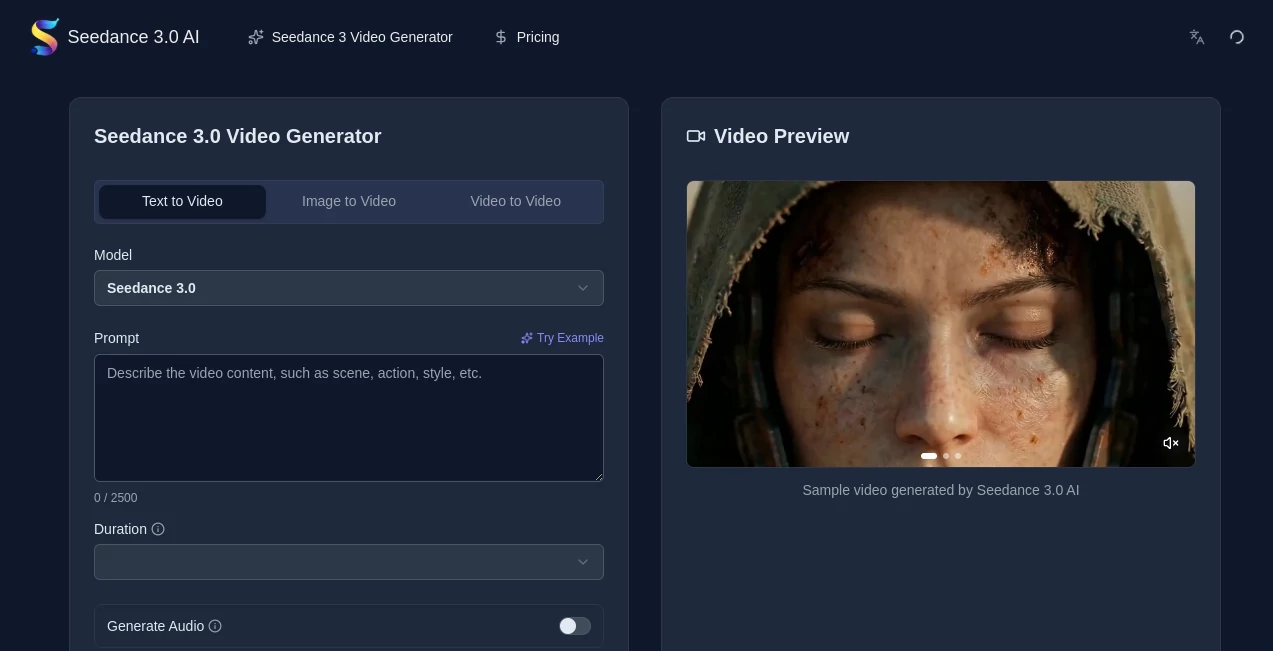
The interface is clean and focused, making it easy to jump right in. A prominent prompt box lets you describe your scene in natural language, with an optional area to upload reference images. Simple controls for aspect ratio, duration, and quality sit nearby without cluttering the screen. Previews load reasonably fast, and you can iterate quickly by tweaking the prompt. It feels welcoming for beginners while giving enough control for experienced creators who know exactly what they want.
Accuracy & Performance
The model excels at keeping characters looking consistent across shots, even with camera movement and changing lighting. Motion feels natural—fabric drapes realistically, water ripples, and actions have proper weight. 4K output comes with accurate textures and skin tones that avoid the plastic look common in other tools. Rendering is impressively quick for the quality level, often finishing in under a minute for short clips, which means you can test ideas rapidly without losing momentum.
Capabilities
It supports text-to-video and image-to-video generation, multi-shot narratives with smooth transitions, native stereo audio including dialogue, effects, and music in one pass, and advanced camera control through simple text prompts (zoom, pan, tracking shots). You get a wide range of styles—from photorealistic to anime, cinematic, cyberpunk, and more—while physics simulation adds believable realism to elements like fire, water, and cloth. Outputs are ready for social media, ads, or further editing, with commercial rights included on paid plans.
Security & Privacy
Your prompts and uploaded images are handled securely during generation. The platform focuses on user privacy, with no unnecessary long-term storage of your content. For creators working on client projects or personal ideas, that thoughtful approach builds confidence that your work stays yours.
Use Cases
A small business creates short product demo videos from a single photo, turning static listings into engaging clips that boost sales. An indie filmmaker prototypes key scenes to test pacing and emotion before full production. A content creator makes daily Reels with consistent characters and synced audio without filming every day. A musician generates visualizers that match the track’s mood perfectly. Wherever you need quick, high-quality video with storytelling impact, it delivers without the usual production headaches.
Pros and Cons
Pros:
- Strong character and style consistency across multi-shot sequences.
- Native audio sync saves significant post-production time.
- Fast 4K rendering lets you iterate quickly and stay creative.
- Cinematic camera control through simple text prompts feels intuitive.
- Generous free tier and flexible credit system make it accessible.
Cons:
- Clip length is best suited for short-form content (longer narratives require multiple generations).
- Extremely complex or contradictory prompts can still need refinement.
- Higher volume and priority features require a paid subscription.
Pricing Plans
It starts with free daily credits so you can test the quality without any commitment. Paid plans use a flexible credit system—Starter, Premium, and Advanced tiers offer increasing monthly credits, faster generation, and priority support. Annual billing saves money, and you can cancel anytime. Many users find the value excellent because one good video can replace hours of traditional editing or stock footage costs.
How to Use Seedance 3 AI
Go to the generator page, type a clear scene description in the prompt box (include camera moves or mood if you want), and optionally upload a reference image for better consistency. Choose your aspect ratio and desired length, then hit generate. Review the preview—tweak the prompt or reference if needed—and download the MP4 when it looks right. For longer stories, generate multiple connected shots and combine them in your editor. The process is fast enough that you can refine several versions in one creative session.
Comparison with Similar Tools
Many AI video generators still struggle with character drift, unnatural motion, or poor audio integration. This one stands out with its focus on cinematic quality, multi-shot consistency, and native audio in a single pass. It’s more accessible than heavy desktop tools and more polished than many browser-based alternatives, striking a sweet spot between ease of use and professional-looking results.
Conclusion
Video creation should feel exciting, not exhausting. This tool removes many of the traditional barriers so you can focus on the story instead of the technical hurdles. It turns simple ideas into cinematic clips with impressive speed and quality, making high-end video accessible to more creators than ever. Whether you’re building a brand, telling personal stories, or just experimenting for fun, it consistently delivers results worth sharing. The future of video looks brighter when tools like this keep raising the bar while keeping things approachable.
Frequently Asked Questions (FAQ)
How long can the generated videos be?
Best suited for short to medium clips; longer narratives work well by generating multiple connected shots.
Do I need a reference image?
Not required—text-only works great—but adding one improves character consistency and visual accuracy.
What styles can I create?
From photorealistic to anime, cinematic, cyberpunk, watercolor, and more—guided by your prompt.
Is audio included?
Yes—native stereo audio with lip-sync, dialogue, effects, and music can be generated in one pass.
Can I use the videos commercially?
Yes—paid plans include full commercial usage rights with no royalties.
AI Animated Video , AI Image to Video , AI Video Generator , AI Text to Video .
These classifications represent its core capabilities and areas of application. For related tools, explore the linked categories above.
Seedance 3.0 AI details
Pricing
- Free
Apps
- Web Tools
Categories

Seedance 3.0 AI Alternatives Product

Vidmix

Wan AI

Seedance 2.0…

VIGGLE

v04 ai

Kling Motion

Sora AI Vide…

Genmi AI

Free Sora Ge…
