
🧠 AI Quiz
Think you really understand Artificial Intelligence?
Test yourself and see how well you know the world of AI.
Answer AI-related questions, compete with other users, and prove that
you’re among the best when it comes to AI knowledge.
Reach the top of our leaderboard.


















Seedance 4.0
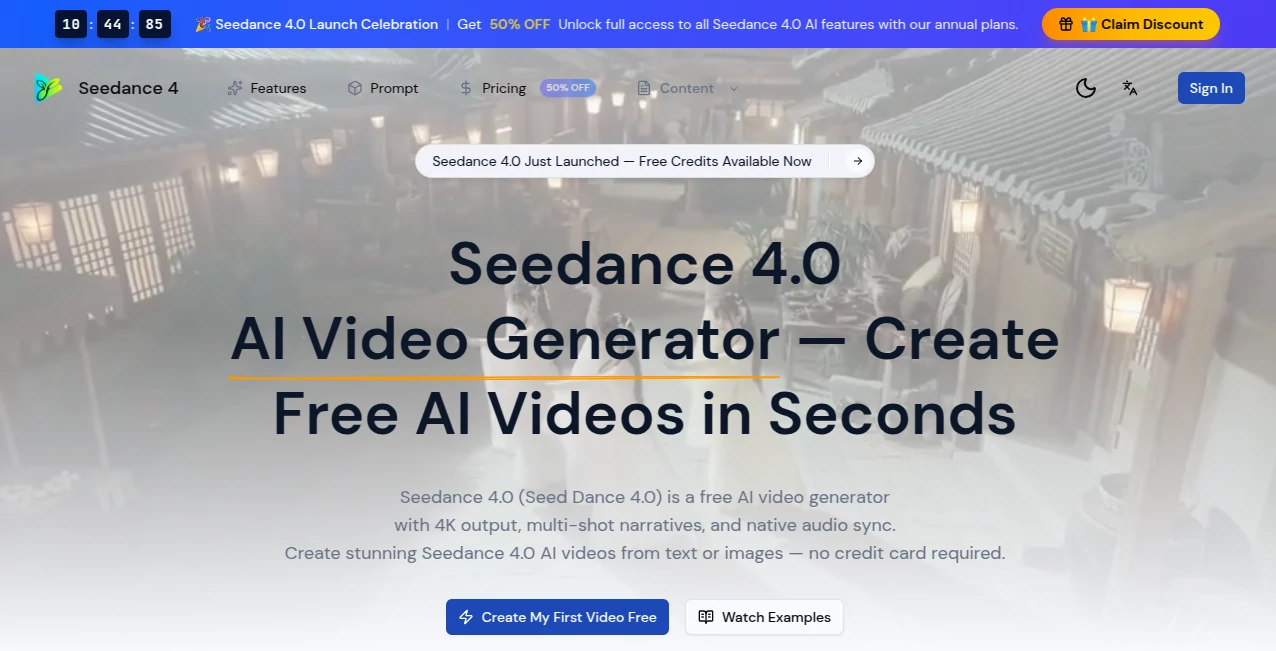
What is Seedance 4.0?
You type a simple scene description or drop in a photo, hit generate, and a few moments later a smooth, cinematic clip plays with natural motion, consistent characters, and even audio that actually matches the lips and mood. No weird glitches, no plastic faces, just video that feels like it was shot with care. I’ve watched creators turn a single prompt into shareable shorts that look far more expensive than they actually were, and the speed is addictive—ideas that used to take hours now come alive in under a minute. It’s the kind of tool that makes you excited to create again because the barrier between thought and finished clip has almost disappeared.
Introduction
AI video has come a long way, but many tools still feel experimental—jerky movement, drifting faces, or audio that needs heavy fixing afterward. Seedance 4.0 quietly raises the bar by delivering 4K resolution, multi-shot storytelling, and native audio synchronization right out of the gate. You can start with text, reference images (up to 9), or even short video clips, and the model weaves them into coherent, emotionally resonant sequences. What stands out is how it respects cinematic basics: lighting feels natural, camera moves have purpose, and characters stay consistent across shots. For content creators, marketers, educators, and indie filmmakers who need fast yet polished results, it’s become a daily go-to that actually saves real time while producing something worth sharing.
Key Features
User Interface
The workspace keeps things clean and focused. A generous prompt area, clear upload zones for images or video references, simple toggles for duration and aspect ratio, and one prominent generate button. Previews load quickly so you can tweak and try again without losing momentum. It never overwhelms you with options—everything you need is visible, nothing you don’t is hidden. Beginners finish their first video in minutes; experienced users appreciate how little friction there is between idea and output.
Accuracy & Performance
Motion stays coherent even in complex scenes, with improved physics and fewer artifacts compared to earlier versions. Character consistency across shots is noticeably better, and the 50% faster generation means you can iterate without frustration. Native audio sync handles lip movements and emotional tone with surprising accuracy, eliminating the usual post-production headache. In practice, most clips feel ready to use after one or two generations, which is rare for AI video tools at this quality level.
Capabilities
It supports text-to-video, image-to-video, and multimodal input (text + up to 9 images + up to 3 video clips). You get true multi-shot narratives with automatic scene transitions, up to 60-second durations, 4K resolution, and native audio synchronization with emotion recognition. Styles range from realistic to anime, fantasy, or cinematic. The model excels at maintaining visual continuity, handling dialogue scenes, product reveals, and atmospheric storytelling. Outputs are MP4 files ready for social media, YouTube, or further editing.
Security & Privacy
Your prompts and reference files are processed securely and not retained long-term for training purposes. The platform emphasizes user control, with clear options for what gets saved. For creators working with client material or personal projects, that thoughtful approach provides welcome peace of mind.
Use Cases
A small brand turns a single product photo into a polished 8-second lifestyle ad that outperforms their previous videos. A YouTuber creates consistent character-driven shorts without daily filming. An educator builds engaging lesson visuals that hold student attention better than static slides. A musician generates lyric videos where the visuals actually match the song’s emotion and rhythm. The common thread is speed paired with quality—getting professional-looking results without a full production team or budget.
Pros and Cons
Pros:
- 4K output with strong motion coherence and character consistency.
- Native audio sync saves hours of editing time.
- Multimodal input (text + images + video clips) gives precise creative control.
- Free access with meaningful daily generation—no credit card required to start.
- 50% faster generation than previous versions, making iteration enjoyable.
Cons:
- Maximum duration per generation is still best suited for short-to-medium clips.
- Extremely abstract or contradictory prompts can occasionally produce unexpected results.
- Heavy daily use benefits from paid annual plans for unlimited access.
Pricing Plans
Free tier offers generous daily generations with full 4K support and core features—no signup or credit card needed for basic use. Annual plans unlock 50% savings, unlimited generations, priority processing, and full access during peak times. It’s priced so that serious creators can scale without breaking the bank, while casual users can still get great results for free.
How to Use Seedance 4.0
Start by typing a clear scene description or uploading reference images/video clips. Choose your preferred aspect ratio and duration, then hit generate. Review the preview—adjust the prompt or references if the feel isn’t quite right—and download the MP4. For multi-shot stories, break the narrative into logical parts or use multimodal input to carry characters and style across scenes. The process is fast enough that you can experiment with several variations in one creative session.
Comparison with Similar Tools
While many AI video generators still struggle with consistency or require heavy post-editing for audio, this one delivers stronger character continuity, native audio sync, and 4K output right from the start. It balances speed, quality, and creative control better than most free or early-stage competitors, making it especially appealing for creators who need reliable results without a steep learning curve or big budget.
Conclusion
Video creation used to mean choosing between speed and quality. Seedance 4.0 quietly removes that trade-off, giving creators cinematic clips with natural motion, coherent storytelling, and synced audio in minutes instead of days. It doesn’t replace human creativity—it amplifies it, letting ideas move from thought to screen faster than ever. For anyone who wants to tell visual stories without the usual production headaches, it’s a genuinely exciting step forward.
Frequently Asked Questions (FAQ)
How long can videos be?
Up to 60 seconds with strong multi-shot support for longer narratives.
Do I need reference images?
Not required—text-only works well—but adding images or clips dramatically improves consistency and control.
Is audio included?
Yes—native audio synchronization with lip matching and emotion awareness is built in.
Can I use it for commercial projects?
Yes—paid plans include commercial licensing; free tier allows generous personal and testing use.
What resolutions are supported?
Up to 4K output for crisp, professional-looking videos.
AI Animated Video , AI Image to Video , AI Video Generator , AI Text to Video .
These classifications represent its core capabilities and areas of application. For related tools, explore the linked categories above.
Seedance 4.0 details
Pricing
- Free
Apps
- Web Tools
Categories

Seedance 4.0 Alternatives Product

seedance 2
Kling-4 Vide…

Seedance 2.0

Sora 2

LTX 2.3

Seedance Art

Mimo AI

Gemini AI vi…

Seedance 2.0…
