🧠 AI Quiz
Think you really understand Artificial Intelligence?
Test yourself and see how well you know the world of AI.
Answer AI-related questions, compete with other users, and prove that
you’re among the best when it comes to AI knowledge.
Reach the top of our leaderboard.


















Sento AI
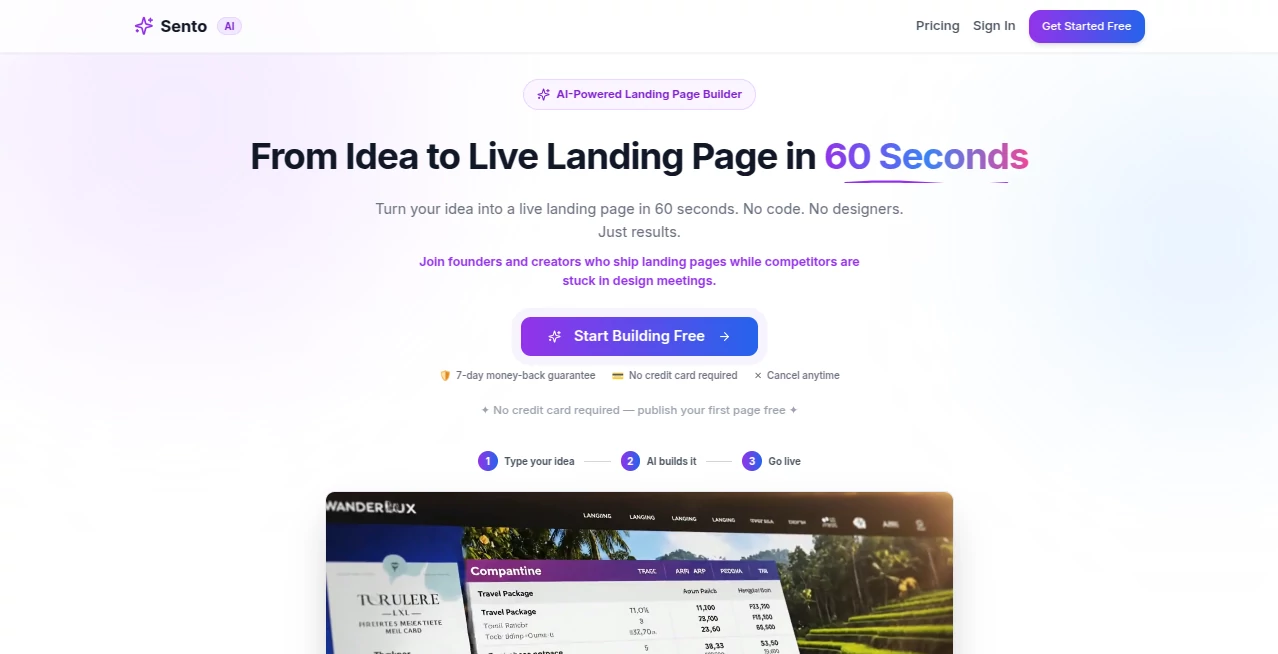
What is Sento AI?
There’s something deeply satisfying about watching an idea turn into a finished website without touching a single line of code or wrestling with templates for hours. This tool makes that possible. You describe what you want in plain English, and it generates a clean, modern, fully functional website that actually looks professional. I’ve seen solo founders go from “I need a site but don’t know where to start” to having something live and shareable in under ten minutes. It feels less like using software and more like having a talented designer who understands exactly what you’re trying to say.
Introduction
Most website builders still force you into rigid templates or require design skills you don’t have. Sento AI flips the script. You simply tell it what your site is for—whether it’s a portfolio, online store, SaaS landing page, or personal blog—and it builds something that looks intentional and modern. No coding, no drag-and-drop frustration, no generic cookie-cutter results. It’s become a favorite among indie makers, small businesses, and creators who want speed without sacrificing good taste. The best part? The sites it creates feel like they were made by a human who actually cared about the details.
Key Features
User Interface
The interface is refreshingly straightforward. You start with a simple text box where you describe your website in natural language. As you type, helpful suggestions appear, and once you hit generate, the preview loads quickly. You can then tweak sections, colors, or text directly on the live preview. Everything feels responsive and intuitive—no overwhelming side panels or hidden settings. It’s the kind of clean experience that makes you want to keep building rather than give up halfway through.
Accuracy & Performance
It understands context surprisingly well. Ask for a “minimalist portfolio for a photographer” and you get clean galleries with proper spacing and typography. Request an “e-commerce site for handmade jewelry” and it includes sensible product layouts and checkout flow. Generation is fast, and the output is responsive across devices from the start. The accuracy of matching your description while keeping design standards high is what sets it apart from tools that just throw elements together randomly.
Capabilities
It can build full websites including homepages, about pages, contact forms, galleries, blogs, and even basic e-commerce structures. You get modern design with good typography, mobile responsiveness, and clean code underneath. After generation, you can edit text, swap images, change colors, add or remove sections, and export or publish directly. It also supports multiple pages and basic navigation, making it suitable for more than just single-page landing sites.
Security & Privacy
Your prompts and generated sites are handled securely, with no unnecessary data collection. Since you own the output, you can export the code or host it anywhere you like. For small businesses and creators who value control over their online presence, that ownership and clean privacy approach is genuinely reassuring.
Use Cases
A freelance photographer describes her work and gets a beautiful portfolio live the same afternoon. A small bakery owner types “cozy online store for fresh bread and pastries” and has a functional shop ready for products. A SaaS founder quickly builds a clean landing page to test messaging before investing in custom design. Even a local coach creates a simple site to book sessions without hiring a developer. It shines whenever someone needs a professional online presence fast but doesn’t want to learn design or code.
Pros and Cons
Pros:
- Turns natural language into surprisingly good-looking websites in minutes.
- Clean, modern designs that don’t look generic or templated.
- Full ownership of the generated code and site.
- Fast enough to support quick testing and iteration.
- No coding or design skills required.
Cons:
- Very complex or highly custom designs may still need manual refinement.
- Advanced e-commerce or membership features are still developing.
- Free tier has limitations; serious projects benefit from paid plans.
Pricing Plans
It starts with a free tier that lets you generate and test websites so you can see the quality firsthand. Paid plans unlock unlimited generations, custom domains, priority support, and removal of any branding limits. Pricing is reasonable for the time and cost it saves compared to hiring a designer or learning a traditional builder.
How to Use Sento AI
Go to the generator, type a clear description of the website you want (“modern portfolio for a landscape photographer with dark theme and contact form”). Hit generate and review the preview. Edit any text, images, or sections directly. When you’re happy, publish or export the code. You can iterate as many times as needed until it feels exactly right. The whole process is fast enough that you can try several directions in one sitting.
Comparison with Similar Tools
Traditional builders force you into templates and manual arrangement. Other AI site generators often produce generic or broken layouts. This one stands out by delivering cleaner, more intentional designs from natural language while giving you easy editing control afterward. It strikes a better balance between speed, quality, and flexibility than most alternatives currently available.
Conclusion
Building a website shouldn’t feel like a chore or a technical hurdle. This tool makes the process feel closer to describing a vision and watching it come to life. It’s especially valuable for anyone who has ideas but lacks time, budget, or design experience. When your site goes live faster than you expected and actually looks good, you realize how much creative energy this kind of simple, effective AI can unlock. For makers, founders, and creators who just want to be seen online, it’s a genuinely helpful companion.
Frequently Asked Questions (FAQ)
How long does it take to generate a website?
Usually under a minute for the initial version, with quick iterations afterward.
Do I need design or coding experience?
Not at all. The tool is built for complete beginners as well as experienced users.
Can I edit the generated website?
Yes—you can change text, images, colors, and layout directly in the editor.
Is the code exportable?
Yes, paid plans allow you to download clean code to host anywhere.
Can I use it for commercial projects?
Absolutely—paid plans are designed for business and commercial use.
AI Website Builder , AI No-Code & Low-Code , AI Design Generator , AI Website Designer .
These classifications represent its core capabilities and areas of application. For related tools, explore the linked categories above.
Sento AI details
Pricing
- Free
Apps
- Web Tools
Categories

Sento AI Alternatives Product

AI Slop Canv…

ImgEnhancer

deck cleaner

Banana AI

FigForm

text to 3d w…

Z-Image

qwen image 2…

China Brush