🧠 AI Quiz
Think you really understand Artificial Intelligence?
Test yourself and see how well you know the world of AI.
Answer AI-related questions, compete with other users, and prove that
you’re among the best when it comes to AI knowledge.
Reach the top of our leaderboard.

















SkyReels-V4
What is SkyReels-V4?
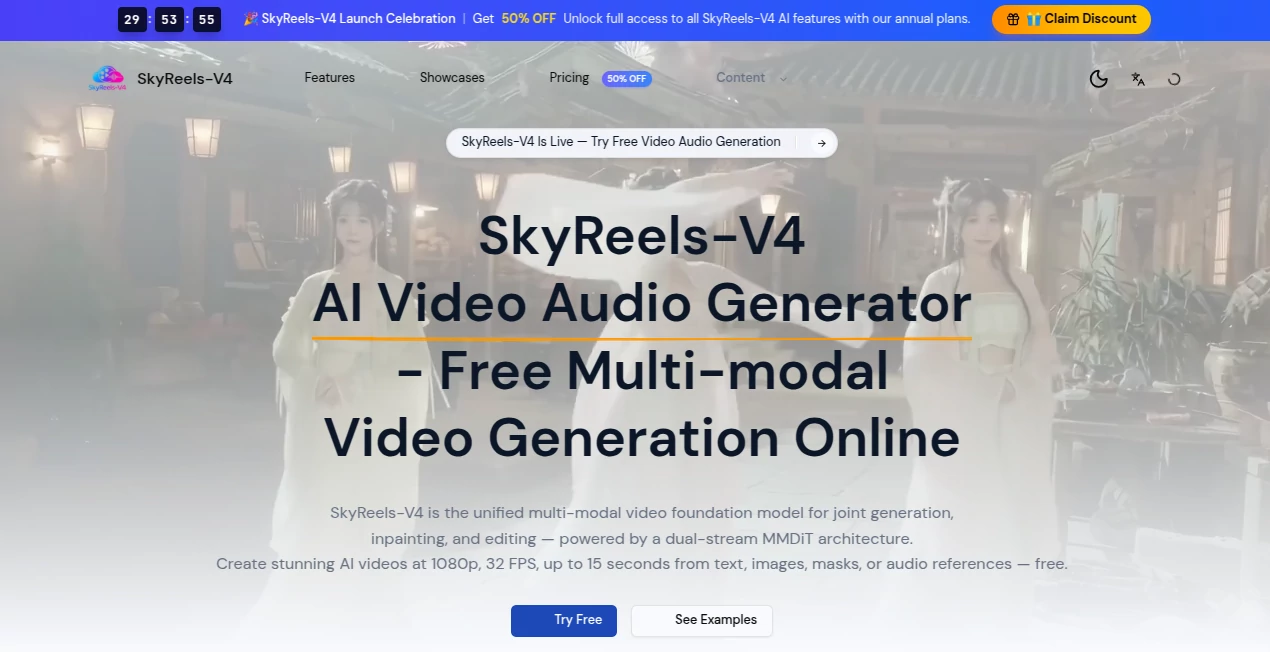
There’s a special kind of excitement when you describe a scene in plain words and moments later a short film plays back with synchronized sound, natural motion, and lighting that actually feels right. This tool makes that happen without the usual glitches or compromises. You can start with text, drop in an image, add a mask for editing, or even feed it audio, and it weaves everything into a coherent 1080p clip at 32 FPS with audio that matches the visuals—lip sync included. I’ve seen creators turn a simple prompt into something that looks like a mini cinematic moment, and the first reaction is usually “wait, that actually worked?” It’s the kind of result that makes you want to keep experimenting because the output feels alive rather than artificial.
Introduction
Making video with sound has always been tricky—separate tools for visuals and audio, endless syncing headaches, and results that often look generated rather than directed. This platform changes the game by handling video and audio together in one unified process. Powered by a dual-stream architecture, it understands how visuals and sound should work in harmony, whether you’re creating from scratch or editing existing clips. It’s free to start, no signup needed for your first try, and it delivers up to 15-second clips that feel surprisingly polished. For indie creators, marketers, or anyone who wants to bring ideas to life quickly, it removes a lot of the friction that used to kill momentum. The best part? It keeps getting better at maintaining consistency across shots and making audio feel like it truly belongs.
Key Features
User Interface
The interface keeps things simple and inviting. A clean prompt area, easy upload spots for images, video clips, masks, or audio references, and clear options for resolution, duration, and style. You can generate in four straightforward steps without getting lost in menus. Previews load reasonably fast, and the whole experience feels designed for flow rather than complexity. Even first-timers can go from idea to finished clip without frustration, while experienced users appreciate the lack of unnecessary steps.
Accuracy & Performance
Motion stays smooth and temporally coherent, characters hold their look across frames, and audio lines up naturally with what’s happening on screen. The dual-stream approach helps avoid the common problems of mismatched lip movements or random sound effects. Clips render at 1080p and 32 FPS, often in seconds, and the quality holds up even when you combine multiple inputs. It’s reliable enough that you can iterate quickly without waiting around or fixing major artifacts.
Capabilities
It supports text-to-video with audio, image-to-video, video inpainting and editing using masks, multi-modal inputs (text + image + audio + masks), and multi-shot storytelling with consistent characters and sound. You can create talking-head content, narrative scenes, or product ads with synchronized environmental sounds and music that follows the emotional beat. Outputs are ready for social platforms or further editing, and the unified model means you don’t need separate tools for visuals and audio.
Security & Privacy
Your inputs are handled with care—processed for the task at hand and not stored indefinitely. The platform emphasizes responsible generation, and free access doesn’t come with hidden data grabs. For creators working on personal or client projects, that straightforward approach provides welcome peace of mind.
Use Cases
A content creator types a short story prompt and gets a complete scene with matching audio for their next Reel. A marketer uploads a product image and turns it into a dynamic ad with voiceover that feels natural. An educator builds quick explainer clips with synchronized narration without recording themselves. A filmmaker prototypes emotional beats or multi-shot sequences to test pacing before full production. It’s especially handy when you need something cinematic fast but don’t have time or budget for traditional shooting.
Pros and Cons
Pros:
- Native audio synchronization that actually matches the visuals instead of feeling tacked on.
- Strong multi-modal support lets you guide the output precisely with images, masks, or reference audio.
- Free tier gives real access without forcing an immediate upgrade.
- Consistent character and motion quality across shots for better storytelling.
- Fast enough generation to support quick creative iteration.
Cons:
- 15-second maximum length keeps it focused on short-form content (multi-shot helps extend narratives).
- Very complex or contradictory prompts can still produce unexpected results.
- Higher usage and advanced features move behind paid annual plans.
Pricing Plans
You can start completely free with full access to the core model—no credit card required for your first videos. Paid annual plans (currently with a launch discount) unlock unlimited generations, higher priority, and full feature access. The structure rewards experimentation first and scales gracefully as your needs grow, making it approachable for hobbyists and serious creators alike.
How to Use SkyReels V4
Head to the generator page and type your scene description in the prompt box. Add a reference image, video clip, mask, or audio file if you want more control. Choose your settings—resolution, duration, style—and hit generate. Review the preview, tweak the prompt or inputs if needed, then download the MP4. For inpainting or editing, use masks to target specific areas. The process is fast and repeatable, letting you refine until the clip feels just right.
Comparison with Similar Tools
Many AI video generators still treat audio as an afterthought or struggle with consistency across shots. This one stands out by handling video and audio together in one unified process, resulting in better lip sync, environmental sounds, and emotional alignment. It offers more flexible multi-modal control than most free options while keeping the workflow simple. For creators who care about sound matching vision, it often feels like a step ahead.
Conclusion
Creating video with sound shouldn’t feel like wrestling separate tools or settling for mediocre results. This platform brings the pieces together in a way that feels natural and efficient, letting ideas move from prompt to playable clip without killing the creative spark. Whether you’re making social content, prototypes, or short stories, it delivers quality that surprises and consistency that builds confidence. In a crowded space, it quietly earns its place by making cinematic moments more accessible to everyone who has a story to tell.
Frequently Asked Questions (FAQ)
How long can the generated videos be?
Up to 15 seconds per clip, with multi-shot options for longer narratives.
Do I need to sign up to try it?
No signup is required for your first video—jump in and generate instantly.
Can I edit existing videos?
Yes—use masks for inpainting and targeted editing while maintaining temporal coherence.
Is audio included and synchronized?
Yes—native audio generation and synchronization are built in, including lip sync and environmental sounds.
What resolutions and frame rates are supported?
1080p at 32 FPS for high-quality output suitable for most platforms.
AI Animated Video , AI Image to Video , AI Video Generator , AI Text to Video .
These classifications represent its core capabilities and areas of application. For related tools, explore the linked categories above.
SkyReels-V4 details
Pricing
- Free
Apps
- Web Tools
Categories

SkyReels-V4 Alternatives Product

Fuser Studio

seedance 2.0

seedance2

soro2

Klyra AI
AISeedance2

Veo4

Seedance 2

Seedance 2.0