🧠 AI Quiz
Think you really understand Artificial Intelligence?
Test yourself and see how well you know the world of AI.
Answer AI-related questions, compete with other users, and prove that
you’re among the best when it comes to AI knowledge.
Reach the top of our leaderboard.


















Small Text Generator

What is Small Text Generator?
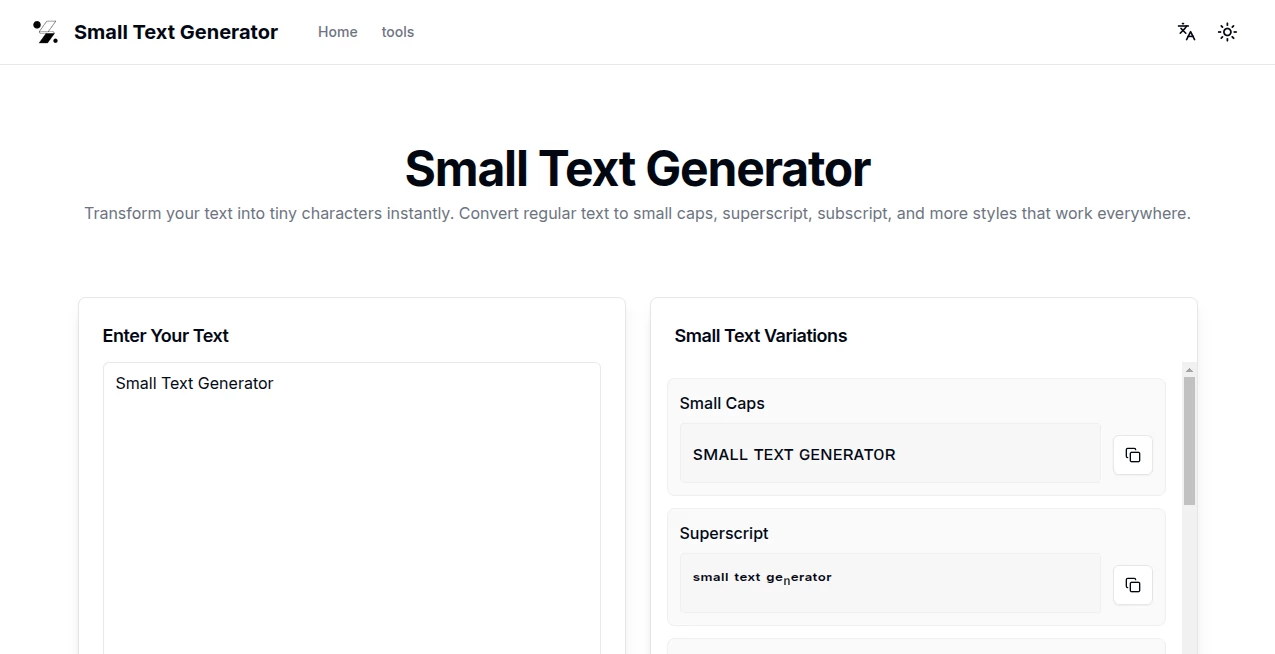
There's something oddly satisfying about typing a normal sentence and watching it shrink down into those quirky little letters that pop on social media. This tool does exactly that—and does it brilliantly. You paste your words, pick a style, and boom, you've got something that stands out without trying too hard. I've used it for Instagram bios that needed a subtle flair, and friends always ask how I got those tiny caps looking so clean.
Introduction
In a sea of generic text tools, this one feels genuinely thoughtful. It takes your everyday words and quietly turns them into 14 different Unicode styles—small caps, superscript, subscript, circled, squared, script, and more—all without forcing you through hoops. No sign-up, no watermarks, no limits; just instant results that work everywhere from Discord to Reddit. What I love most is how reliable it is—paste a long paragraph, and every character transforms perfectly, no weird gaps or broken symbols. It's the little things that make it a daily go-to for anyone who likes their text to have personality.
Key Features
User Interface
The page loads fast and stays simple: one big input box, a row of style buttons, and previews that update the moment you type. No clutter, no ads crowding the screen—just you and your text. I appreciate how it shows all variations side by side so you can compare them instantly. It's the kind of clean design that makes you feel productive right away.
Accuracy & Performance
It handles letters, numbers, and common symbols with zero hiccups—paste a mix of emojis and text, and it keeps everything intact. The conversion happens in real time, no lag even on longer inputs. I've thrown in phrases with accents or special characters, and it never skips a beat. That's the reliability that keeps people coming back.
Capabilities
With 14 styles on tap, you can go from elegant small caps for a professional bio to upside-down text for a playful twist, or superscript for that scientific vibe. It even does circled and squared versions that look sharp on any platform. The best part? Everything is pure Unicode, so it displays perfectly on phones, desktops, and apps—no fonts or images required.
Security & Privacy
Your text never leaves your device. Everything processes right in the browser, so there's no server snooping or data stored anywhere. It's a rare thing these days, but this tool respects your privacy completely—no tracking, no accounts, just pure functionality.
Use Cases
Social media users love it for eye-catching usernames and bios that stand out in a crowded feed. Marketers use small caps or subscript to make product names feel premium without custom design work. Students add superscript to footnotes or equations in presentations, and gamers craft unique Discord tags or Twitch overlays. It's versatile enough that I find myself reaching for it whenever I want text to feel a little more intentional.
Pros and Cons
Pros:
- Instant results with no loading or delays.
- 14 clean, consistent styles that work everywhere.
- Completely free with no limits or sign-up.
- Processes locally for maximum privacy.
Cons:
- Some symbols don't have perfect matches in every style.
- Display can vary slightly across older devices.
Pricing Plans
It's 100% free forever—no hidden tiers, no premium upsells. Every style and feature is available to everyone, no catch. That's rare these days, and it's one reason this tool has earned such a loyal following.
How to Use Small Text Generator
Type or paste your text into the main box. Click any style button—small caps, superscript, circled, whatever catches your eye—and the transformed version appears instantly below. Hit the copy button, and you're ready to paste it anywhere. It's that simple. I usually preview a few options side by side to see which one feels right for the vibe I'm going for.
Comparison with Similar Tools
Other generators often feel clunky or limited to a handful of styles, but this one offers more variety and cleaner results without the bloat. Some add ads or force logins; this skips all that and focuses purely on delivering crisp Unicode text. It's faster, more private, and just works better for everyday use.
Conclusion
This tool quietly makes your text more interesting without any fuss. It's reliable, free, and does exactly what it promises—nothing more, nothing less. Whether you're tweaking a bio, spicing up a post, or adding flair to a username, it's the kind of helper you end up using way more than you expected. Give it a try; you'll probably keep it bookmarked.
Frequently Asked Questions (FAQ)
Does it work on all platforms?
Yes—since it's Unicode, it displays correctly on Instagram, Twitter, Discord, Reddit, and most apps.
Can I mix styles?
Absolutely. Generate one style, copy it, then paste into the input and apply another for layered effects.
What if a character doesn't convert?
Some rare symbols lack matches in every style, but it handles letters, numbers, and most punctuation perfectly.
Is it really free?
Completely—no limits, no ads, no sign-up. Use it as much as you want.
Does it save my text?
No—everything stays in your browser. Nothing is stored or sent anywhere.
AI Creative Writing , AI Fun Tools , AI Content Generator , AI General Writing .
These classifications represent its core capabilities and areas of application. For related tools, explore the linked categories above.
Small Text Generator details
This tool is no longer available on submitaitools.org; find alternatives on Alternative to Small Text Generator.
Pricing
- Free
Apps
- Web Tools
Categories

Small Text Generator Alternatives Product
nano banana …

SomniaScope …

Dewy Chat
Ablaze AI

Grok
tarotguide

Instaposts.ai

bratgenerator

BlogBuster