🧠 AI Quiz
Think you really understand Artificial Intelligence?
Test yourself and see how well you know the world of AI.
Answer AI-related questions, compete with other users, and prove that
you’re among the best when it comes to AI knowledge.
Reach the top of our leaderboard.


















SONGMAKER AI

What is SONGMAKER AI?
There's something truly special about typing a few lines of thought and hearing them transform into a full song, complete with melody, instruments, and vocals that actually fit. This tool nails that experience, making music creation feel accessible and exciting again. I remember fiddling with a silly prompt about a rainy day walk, and out came a track that surprised me with its catchy hook—good enough to share with friends who thought I'd spent hours in a studio.
Introduction
For anyone who's ever hummed a tune in the shower or jotted lyrics on a napkin but never knew how to bring them to life, this platform changes everything. It takes your simple text ideas and builds complete songs around them, choosing styles that match and adding layers that sound polished from the first listen. No need for instruments or recording setups; just your words and a click. It's gained a loyal following among hobbyists and content makers who love how it sparks ideas quickly, often turning vague concepts into tracks you'd proudly play out loud. The beauty lies in its straightforward magic—democratizing music in a way that feels genuine and inspiring.
Key Features
User Interface
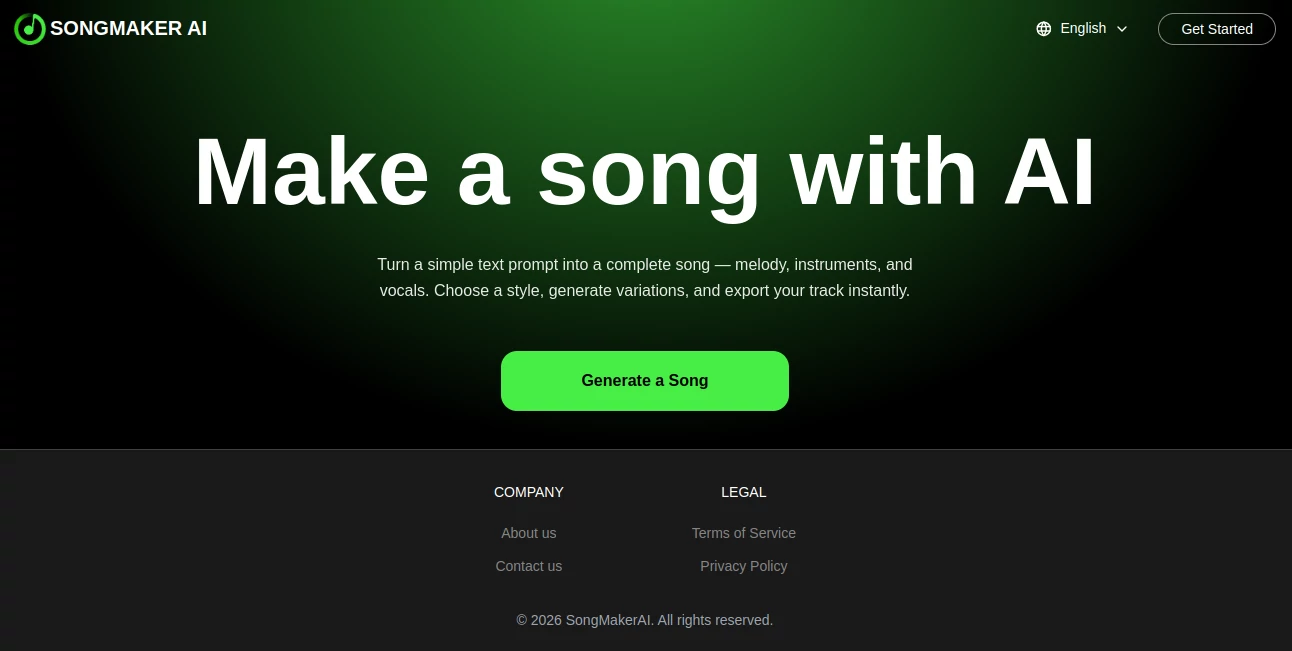
The layout keeps things delightfully simple: a big prompt box invites your description, a dropdown for styles sits nearby, and buttons for variations or exports are right at hand. No overwhelming options or hidden menus—just a clean space that lets you focus on the fun part. Even on a phone during a commute, it's smooth, with quick loads that keep the creative flow uninterrupted.
Accuracy & Performance
It listens to your prompt with impressive care, weaving melodies and arrangements that capture the mood you described, often on the first try. Generations happen fast, delivering ready tracks without long waits, and the sound quality holds up nicely across devices. In my plays, it consistently avoided off-key mishaps, producing coherent pieces that feel thoughtfully composed rather than random.
Capabilities
Choose from a range of styles to shape the vibe, generate multiple takes to pick the best, and export instantly for sharing or further tweaks. It handles everything from upbeat pops to mellow acoustics, adding vocals and instruments that blend seamlessly. The variation option is a gem—refine until it clicks perfectly, opening doors for personalized gifts or quick demos.
Security & Privacy
Your creations process quickly and stay private, with no unnecessary storage or sharing unless you choose to download. It's reassuring for personal projects, letting you experiment freely without concerns over data lingering around.
Use Cases
Content creators whip up custom background tracks for videos that fit the narrative just right, saving time on stock hunts. Aspiring songwriters test lyric ideas with full productions, gaining confidence before studio steps. Families craft fun birthday tunes with inside jokes, turning ordinary messages into memorable keepsakes. Even podcasters add themed intros that set the tone perfectly, all from a short description.
Pros and Cons
Pros:
- Turns basic ideas into complete, listenable songs effortlessly.
- Style choices and variations help nail the perfect feel.
- Instant exports make sharing a breeze.
- Surprisingly cohesive results that spark real joy.
Cons:
- Occasional variations needed for spot-on matches.
- Style library could grow even broader over time.
Pricing Plans
It's completely free to use, with no sign-ups or hidden fees holding you back—just dive in and create as inspiration strikes. That open approach makes it ideal for trying out ideas without commitment, perfect for casual explorers or frequent visitors alike.
How to Use SongMakerAI
Head straight to the prompt area and describe your song—mood, theme, or even specific lyrics. Select a style that fits, hit generate, and listen to the options that appear. Like one? Export it right away. Not quite? Tweak the description or try variations until it sings to you. It's that iterative play that turns good into great, often in just a few minutes.
Comparison with Similar Tools
While some platforms overload with options or require uploads for every tweak, this one keeps the focus on pure text-to-song simplicity, delivering quick, complete results without extra steps. It stands out for its clean execution and instant accessibility, making the process more enjoyable and less fiddly than alternatives that scatter the effort.
Conclusion
This tool reminds us why music feels magical—lowering barriers so anyone can turn a fleeting idea into something that resonates. It's a joyful companion for creative moments, consistently delivering tracks that surprise and delight. Whether you're chasing a hobby or needing quick inspiration, it opens a world where your words find their voice, effortlessly and beautifully.
Frequently Asked Questions (FAQ)
What styles can I choose?
A solid variety covers popular moods, from energetic to introspective, with room to describe custom twists.
Do I need to write full lyrics?
Not at all—a short description or theme works wonders to get started.
Are the songs royalty-free?
Yes, feel free to use them personally or in projects.
How long do songs typically run?
Full-length feels with verses and choruses, ready to enjoy as is.
Can I generate multiple versions?
Absolutely—explore variations until one stands out.
AI Text to Music , AI Lyrics Generator , AI Music Generator , AI Singing Generator .
These classifications represent its core capabilities and areas of application. For related tools, explore the linked categories above.
SONGMAKER AI details
This tool is no longer available on submitaitools.org; find alternatives on Alternative to SONGMAKER AI.
Pricing
- Free
Apps
- Web Tools
Categories

SONGMAKER AI Alternatives Product

lyria 3
MemoTune

Custom Gift …

MakeBestMusic
Soniq Chat

MusicGPT AI

AI Music Gen…

Lyrics to So…

AI Makes Song