🧠 AI Quiz
Think you really understand Artificial Intelligence?
Test yourself and see how well you know the world of AI.
Answer AI-related questions, compete with other users, and prove that
you’re among the best when it comes to AI knowledge.
Reach the top of our leaderboard.

















SquareFaceAI

What is SquareFaceAI?
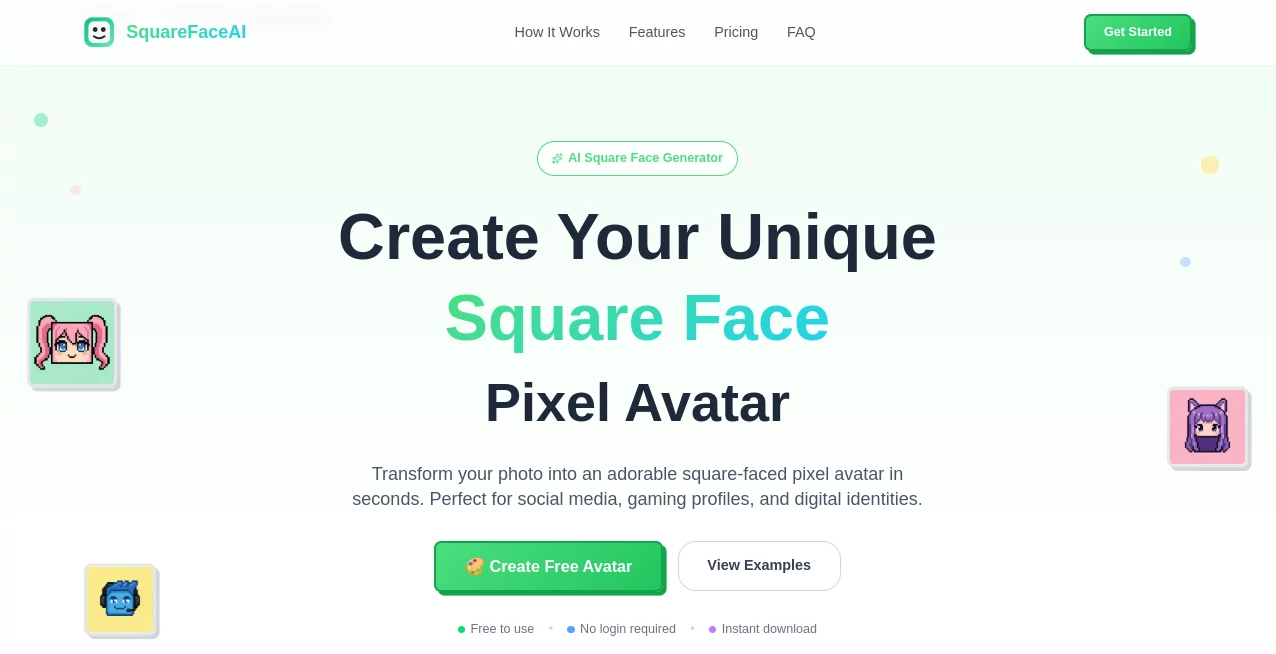
There's something delightfully whimsical about turning a regular selfie into a chubby-cheeked, square-faced pixel character that still somehow looks just like you. This tool nails that charm every time, whipping up adorable avatars that are equal parts cute and recognizable, ready to pop on your profiles without a hint of generic blandness. I've tossed in photos of friends on a whim, and the results always spark laughs and "that's so me!" moments—perfect for shaking up your online persona with zero effort.
Introduction
In the sea of profile pics that all blend together, this little gem stands out by focusing on one fun twist: those endearing square faces in pixel style that pack personality into every blocky line. It analyzes your upload to capture your unique features—eyes, smile, hair—and rebuilds them into something playful yet faithful, with styles ranging from kawaii sweetness to bold gaming vibes. No sign-up hassle for starters, just upload and go, and the privacy angle feels genuinely reassuring in a world full of data worries. It's the kind of straightforward joy that turns a boring avatar update into a quick creative win, loved by gamers, social scrollers, and anyone wanting a digital self that's fun and fresh.
Key Features
User Interface
Drag your photo in or click to browse—it's that simple, with a gallery of tempting examples staring back to inspire your pick. Styles line up neatly for scrolling, and the create button sits front and center, no hidden menus or confusing steps. My first try felt like playing with a toy: upload a goofy shot, watch it process in a flash, and there you are, pixel-perfect and grinning wider than before.
Accuracy & Performance
It picks up on subtle traits remarkably well, keeping your expression and quirks intact while wrapping them in that signature square charm, often nailing it on the first go. Generations zip by in about ten seconds, smooth even on spotty connections, delivering crisp files that look sharp at any zoom. Friends who've used it for group server icons swear by the consistency—no weird distortions, just reliable fun every time.
Capabilities
Over 200 tweaks across kawaii, anime, gaming, cool, and minimalist vibes let you fine-tune to your mood, with exports scaling up to full 1024px clarity for pro touches. It handles personal snaps for fun or commercial needs with the upgrade, always keeping that pixel heart beating strong. The real magic? Turning a plain headshot into something you'd proudly slap on Discord, Twitch, or an NFT without a single brushstroke.
Security & Privacy
Your photo gets a quick, secure once-over and then vanishes—no storage, no sharing, just in-and-out processing that puts your mind at ease. It's a rare breath of fresh air, especially for casual uploads where you don't want traces lingering. That commitment shines through, letting you experiment freely with silly shots or serious ones alike.
Use Cases
Gamers level up their Discord presence with bold pixel looks that stand out in crowded servers, drawing compliments mid-match. Content makers refresh Twitter or TikTok icons to match new series vibes, pulling more eyes with that cute factor. NFT enthusiasts craft Web3 identities that feel unique yet approachable, or YouTubers build brand consistency across channels. Even casual folks swap in fun versions for family chats, turning everyday messages into smiles.
Pros and Cons
Pros:
- Lightning-quick turns that fit into any spare moment.
- Spot-on personalization that captures your essence in pixels.
- Loads of styles to match any mood or platform.
- True privacy respect that builds instant trust.
Cons:
- Free daily cap means pacing yourself for big batches.
- Locked higher res and full styles behind the pro gate.
Pricing Plans
Dip in free with three a day at solid 256px and basic styles—plenty for casual tweaks or testing the waters. Go pro for under five bucks monthly to unlock unlimited runs, max resolution, every style, priority speed, and commercial rights, complete with a full month to change your mind. It's straightforward and fair, scaling with your avatar addiction without nickel-and-diming along the way.
How to Use SquareFaceAI
Grab a clear selfie (JPG, PNG, or WEBP works best), drag it onto the spot or click to load. Browse styles if you want a specific flavor, then let it brew for those quick ten seconds. Preview your new pixel self, download straight away, and slap it on your favorite spots. Experiment with different shots or tweaks—I've redone old photos into anime twists that became instant favorites.
Comparison with Similar Tools
While some avatar makers churn out generic circles or over-the-top cartoons, this one owns its square-pixel niche with personalization that feels genuinely yours, skipping the bland for that endearing chub. It's faster and fiercer on privacy than many, delivering higher fidelity without the bloat, making it the cozy choice for folks who want fun without the fuss.
Conclusion
This tool wraps up the hunt for a standout profile pic in one joyful package, blending cute quirks with clever tech to make your digital face unforgettable. It's the small delight that brightens online spaces, reminding us that a little pixel play can go a long way. Give it a shot with a favorite photo—you'll likely walk away with a grin and a new go-to look.
Frequently Asked Questions (FAQ)
Do photos stick around?
Nope—processed on the fly and deleted right after, full stop.
What formats for upload?
JPG, PNG, or WEBP, keeping it simple and flexible.
Commercial use okay?
With pro, yes—go wild for branding or sales.
How sharp are the downloads?
Up to 1024px in pro, crisp for any zoom or print.
Need an account to start?
Not for free tries—just upload and create.
AI Illustration Generator , AI Avatar Generator , Photo & Image Editor , AI Profile Picture Generator .
These classifications represent its core capabilities and areas of application. For related tools, explore the linked categories above.
SquareFaceAI details
This tool is no longer available on submitaitools.org; find alternatives on Alternative to SquareFaceAI.
Pricing
- Free
Apps
- Web Tools
Categories

SquareFaceAI Alternatives Product

FLUX 2

Professional…
SurgePix
DLSS 5 Meme …

AI Polaroid …

Image Unblur

Upscale image
Ghibli Image…

AI Age Progr…