
🧠 AI Quiz
Think you really understand Artificial Intelligence?
Test yourself and see how well you know the world of AI.
Answer AI-related questions, compete with other users, and prove that
you’re among the best when it comes to AI knowledge.
Reach the top of our leaderboard.


















PDF Generator in ChatGPT

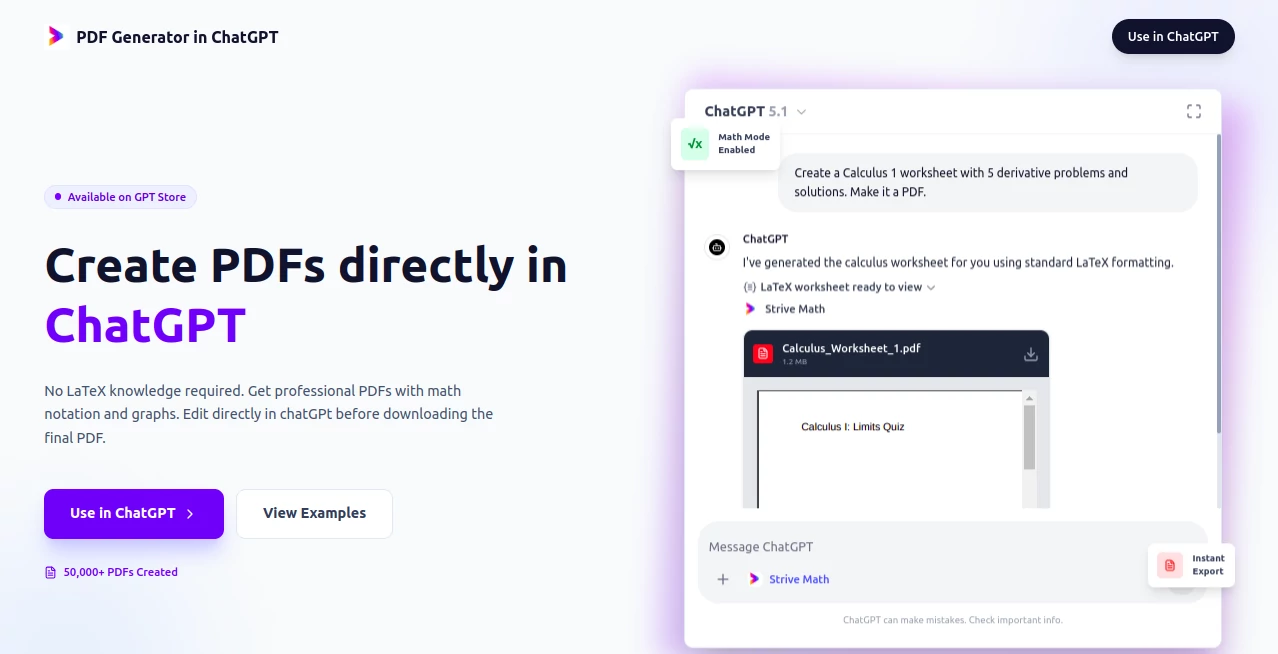
What is PDF Generator in ChatGPT?
StriveMath PDF slips into your daily workflow like a trusted notepad, turning casual descriptions into crisp, ready-to-share files that handle the tough stuff without a hitch. This handy addition lets you build everything from quick notes to detailed layouts right where you're already typing, saving the scramble for separate apps. Teachers and note-takers alike pass along stories of how it turned a rambling idea into a polished handout in minutes, keeping the focus on content over the clicks.
Introduction
StriveMath PDF came together through the lens of classroom chaos, where a team of educators spotted the gap between brainstorming and buttoning up a lesson plan. They wove it into familiar chat spaces to cut the cord on clunky editors, and it took off among folks juggling grades and gigs who needed something that just worked. Before long, users were trading tips on crafting full sets of practice pages or tweaking drafts on the fly, turning what used to eat afternoons into after-lunch wins. It's all about that seamless handoff, where the tool fades back so your words can step forward, making the whole process feel less like a chore and more like a conversation with a sharp assistant.
Key Features
User Interface
The setup blends right into your ongoing exchanges, popping up as a natural next step without pulling you to a new tab or toolbar tango. You describe what you need, and it serves up a preview alongside the file, complete with easy spots to spot-check or swap in changes. It's that straightforward flow—type, tweak, take—that keeps things moving, like having a co-pilot who reads your shorthand and hands back something print-ready.
Accuracy & Performance
It holds steady on the details you lay out, weaving in elements like charts or formulas with a precision that rarely wanders, though a quick once-over never hurts for the nitty-gritty bits. Turnarounds come quick as a reply, often wrapping a full build in seconds, even when layering in extras, so you stay in the groove without watching a wheel spin.
Capabilities
From sketching out practice sets with built-in answers to laying out longer reports with visuals that stick, it covers the ground for everyday builders who need more than plain text but less than a full suite. You can circle back in the same thread to refine a section or two, pulling in fresh bits without starting over, and it grabs onto those tricky symbols or layouts that trip up simpler saves.
Security & Privacy
Your drafts stay within the bounds of your session, handled on the spot and left behind once you're done, giving you that easy trust to jot freely without extra locks or logs to mind. It's tuned to keep things contained, so personal touches or private plans don't linger longer than needed.
Use Cases
Lesson planners whip up targeted exercises for the week's topics, complete with guides that match the class level without pulling out old files. Study groups build shared review packs from group chats, iterating on spots that stump the squad. Pros sketch out project summaries with embedded figures, ready for client drops without the usual format fuss. Even solo learners craft personal cheat sheets, blending notes and nuggets into neat bundles that fit in a bag.
Pros and Cons
Pros:
- Folds right into chats you already use, no app-hopping required.
- Handles the hard parts like symbols and sketches without extra steps.
- Quick revisions keep the pace lively, dodging full rewinds.
- Opens up pro looks for anyone, from novices to note pros.
Cons:
- Best on clear asks; loose outlines might need a tighten.
- Tied to the chat ecosystem, so standalone seekers look elsewhere.
- Double-checks wise for spot-on facts in the mix.
Pricing Plans
It rolls out as part of your existing setup, no fresh fees or forms to fill, letting you dive in with what you've got and scale as the needs grow. That keeps the barrier low, focusing on the build rather than the bill.
How to Use StriveMath PDF
Kick off in your usual spot by spelling out the goal, like a set of problems with hints, and let it shape the draft. Glance at the attached piece, chat back any shifts needed, and snag the updated version fresh off the press. Tuck it away for later tweaks or print, building a rhythm that fits your flow from first jot to final share.
Comparison with Similar Tools
Where standalone shapers demand a download and dive, StriveMath PDF keeps it chat-close, trading bells for that instant back-and-forth, though those might muster more for offline overhauls. Against basic export buttons, it ups the ante with built-in brains for layouts that last, skipping the breaks but perhaps bowing to bulk beasts in sheer size. It suits the seamless seeker, edging out the extras with ease and edge.
Conclusion
StriveMath PDF bridges the blank between brainstorm and bound, handing over a shortcut that sharpens without stealing the show. It empowers the everyday maker to craft with confidence, turning tangled thoughts into tidy takes that teach or tell. As more minds turn to mixed media, this one's poised to keep the conversation going, one polished page at a time.
Frequently Asked Questions (FAQ)
Does it work with any chat version?
It pairs best with the latest builds, unlocking the full flow for smooth sails.
Can I add my own touches mid-way?
Yes, just mention the mods, and it rolls out a refreshed round right away.
What sorts of files come out?
Clean, compact ones that open wide on any reader, ready for ring or rack.
Is it locked to certain topics?
Nah, it stretches from simple sums to story spreads with equal grace.
How do I start without a plan?
Drop a sample ask, like a quick quiz, and let it lead the way from there.
These classifications represent its core capabilities and areas of application. For related tools, explore the linked categories above.
PDF Generator in ChatGPT details
This tool is no longer available on submitaitools.org; find alternatives on Alternative to PDF Generator in ChatGPT.
Pricing
- Free
Apps
- Web Tools
Categories

PDF Generator in ChatGPT Alternatives Product

QuestionAI

AHelp

GLM-OCR Onli…

Physics gpt

GradeProAI

Markdown to …

Sourcetable

TO MD

Ryne AI
