🧠 AI Quiz
Think you really understand Artificial Intelligence?
Test yourself and see how well you know the world of AI.
Answer AI-related questions, compete with other users, and prove that
you’re among the best when it comes to AI knowledge.
Reach the top of our leaderboard.


















SuperHumanizer

What is SuperHumanizer?
SuperHumanizer slips into the workflow of writers everywhere, quietly transforming stiff drafts into flowing prose that reads like it came straight from a coffee-fueled brainstorm. This handy spot lets you drop in rough copy and watch it loosen up, shedding that robotic edge while holding onto the heart of what you meant. Folks who've given it a spin often mention how it saves those late-night revisions, turning 'good enough' into something that grabs and holds attention without a trace of machine polish.
Introduction
SuperHumanizer came along a short while back, sparked by the growing pile of content that felt a bit too perfect, a bit too programmed, leaving readers wondering if a human had any hand in it at all. It started as a simple fix for those odd tells in writing that detectors love to flag, but quickly grew into a go-to for anyone chasing that natural rhythm in their words. Over time, users have shared stories of blog posts that finally clicked with their audience or emails that landed warmer than before, all thanks to a quick pass through its gentle tweaks. What draws people in is how it listens to the original intent, reshaping without rewriting the soul, making it feel less like a tool and more like a sharp-eyed editor who knows when to step back.
Key Features
User Interface
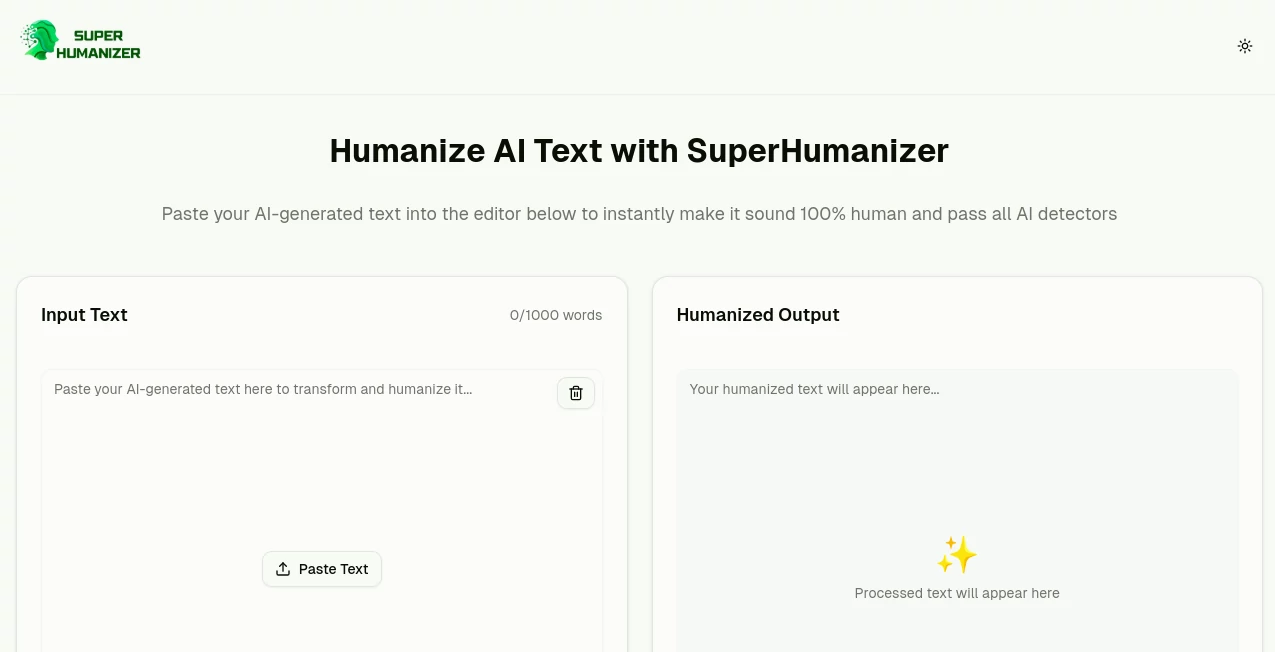
The setup keeps it light and direct, with a big open field waiting for your text and a counter that nudges you if things run long. Pick between a quick touch-up or a deeper dive with a couple of toggles, then tap to go—results slide in below without any extra pages or waits. It's the kind of page that feels welcoming right away, like pulling up a chair at a desk where everything's already in reach, no hunting for hidden buttons or confusing menus.
Accuracy & Performance
When you hand over a block of copy, it sifts through the patterns and pulls out a version that stays true, often nailing the flow so well that it fools even the pickiest checks. Things move fast, wrapping up chunks in moments no matter the length, keeping your train of thought from derailing. Those who've run it against tough spots swear by how it holds the line on meaning, dodging those off-kilter shifts that can throw the whole piece sideways.
Capabilities
It shines at smoothing out the rough spots, breaking up those even rhythms and swapping in a mix of short punches and longer breaths to keep things lively. You can toss in fresh batches anytime, up to a solid handful of words per go, and it layers in checks to spot any lingering stiffness right there. Beyond the basics, it tweaks for better read-aloud ease, weaving in everyday turns of phrase that make the words land softer, all while keeping the core message locked in place.
Security & Privacy
Your drafts get handled with a light touch, processed on the spot and then let go without any strings or shares to outsiders. Nothing sticks around unless you grab it yourself, and the whole setup runs on a promise of keeping things close to the chest. Writers lean on that quiet setup, knowing their half-baked ideas or client notes won't pop up anywhere they shouldn't, letting them experiment without a second glance over the shoulder.
Use Cases
Bloggers feed it their outline-fueled posts, watching them warm up into pieces that pull readers in for the long haul. Marketers reshape sales pitches that started too salesy, landing on notes that nudge without pushing too hard. Students polish essays that need a more personal voice, turning formal drafts into submissions that feel lived-in. Even pros in reports or memos use it to cut the corporate chill, making updates read like updates from a colleague rather than a manual.
Pros and Cons
Pros:
- No barriers to jump in—just paste and go, anytime.
- Hits high on making things feel real without losing the point.
- Two ways to tweak, from light lift to full refresh.
- Stays open on any gadget, no apps or installs needed.
Cons:
- Caps at a certain word count per round, so big jobs need breaks.
- Deeper modes might over-smooth for voices that like a bit of edge.
- Lacks spots to save or track past runs without copying out.
Pricing Plans
Everything rolls out free from the start, with no tiers or catches to chase—just open access to the full kit for as many rounds as you need. That flat setup means you can dip in for a single fix or lean on it daily without watching a meter tick. It's built to stay that way, rewarding steady use without nudging toward upgrades or hidden walls.
How to Use SuperHumanizer
Head over and clear the field, then slide in your text with a quick paste or type it fresh. Flip to the mode that fits—light for a once-over or full for a thorough going-through—and give it the nod to start. In a flash, the reworked version shows up below, ready to copy or tweak further. Run it again on the spots that need more nudge, building toward a piece that flows just right.
Comparison with Similar Tools
Next to setups that charge per spin or demand sign-ups, SuperHumanizer keeps the door wide open, trading fancy add-ons for straightforward reliability that often outshines the flashier ones in real checks. Where some skim the surface and leave tells behind, it digs a touch deeper for results that hold up better under scrutiny. It fits snug for folks wanting quick, no-fuss lifts over loaded suites that promise more than they deliver day-to-day.
Conclusion
SuperHumanizer wraps up the chase for writing that warms the room, handing back drafts that breathe easy and invite a second read. It turns the trick of blending machine speed with human heart into something anyone can tap, proving that a little nudge can make all the difference in connecting. As more words flood the web, this one's poised to keep the good ones standing out, one natural line at a time.
Frequently Asked Questions (FAQ)
Does it keep the main idea intact?
Yes, it reshapes without shifting the core, so your point stays sharp.
How long until I see changes?
Seconds for most, keeping the wait short and the flow going.
Works on phones too?
Smooth across boards, from desks to pockets without a hitch.
Any word limits to watch?
Up to five hundred per go, plenty for most quick fixes.
Safe for work stuff?
Keeps things private, no shares or saves on their end.
AI Rewriter , AI General Writing , AI Grammar Checker , AI Content Detector .
These classifications represent its core capabilities and areas of application. For related tools, explore the linked categories above.
SuperHumanizer details
This tool is no longer available on submitaitools.org; find alternatives on Alternative to SuperHumanizer.
Pricing
- Free
Apps
- Web Tools
Categories

SuperHumanizer Alternatives Product

AHelp

Markdown to …

Spell Checki…

Rephrazy

ChatGPT

Jasper
RewriteBar

Klyra AI

labgen