
🧠 AI Quiz
Think you really understand Artificial Intelligence?
Test yourself and see how well you know the world of AI.
Answer AI-related questions, compete with other users, and prove that
you’re among the best when it comes to AI knowledge.
Reach the top of our leaderboard.


















SVGAI
Instant Vector Magic from Text

What is SVGAI?
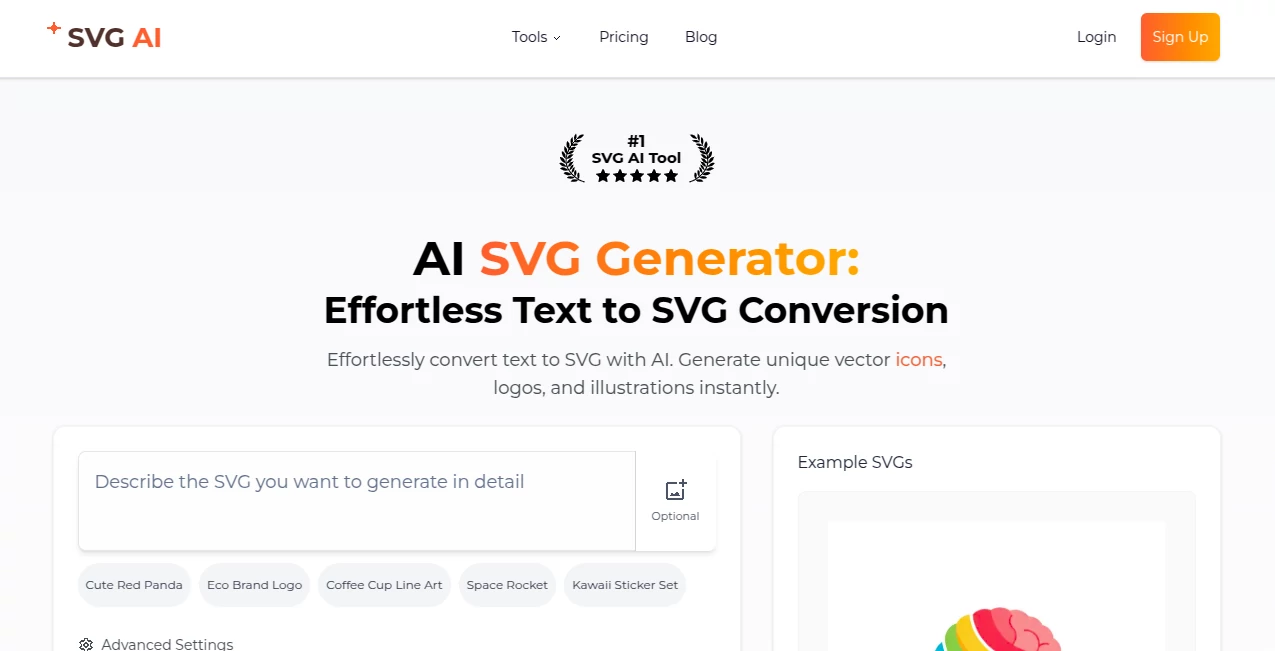
SVG AI slips into the toolkit of designers like a well-worn sketchpad, whispering crisp vectors into existence from nothing but a handful of words. Picture typing "a sleek fox in mid-leap" and watching it unfold into a scalable icon that holds its edge on billboards or buttons alike. It's the kind of shortcut that turns late-night brainstorms into morning-ready assets, earning nods from folks who've ditched clunky drawing apps for this quiet powerhouse.
Introduction
SVG AI quietly rolled out a few seasons back, cooked up by a tight-knit group of vector veterans who'd grown weary of tracing paths pixel by pixel. They wanted something that captured the raw thrill of ideation without the drag of software sprawl, and what emerged was a spot that feels less like a tool and more like a collaborative doodle session. Word trickled through design dens and freelance forums, with users swapping screenshots of logos that nailed briefs on the first go. Today, it sits pretty as the crowd favorite, backed by a string of perfect scores that speak to its knack for delivering just what the prompt promises, all while keeping things light and unpretentious.
Key Features
User Interface
The screen opens to a welcoming void—a single prompt box that invites your wildest whims, flanked by gentle nudges like "craft an icon" or "spin a logo." As you type, subtle previews flicker in, building confidence without overwhelming the flow, and export buttons hover nearby for snag-free saves. It's built for the dash between meetings, with a mobile-friendly squeeze that lets you iterate on the subway, turning idle scrolls into productive sparks.
Accuracy & Performance
Prompts land with a precision that borders on intuitive, translating "vintage key emblem" into lines that curve just so, rarely veering into the abstract weeds. It hums along at a clip that outpaces coffee breaks, rendering complex builds in heartbeats and scaling them flawlessly across resolutions. Designers often marvel at how it sidesteps the common pitfalls of over-simplification, yielding outputs that feel thoughtfully tuned rather than machine-guessed.
Capabilities
At its core, it breathes life into icons that pop with personality, logos that whisper brand stories, and illustrations that layer depth without bulk. Tweak a description mid-stream, and it adapts on the fly, blending styles from minimalist strokes to ornate flourishes. Beyond basics, it handles thematic clusters—like a suite of weather symbols or zodiac motifs—making it a one-stop for cohesive sets that save hours of thematic chasing.
Security & Privacy
Your prompts and prototypes stay close to the chest, processed in fleeting sessions that leave no digital footprints unless you choose to archive. It leans on straightforward safeguards, ensuring shared links require your nod before peeks, and auto-clears drafts to keep the slate fresh. In a field rife with idea theft worries, this understated approach lets creators exhale, focusing on the craft over the caution.
Use Cases
Freelancers whip up client mocks for app dashboards, testing fox motifs against fox-free alternatives to land that perfect fit. Web builders stock their kits with custom arrows and badges, dodging stock-site sameness for sites that stand out. Crafters etch seasonal ornaments, from pumpkin patches to pine boughs, prepping prints that charm markets without the manual trace. Even hobby sketchers play with personal sigils, evolving family crests from casual chats into heirloom keepsakes.
Pros and Cons
Pros:
- Transforms vague vibes into vector gold faster than a sketch can dry.
- Scales endlessly without a hint of fuzz, ideal for any canvas.
- Light on the learning, heavy on the delight from jump.
Cons:
- Shines on straightforward asks; labyrinthine lore might need paring down.
- Free flights cap quick, teasing the full horizon.
- Customization craves clear cues, rewarding the articulate.
Pricing Plans
Start with a no-strings sampler that gifts a dozen drafts, enough to whet the appetite without a wallet wince. Monthly muses run about eight bucks for boundless builds and priority queues, stepping to twenty for teams trading tips and templates. Annual arcs trim the toll by a tidy quarter, and a week's full whirl lets you spin without the sink, easing the leap into regular rhythm.
How to Use SVG AI
Drop into the prompt pane with a dash of detail—like "elegant owl perched on branch"—and let it loose. Scan the spread of suggestions, hone one with a follow-up flourish, then pluck the winner for your palette. Embed straight into code or stash as SVG for later layers, circling back to remix as moods shift, building a bespoke bank from bedtime bursts.
Comparison with Similar Tools
Where broader brushes splash scenes in pixels, SVG AI carves clean lines that last, though those might muster more for raster revelers. Against manual mills that demand draftsman's digits, it frees the flow for thinkers, skipping the strain but perhaps pinching on pure hand-hewn heart. It claims the crown for vector velocity, outflanking the fleet with finesse and fleetness.
Conclusion
SVG AI stands as a sly enabler in the design dance, handing vectors to visionaries who once chased them through thickets of tools. It turns the tyranny of the trace into a tango of text, yielding assets that amplify without apology. As screens swell and styles shift, this whisper of wit keeps creators current, one elegant edge at a time.
Frequently Asked Questions (FAQ)
What prompts work best?
Vivid verbs and key quirks—like "playful puppy in profile"—unlock the sharpest strokes.
Can I tweak after the fact?
Sure, feed refinements back in or export to editors for final fiddles.
How versatile are the outputs?
From tiny tabs to towering prints, they hold form across the fray.
Is it for pros only?
Nah, novices nestle right in, with examples easing the entry.
What about sharing my gems?
Yours to yield freely, with embeds that keep credit crisp if craved.
AI Illustration Generator , AI Icon Generator , AI Logo Generator , AI Design Generator .
These classifications represent its core capabilities and areas of application. For related tools, explore the linked categories above.
SVGAI details
This tool is no longer available on submitaitools.org; find alternatives on Alternative to SVGAI.
Pricing
- Free
Apps
- Web Tools
Categories

SVGAI Alternatives Product

X Grok Imagi…

Paper Animat…

Flux2 Klein

FaceTo3D

AI Raphael

Brat Generat…

Lexica AI

SlideStorm AI

Reztune
