
🧠 AI Quiz
Think you really understand Artificial Intelligence?
Test yourself and see how well you know the world of AI.
Answer AI-related questions, compete with other users, and prove that
you’re among the best when it comes to AI knowledge.
Reach the top of our leaderboard.

















The #1 Text to PDF Converter
What is The #1 Text to PDF Converter?
There’s something satisfying about taking plain text—notes from a meeting, a draft email, a long article you want to save—and turning it into a clean, professional-looking PDF with one click. No formatting headaches, no weird layout shifts, no extra software required. This tool does exactly that, and it does it with surprising care. You paste your text, choose a few simple options, and get a polished document ready to share or print. I’ve used it to turn messy meeting notes into something my team actually respects, and I’ve watched students convert long research drafts into neat submissions that look far more professional than they expected. It’s one of those quiet tools that solves a daily annoyance so well you start wondering how you ever managed without it.
Introduction
Converting text to PDF sounds simple, but anyone who’s tried it with basic word processors knows how quickly things can go wrong—fonts change, margins shift, or the file suddenly looks messy on someone else’s screen. This platform removes all that frustration. It takes your raw text and turns it into a consistent, well-formatted PDF every single time. No installation, no account needed to start, and no hidden surprises in the final file. It’s become a favorite for students, professionals, writers, and anyone who needs to share information cleanly and reliably. The best part? It respects your time and keeps the focus on your content rather than forcing you to fight with formatting tools.
Key Features
User Interface
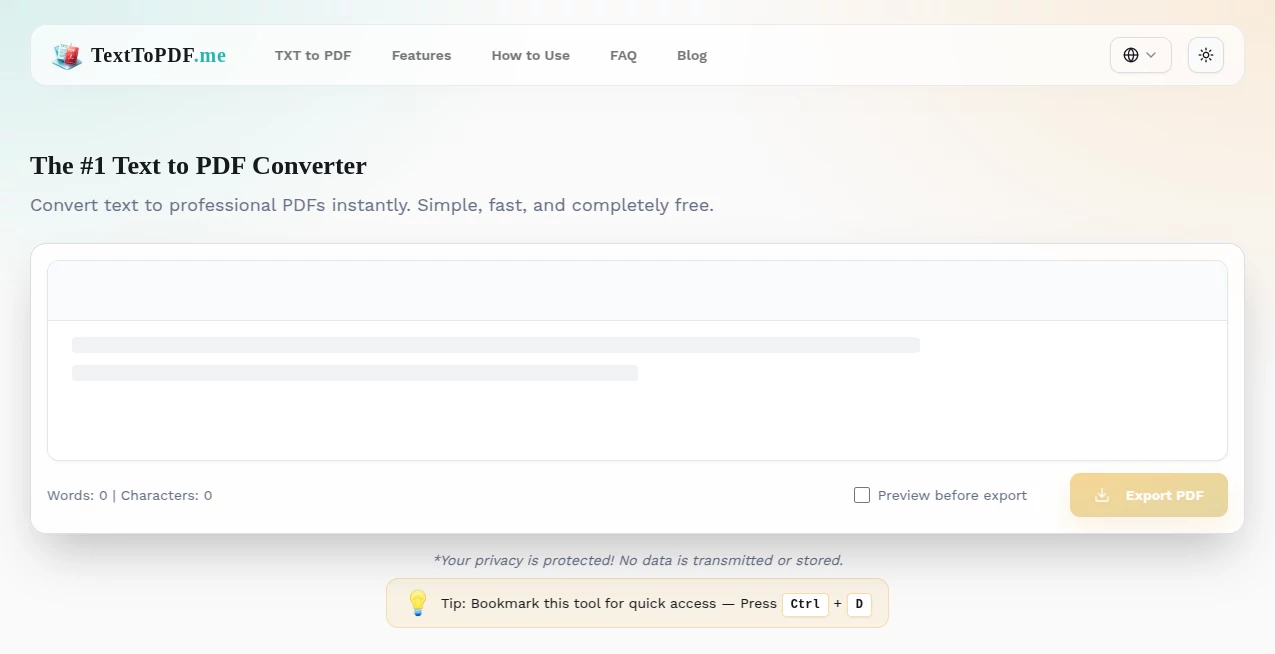
The design is wonderfully straightforward. A large text box welcomes your paste or typing, followed by simple options for font style, size, margins, and page orientation. There’s a live preview area so you can see exactly how the final PDF will look before you generate it. One clear button starts the conversion, and the download happens almost instantly. It never feels cluttered or intimidating—even first-time users figure it out in seconds.
Accuracy & Performance
The conversion is remarkably faithful. What you see in the preview is what you get in the final PDF—line breaks, paragraphs, and basic formatting stay intact. It handles long documents smoothly without slowing down or introducing strange spacing issues. The resulting files are lightweight yet crisp, opening cleanly on any device. In my experience, it consistently produces better-looking results than many built-in “Save as PDF” options in word processors.
Capabilities
You can convert plain text, formatted notes, articles, reports, or even code snippets into professional PDFs. It supports multiple font choices, adjustable margins, portrait or landscape orientation, and basic styling options. The tool also handles longer documents without performance drops and generates files that are easy to share via email, cloud storage, or print. It’s especially handy when you need a clean, universal format that looks good no matter who opens it.
Security & Privacy
Your text is processed quickly and not stored on the servers after conversion. No account is required for basic use, so there’s no unnecessary data collection. For sensitive notes, contracts, or personal documents, that straightforward privacy approach gives real peace of mind.
Use Cases
Students convert lecture notes or research drafts into neat submission files. Professionals turn meeting summaries or reports into polished PDFs for clients. Writers save blog drafts or story outlines in a clean, shareable format. Teachers prepare handouts or reading materials that look professional. Even casual users turn important emails or recipes into printable PDFs that won’t lose formatting. Wherever you need text to look more official and reliable, this tool delivers without fuss.
Pros and Cons
Pros:
- Extremely simple and fast—no learning curve at all.
- Results look clean and professional every time.
- Works instantly in the browser with no software installation.
- Free to use for most everyday needs.
- Preserves your original text layout reliably.
Cons:
- Limited advanced formatting options (it focuses on clean, simple PDFs).
- Very large documents may take slightly longer to process.
- No built-in editing tools—if you need heavy formatting, you may still need a word processor first.
Pricing Plans
The basic service is completely free for most users, with generous daily limits that cover typical needs. For heavier daily use or additional features like batch processing and priority conversion, affordable paid plans are available. It’s priced sensibly so you only upgrade when your volume actually requires it.
How to Use Text to PDF
Simply paste your text into the large box (or type directly). Adjust font, size, margins, or orientation if needed. Click the preview button to see how it will look, then hit “Convert to PDF.” The file downloads immediately, ready to save, share, or print. For repeated tasks, you can keep the same settings and quickly convert new text. The entire process usually takes less than 30 seconds.
Comparison with Similar Tools
Many online converters add watermarks, limit file size, or produce inconsistent formatting. Others require accounts or push heavy ads. This one keeps things clean, fast, and focused on delivering a good-looking PDF without extras getting in the way. It’s particularly strong for users who want reliability and simplicity rather than a full document editor.
Conclusion
Turning text into a proper PDF shouldn’t be complicated or frustrating. This tool makes it effortless, reliable, and surprisingly polished. Whether you’re a student submitting assignments, a professional sharing reports, or anyone who just wants their words to look clean and professional, it quietly solves a daily annoyance with consistent quality. In a world full of complicated software, its straightforward approach feels like a breath of fresh air.
Frequently Asked Questions (FAQ)
Do I need to create an account?
No account is required for basic use—you can start converting immediately.
Is there a file size limit?
The free tier handles most everyday documents comfortably; very large files may need the paid plan.
Can I customize the appearance?
Yes—font choice, size, margins, and orientation are all adjustable before conversion.
Are the PDFs editable afterward?
The output is a standard PDF; you can open and edit it in any PDF editor if needed.
Is my text stored anywhere?
No—your text is processed only for the current conversion and not stored long-term.
AI Content Generator , AI PDF , AI Documents Assistant .
These classifications represent its core capabilities and areas of application. For related tools, explore the linked categories above.
The #1 Text to PDF Converter details
Pricing
- Free
Apps
- Web Tools
Categories

The #1 Text to PDF Converter Alternatives Product
promptcat
markdown to …

JSON to Excel

SuperAI

Instaposts.ai
PDF to Video
Filmpitch

TO MD

UPDF AI
