🧠 AI Quiz
Think you really understand Artificial Intelligence?
Test yourself and see how well you know the world of AI.
Answer AI-related questions, compete with other users, and prove that
you’re among the best when it comes to AI knowledge.
Reach the top of our leaderboard.


















The AI Voice Generator
Free, Fast, and Lifelike Audio Creation

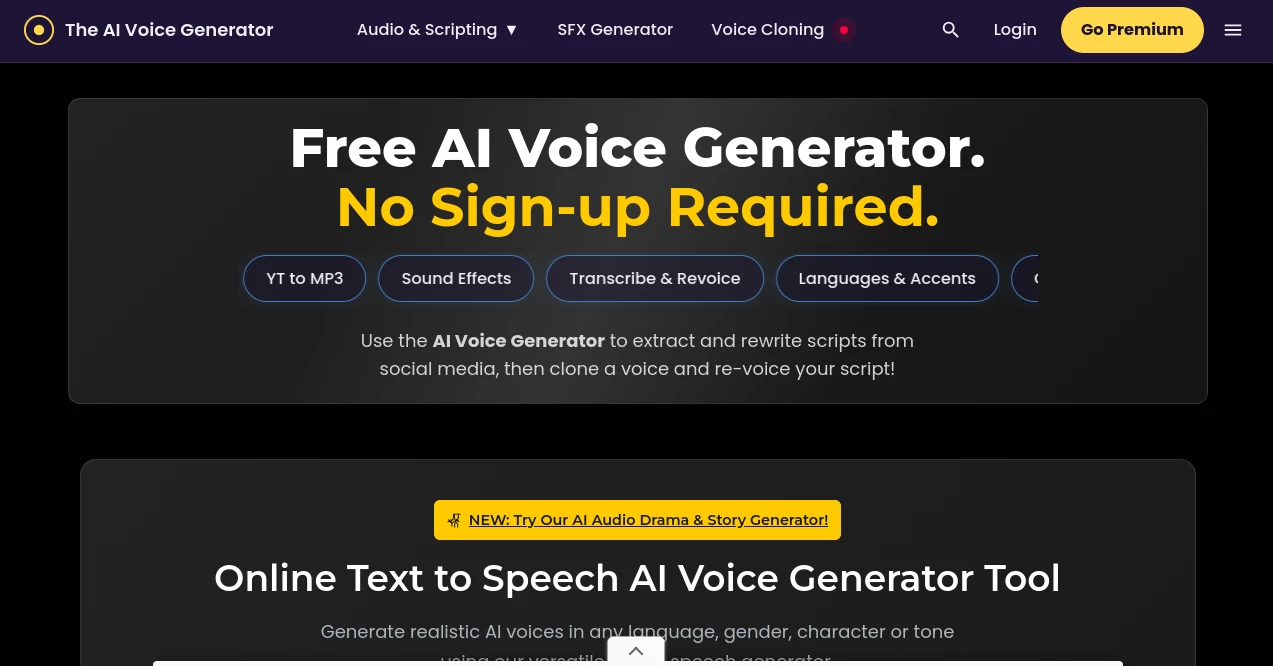
What is The AI Voice Generator?
The AI Voice Generator slips into your workflow like an old friend who knows just what to say, whipping up natural-sounding spoken words from simple text in no time flat. Picture this: you're knee-deep in a video project, and instead of fumbling with clunky recordings, you type out your lines and hit play on a voice that fits the mood perfectly. It's drawn a crowd of creators who swear by its no-fuss approach, turning solo brainstormers into polished producers without breaking the bank or the bank of time.
Introduction
A few years back, a handful of audio enthusiasts got tired of shelling out for pricey studios just to hear their scripts come alive, so they pieced together this gem as a way to democratize the magic. What kicked off as a basic converter has since bloomed into a playground for voices, pulling in podcasters, YouTubers, and even game devs who needed quick, quality sound without the hassle. Stories float around from users who nailed a viral clip on their first try, or salvaged a rushed deadline with a batch of clips that sounded pro. It's that rare tool that feels generous from the jump, handing over the reins to anyone with a story to tell and letting the tech handle the heavy lifting.
Key Features
User Interface
You land on a page that's all business in the best way—no pop-ups or endless forms, just a big text box ready for your words, with a little ticker showing how much room you've got left. Below it, a dropdown brims with voice picks, easy to scroll and sample with a quick click. Everything flows in a single view, from typing to tweaking to downloading, like chatting with a collaborator who never interrupts your train of thought.
Accuracy & Performance
It catches the little things, like a pause after a comma or the lift in a question, spitting out clips that roll off the tongue smooth and true. Even with a full script, it wraps up in seconds, no buffering or half-baked outputs to frustrate the flow. Folks who've tested it against pricier setups often nod at how it holds its own, delivering tones that fool listeners into thinking it's a real read-through every time.
Capabilities
With a library pushing eight hundred voices strong, spread across over a hundred tongues, it covers everything from gravelly narrators to bubbly sidekicks, complete with accents that add that extra layer of real. Toss in a dash of drama mode, and it builds out full scenes with back-and-forth banter or layered effects, perfect for spinning tales or scripting chats. It's got the chops for cloning quirks too, letting you mimic favorites for fun twists on familiar lines.
Security & Privacy
Since you can dive in without spilling any personal details, it keeps things light on the data front, processing your text on the fly and tossing the scraps once the audio's yours. No sneaky trackers or shared files unless you opt in for extras, giving you that peace of mind to experiment freely without a second glance over your shoulder.
Use Cases
Content folks grab it for dubbing shorts with character flair, making TikToks pop with voices that match the energy. Developers weave in prepped replies for chat apps, skipping the recording booth altogether. Storytellers fire up audio plays from book bits, layering emotions that pull listeners right in. Even educators slip it into lessons, voicing over slides with accents that make history feel alive, turning dry facts into dinner-table chats.
Pros and Cons
Pros:
- Zero cost to start, no logins nagging you from the get-go.
- Huge voice pool means options for every ear and earworm.
- Snappy speeds that keep ideas hot off the press.
- Handles global tongues without a hitch or extra fee.
Cons:
- Short clips work best; epics need chopping to avoid hiccups.
- Advanced batches hide behind a quick sign-up wall.
- Fine emotions lean on your text smarts, not auto-magic.
Pricing Plans
It's all on the house for the essentials—paste, pick, play, and pocket your file without a whisper of a charge. If you crave the bells like bulk runs or saved sessions, a free account unlocks them, still no wallet hit. That open-door policy keeps it welcoming, letting you scale up as your projects grow without the sticker shock.
How to Use The AI Voice Generator
Swing by the site and drop your lines into the box, minding the character nudge to keep it tidy. Scroll for a voice that vibes—maybe a warm storyteller or zippy host—then tap generate and listen to the magic unfold. Polish with punctuation pauses if needed, snag the MP3, and weave it into your edit. For bigger builds, sign up to string multiples together, turning singles into symphonies step by easy step.
Comparison with Similar Tools
Where some setups lock the good stuff behind paywalls or force you through tutorials, this one hands over the keys upfront, though those might offer fancier edits for studio types. Against app-heavy rivals, it stays web-light and login-free for basics, edging out for quick hits but maybe trailing in deep customization chains. It lands that sweet spot for everyday creators who want solid sound without the setup circus.
Conclusion
The AI Voice Generator wraps up the hunt for hassle-free audio, serving up voices that breathe life into words with a generosity that sticks. It turns 'what if I could hear it?' into 'listen to this,' empowering anyone to sound sharp and share wide. As stories keep calling for fresh ears, this tool tunes in right, proving that great voices don't need deep pockets—just a spark and a screen.
Frequently Asked Questions (FAQ)
How do I make a voice assistant sound spot-on?
Script out responses here, export the files, and plug them into your bot setup for seamless playback.
Can it nail different characters or celebs?
Yep, pick from the roster or tweak text for age, mood, or mimic favorites to fit your scene.
What's the top free pick out there?
It boils down to your gig, but this one's tough to beat for no-strings quality and variety.
Does punctuation really change the output?
Big time—dots for breaths, dashes for drama, it all shapes the flow like a director's cue.
Any limits on what I can create?
Keep texts clean and under the cap per go; for marathons, break 'em up and batch if logged in.
AI Text to Speech , AI Voice Cloning , AI Speech Synthesis , AI Voice Assistants .
These classifications represent its core capabilities and areas of application. For related tools, explore the linked categories above.
The AI Voice Generator details
This tool is no longer available on submitaitools.org; find alternatives on Alternative to The AI Voice Generator.
Pricing
- Free
Apps
- Web Tools
Categories

The AI Voice Generator Alternatives Product

Qwen3 TTS

VideoDubber

NepVox

PolyBuzz

Adobe Podcast
vo4 ai

AI2AI project

Goose Pod

Vapi