🧠 AI Quiz
Think you really understand Artificial Intelligence?
Test yourself and see how well you know the world of AI.
Answer AI-related questions, compete with other users, and prove that
you’re among the best when it comes to AI knowledge.
Reach the top of our leaderboard.


















AI Thumbnail Maker
What is AI Thumbnail Maker?
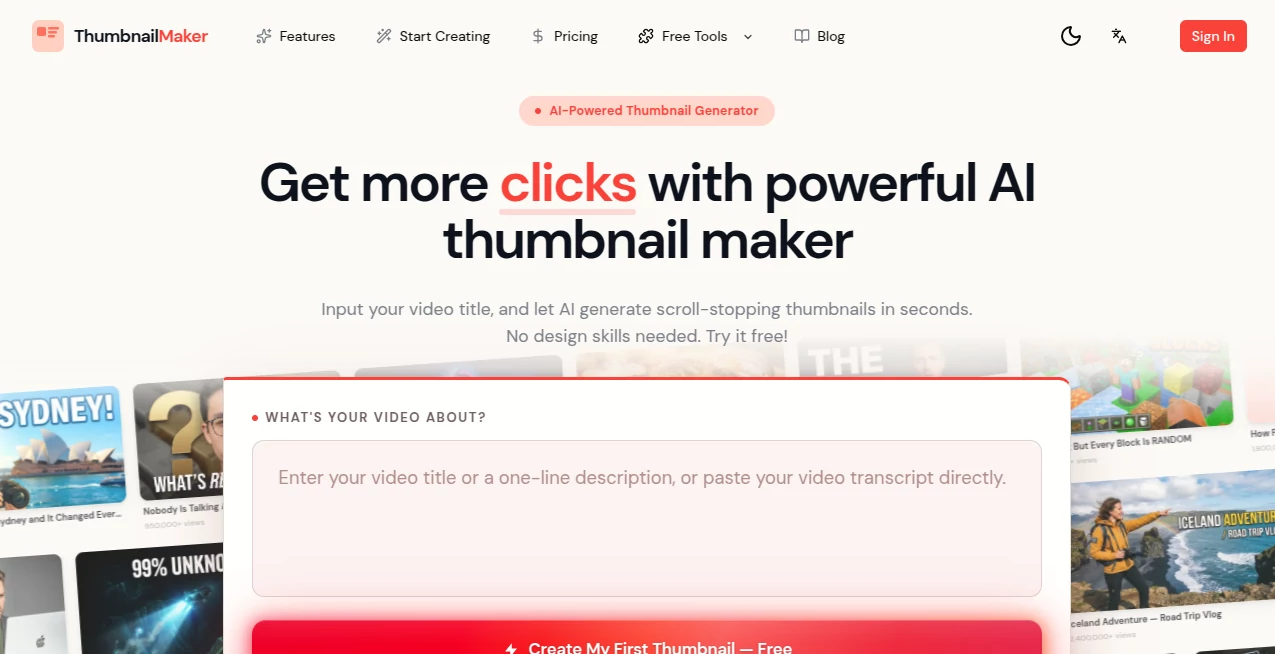
Nothing hurts more than spending hours editing a video only to watch it get ignored because the thumbnail looks boring. This tool fixes that frustration beautifully. You upload a screenshot from your video or describe what you want, and it quickly generates eye-catching thumbnails that actually make people want to click. I’ve seen creators test different versions and immediately notice which one performs better—just from the first few hours after posting. It’s the kind of practical help that turns average videos into ones that stand out in crowded feeds.
Introduction
Great thumbnails are often the difference between a video getting watched and getting skipped. Most creators either spend too much time in Canva or Photoshop, or settle for something basic that doesn’t grab attention. This platform makes the whole process fast and effective by using AI to suggest strong compositions, bold text, vibrant colors, and eye-catching elements tailored to your content. It’s especially useful for YouTube creators, but works just as well for TikTok, Instagram, or any platform where the first impression matters. The best part? You don’t need design skills—just your video and a few minutes.
Key Features
User Interface
The layout is clean and purpose-built. Upload your video screenshot or photo, add a title suggestion if you want, choose a style direction, and watch multiple thumbnail options appear. You can tweak text, colors, and layout with simple clicks—no layers or complicated tools required. The side-by-side preview makes it easy to pick the strongest version before downloading. It feels designed for busy creators who want results fast rather than fiddling with software for hours.
Accuracy & Performance
It understands what makes thumbnails work—strong focal points, readable text, emotional contrast, and trending visual styles. The AI suggests compositions that actually increase click potential rather than just looking pretty. Generation is quick, and the results stay sharp even when you upscale or add bold text. In practice, creators often find at least one version that feels ready to publish right away.
Capabilities
You can generate multiple variations from one upload, customize text placement and fonts, adjust colors to match your brand, add emojis or effects, and choose different aspect ratios for various platforms. It works with both video screenshots and regular images, and the AI helps suggest high-click potential layouts. The output is high-resolution and ready for immediate use—no extra editing needed in most cases.
Security & Privacy
Your uploaded images are processed securely and not stored longer than necessary. There’s no forced account for basic use, so you can test ideas privately. For creators who work with client content or upcoming videos, that respectful approach matters.
Use Cases
A gaming YouTuber uploads a screenshot from their latest playthrough and gets thumbnails that highlight the most exciting moment with bold text. A cooking channel turns recipe stills into appetizing previews that drive more views. A vlogger creates consistent branding across episodes without spending hours in design software. Small businesses use it for product announcement thumbnails that look professional on a budget. It fits anywhere a strong first impression can make the difference between being seen and being scrolled past.
Pros and Cons
Pros:
- Fast generation of multiple strong options from one upload.
- Smart suggestions that actually help with click-through potential.
- Easy customization without needing design experience.
- High-quality outputs ready for all major platforms.
- Free tier available for regular use.
Cons:
- Very specific brand styles may need a few attempts to match perfectly.
- Advanced features and unlimited generations require a paid plan.
Pricing Plans
The free version gives you enough generations per day to create thumbnails for several videos comfortably. Paid plans unlock unlimited creations, priority processing, more style options, and higher resolution downloads. The upgrade feels worth it once you start posting more frequently, especially when you see the time saved and improved performance.
How to Use Thumbnail Maker
Upload a key screenshot from your video or any relevant image. Add your title or headline if you want the AI to incorporate it. Choose a general style or let it suggest options. Review the generated thumbnails, tweak text, colors, or layout on the ones you like, and download your favorite. Test a couple of variations on your next video and see which one performs better. The whole process usually takes just a few minutes from upload to final file.
Comparison with Similar Tools
Many thumbnail tools are either too basic or require manual design work. This one stands out by combining smart AI suggestions with easy customization, giving better results faster than generic editors. It focuses specifically on what works for video platforms rather than general graphic design, which makes the output more effective for driving clicks compared to broader tools.
Conclusion
A strong thumbnail can make or break a video’s success, but creating one shouldn’t eat up your whole editing day. This tool makes the process quick, effective, and even enjoyable. It helps creators focus more on making great content and less on struggling with design. When your thumbnails start pulling in more views and the workflow feels smoother, you realize how much this kind of practical AI help matters. For anyone serious about growing their channel or content, it’s a worthwhile addition to the toolkit.
Frequently Asked Questions (FAQ)
How many thumbnails can I generate for free?
The free tier offers a good daily limit—enough for several videos per day.
Do I need design experience?
Not at all. The AI handles most of the heavy lifting while still letting you make easy adjustments.
Can I use my own branding?
Yes—you can upload logos, choose brand colors, and customize text to match your style.
Are the images high resolution?
Yes, outputs are sharp and suitable for all major platforms, with even higher options on paid plans.
Is it only for YouTube?
It works great for YouTube but is equally useful for TikTok, Instagram, Facebook, and any video platform.
Photo & Image Editor , AI Art Generator , AI Design Generator , AI Thumbnail Maker .
These classifications represent its core capabilities and areas of application. For related tools, explore the linked categories above.
AI Thumbnail Maker details
Pricing
- Free
Apps
- Web Tools
Categories

AI Thumbnail Maker Alternatives Product
China Brush
z image

deck cleaner

AI Clothes

Nano Banana …

Banana Pro

Image To Ima…

Remove Handw…

CozAIPhoto