
🧠 AI Quiz
Think you really understand Artificial Intelligence?
Test yourself and see how well you know the world of AI.
Answer AI-related questions, compete with other users, and prove that
you’re among the best when it comes to AI knowledge.
Reach the top of our leaderboard.


















AI translation
AI-Powered Localization for Effortless Global Reach

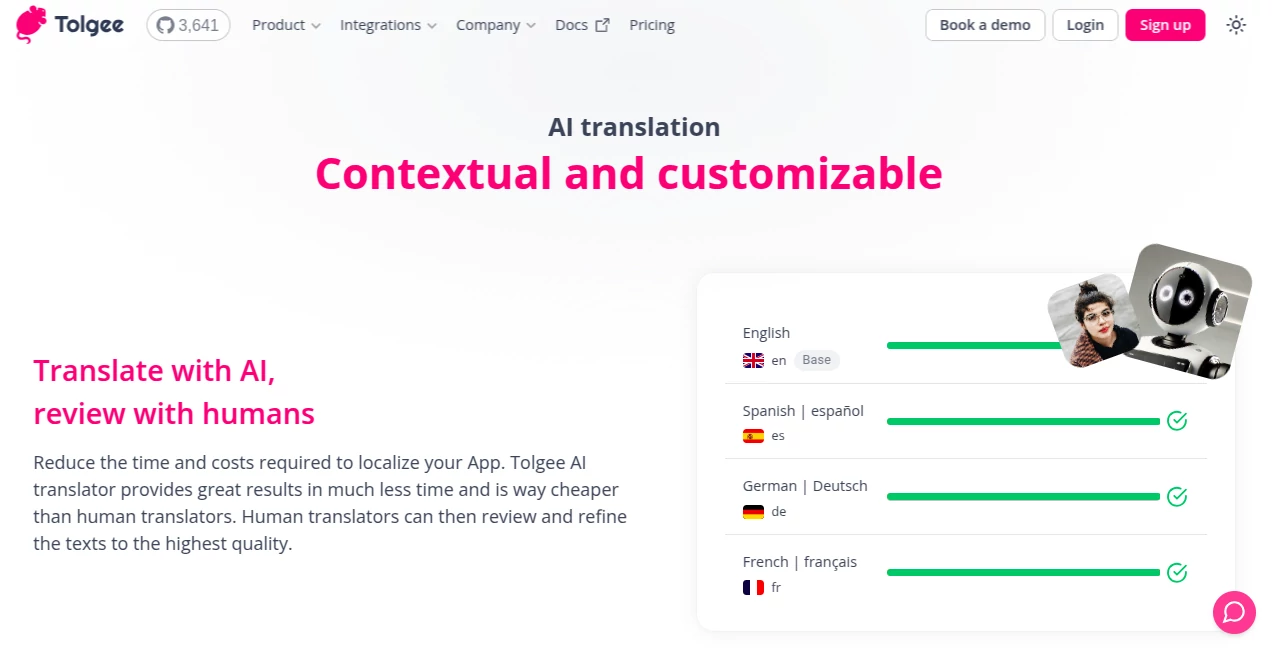
What is AI translation?
Tolgee slips into the workflow of developers and translators like a well-oiled gear, using smart tech to handle the heavy lifting of turning apps into worldwide wonders. It starts with quick drafts that capture the essence, then invites a human touch to polish them just right. Folks building everything from mobile games to enterprise dashboards have found it cuts down the usual headaches, letting them focus on what matters—getting their creations into hands across borders without the budget busting blues.
Introduction
Tolgee grew out of the real-world gripes of teams buried in localization chores, where every string of text meant hours of back-and-forth and surprise costs. A few years in the making, it hit the ground running by blending clever algorithms with the wisdom of seasoned linguists, quickly becoming a whisper in the ears of indie devs and big outfits alike. I've heard from users who went from dreading quarterly updates to breezing through them, all thanks to how it anticipates the nuances that make or break a user's experience. It's that rare tool that feels like it gets the grind, turning what used to be a slog into something almost enjoyable.
Key Features
User Interface
The dashboard opens up clean and inviting, with a central hub where your app's strings pop up alongside their contexts—no more guessing what "Share" means in a menu versus a button. Tabs let you flip between languages effortlessly, pulling in previews that show how tweaks land in real spots. The playground area stands out, like a sandbox for prompts where you can fiddle with models and see changes ripple through sample texts, all without leaving the flow. It's the kind of setup that rewards a quick glance but unfolds deeper the more you poke around.
Accuracy & Performance
What grabs you first is how it tunes into the full picture, pulling app details to craft translations that don't just swap words but carry the right vibe—think nailing a casual app tone in French without it sounding stiff. Speeds are snappy, handling batches in minutes that would've taken days, and it holds steady even as projects scale. Teams note fewer revisions needed upfront, with initial passes often clocking in at levels that rival a first human go, saving everyone a round of emails.
Capabilities
It goes beyond basic swaps by letting you craft custom nudges for the engine, weaving in project vibes or language quirks to guide the output. Hook it to your pick of big-name models, or roll your own for that extra layer of control, and it balances loads to keep things humming without hiccups. From auto-grabbing screenshots for context to layering notes per tongue, it builds a bridge between code and culture, making sure nothing gets lost in the handoff.
Security & Privacy
Your app's guts stay shielded, with tight controls on who sees what and where data flows—think encrypted handshakes and options to keep sensitive strings off the cloud entirely. It plays nice with compliance standards, wiping temps clean after jobs wrap, so you can breathe easy about those proprietary phrases. Developers appreciate the transparency, knowing their edge stays sharp without leaks or lags from overzealous logging.
Use Cases
Game studios use it to localize dialogue trees, ensuring jokes land just as punchy in Spanish as in English, while e-learning platforms adapt lessons with cultural nods that keep learners hooked. SaaS teams roll it out for dashboard labels, tweaking for regional flavors without derailing sprints, and marketing apps breathe life into campaigns that feel native from day one. It's a lifeline for anyone eyeing markets where a off-kilter phrase could tank trust.
Pros and Cons
Pros:
- Shaves serious time off launches, blending speed with smarts.
- Contextual smarts mean fewer fixes down the line.
- Flexible hooks to your stack, no forced overhauls.
- Budget-friendly entry that scales without sticker shock.
Cons:
- Human polish still key for the trickiest idioms.
- Setup takes a beat to sync with quirky codebases.
- Relies on solid prompts for peak punch.
Pricing Plans
You can start free with core tools for small projects, dipping into AI bursts without a dime. Monthly plans kick in around the mid-teens for unlimited strings and basic model access, stepping up to forties for teams with custom integrations and priority queues. Enterprise bends to your needs with dedicated support, and annuals trim the tab nicely. Trials give a full month to test the waters, easing the leap.
How to Use Tolgee
Plug it into your repo first, letting it sniff out strings and contexts on the fly. Jot a quick project blurb to set the tone, then head to the playground to test a prompt on a sample—like swapping "Share" across keys. Tweak the fragments till it sings, save your winner, and hit translate for the batch. Review the drafts side-by-side, nudge the odd ones, and push live. It's a loop that gets smoother with each run, like tuning an instrument you already love.
Comparison with Similar Tools
Next to straight machine swaps, Tolgee layers in app smarts that keep things feeling local, though those might edge for sheer volume on a shoestring. Against full-suite locals, it skips the bloat, focusing on the AI spark without dragging in extras you won't use. It carves a cozy spot for devs who want quick wins with room to grow, outshining the rigid ones in flexibility.
Conclusion
Tolgee wraps the wild world of going global in a neat package, blending brains and balance to make localization feel less like a chore and more like an extension of your craft. It empowers teams to reach further without stretching thin, turning potential pitfalls into polished portals for users everywhere. In a landscape where borders blur daily, this tool stands as a steady hand, guiding creations to resonate right where they land.
Frequently Asked Questions (FAQ)
Does it work with my framework?
It hooks into most popular ones out of the box, from React to Flutter, with guides for the rest.
How much human oversight is needed?
Depends on the nuance, but many find a light pass catches the gems.
Can I use my own models?
Yep, bring your hosted favorites for that tailored touch.
What languages are supported?
Over a hundred, with room to request more as you go.
Is there a learning curve?
Gentle for basics, but the playground unlocks the real magic quick.
These classifications represent its core capabilities and areas of application. For related tools, explore the linked categories above.
AI translation details
This tool is no longer available on submitaitools.org; find alternatives on Alternative to AI translation.
Pricing
- Free
Apps
- Web Tools
Categories

AI translation Alternatives Product

AI page tran…

Simplified

ModelsLab

Rephrazy
RewriteBar

TranslateAI …

Klyra AI

AI Subtitle …

Maestra
