
🧠 AI Quiz
Think you really understand Artificial Intelligence?
Test yourself and see how well you know the world of AI.
Answer AI-related questions, compete with other users, and prove that
you’re among the best when it comes to AI knowledge.
Reach the top of our leaderboard.


















Tonemark

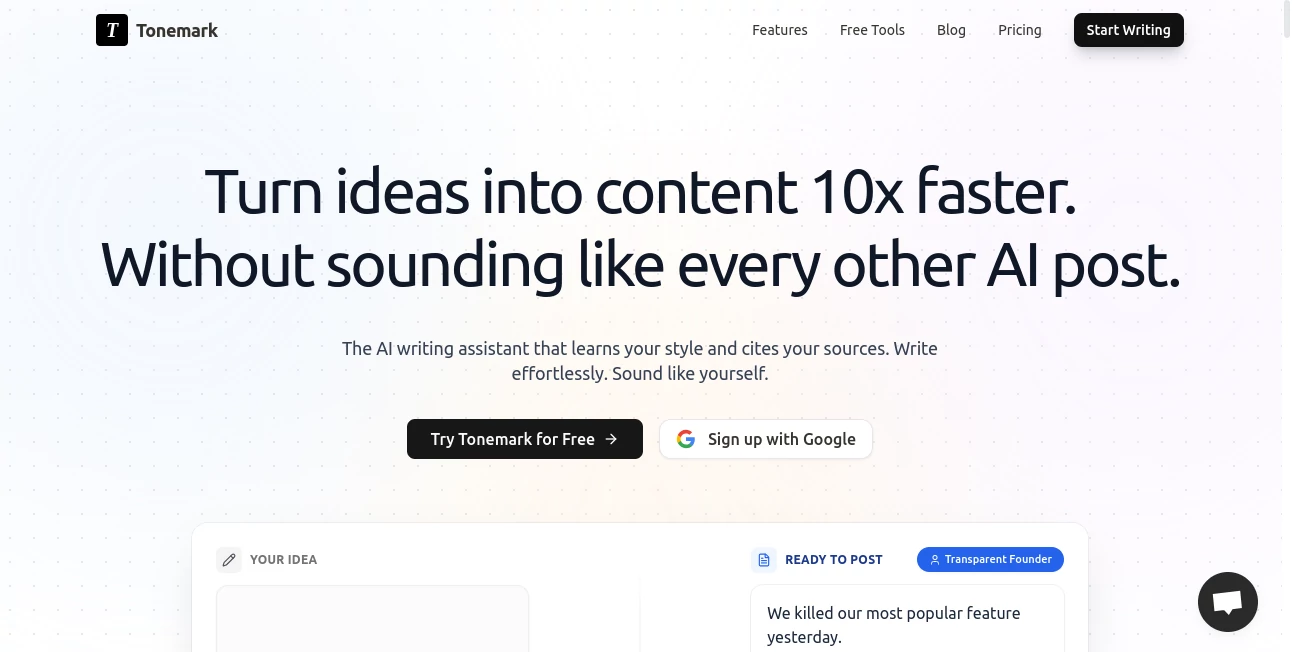
What is Tonemark?
Imagine writing a message that lands exactly the way you meant it—warm when you want warmth, sharp when you need edge, playful when the mood calls for it. This little tool does precisely that: it reads your text and instantly reshapes it into whatever tone fits the moment. I’ve used it for everything from client emails that needed to sound confident yet approachable to social posts that had to feel fun without trying too hard. It’s one of those things that once you start using it, you wonder how you ever sent anything without it.
Introduction
Writing with the right tone is tricky—too formal and you sound stiff, too casual and you risk coming off careless. This platform solves that problem beautifully by letting you generate, save, and apply custom tones in seconds. It’s built for marketers, founders, creators, and anyone who communicates a lot and wants every word to feel intentional. What I love most is how quickly it understands nuance: tell it “make this sound like a friendly coworker” and it gets it. In my own work, it’s cut revision time in half and made even last-minute messages feel polished and on-brand.
Key Features
User Interface
The layout is clean and focused—paste your text on the left, pick or type a tone on the right, and watch the result appear instantly. No overwhelming menus or hidden settings; it’s designed so you can jump in and start tweaking without a learning curve. There’s also a tone library where you can save and reuse your favorites, which has become my secret weapon for keeping client voices consistent across long campaigns.
Accuracy & Performance
It’s surprisingly accurate at capturing subtle differences—professional vs. authoritative, friendly vs. overly chummy, witty vs. sarcastic. The suggestions feel human, not robotic, and it processes quickly even with longer copy. I’ve thrown complex paragraphs at it during late-night edits and it never felt like I was waiting. The output always sounds natural, which is rare in tone tools.
Capabilities
Beyond basic rewrites, you can create custom tones from scratch (“like a witty British journalist” or “confident startup founder”), save them for reuse, and even analyze existing copy to match a specific voice. It handles everything from short social captions to full emails and blog intros. The ability to save and name tones has been a game-changer for teams—everyone writes in the same voice without endless feedback loops.
Security & Privacy
Privacy is handled thoughtfully: your text isn’t stored unless you explicitly save a tone, and there’s no training on user data. For anyone working with sensitive copy—client proposals, legal copy, internal comms—this level of care makes it easy to trust.
Use Cases
Marketers use it to keep brand voice consistent across LinkedIn, Twitter, and email campaigns. Founders draft investor updates that sound confident without arrogance. Content creators match tones to different platforms—playful on TikTok, thoughtful on Substack. Even customer support teams use it to soften responses while staying professional. I’ve seen sales reps turn cold emails into warm conversations just by running them through a “approachable expert” tone preset.
Pros and Cons
Pros:
- Feels like having a writing partner who really understands tone.
- Saves tones for reuse—huge time-saver for recurring projects.
- Fast, accurate, and surprisingly nuanced.
- Clean, distraction-free interface.
Cons:
- Free tier has limits on saves and rewrites.
- Advanced tone customization is paid-only.
Pricing Plans
Free plan gives you enough daily rewrites to get a feel for it. Pro unlocks unlimited saves, custom tone creation, and priority processing for about the cost of a couple coffees a month. There’s also a team plan with shared tone libraries, which is perfect for agencies or marketing departments. The pricing feels fair—especially when you consider how much time and revision cycles it saves.
How to Use ToneMark
Head to the dashboard, paste your text, and either choose a preset tone (Professional, Friendly, Witty, etc.) or type your own description. Hit generate and review the result. Like it? Save it as a custom tone for future use. Need to tweak? Adjust the tone description and regenerate. For teams, create a shared library so everyone stays aligned. I usually start with a preset, then refine it to match the exact voice I’m going for—it takes seconds.
Comparison with Similar Tools
Most tone tools feel either too rigid (preset-only) or too vague (generic rewrites). This one strikes the perfect balance: fast presets for speed, deep customization for precision, and saved tones for consistency. It’s not trying to rewrite your entire voice—it just helps you nail the delivery, which is exactly what most of us need.
Conclusion
This tool quietly solves one of the hardest parts of writing: getting the tone right. It’s fast, accurate, and surprisingly intuitive, making every message feel more intentional. Whether you’re sending a quick email, crafting a campaign, or building a personal brand, it helps you sound like the best version of yourself—every time.
Frequently Asked Questions (FAQ)
How many tones can I save?
Unlimited on Pro; limited on free.
Can I share tones with my team?
Yes, on the team plan—perfect for brand consistency.
Does it support multiple languages?
Yes, it works well in English, Spanish, French, German, and more.
Is my data private?
Absolutely—nothing is stored unless you save a tone.
Can I use it for long-form content?
Yes, it handles paragraphs or full emails beautifully.
AI Creative Writing , AI Content Generator , AI General Writing , AI Writing Assistants .
These classifications represent its core capabilities and areas of application. For related tools, explore the linked categories above.
Tonemark details
This tool is no longer available on submitaitools.org; find alternatives on Alternative to Tonemark.
Pricing
- Free
Apps
- Web Tools
Categories

Tonemark Alternatives Product

Perchance AI…

AI Fanfic Ge…

PostingCat

Automateed
Serplux

Shutterstock

StudentAI De…
md2card

Jasper
