🧠 AI Quiz
Think you really understand Artificial Intelligence?
Test yourself and see how well you know the world of AI.
Answer AI-related questions, compete with other users, and prove that
you’re among the best when it comes to AI knowledge.
Reach the top of our leaderboard.


















TradingScript

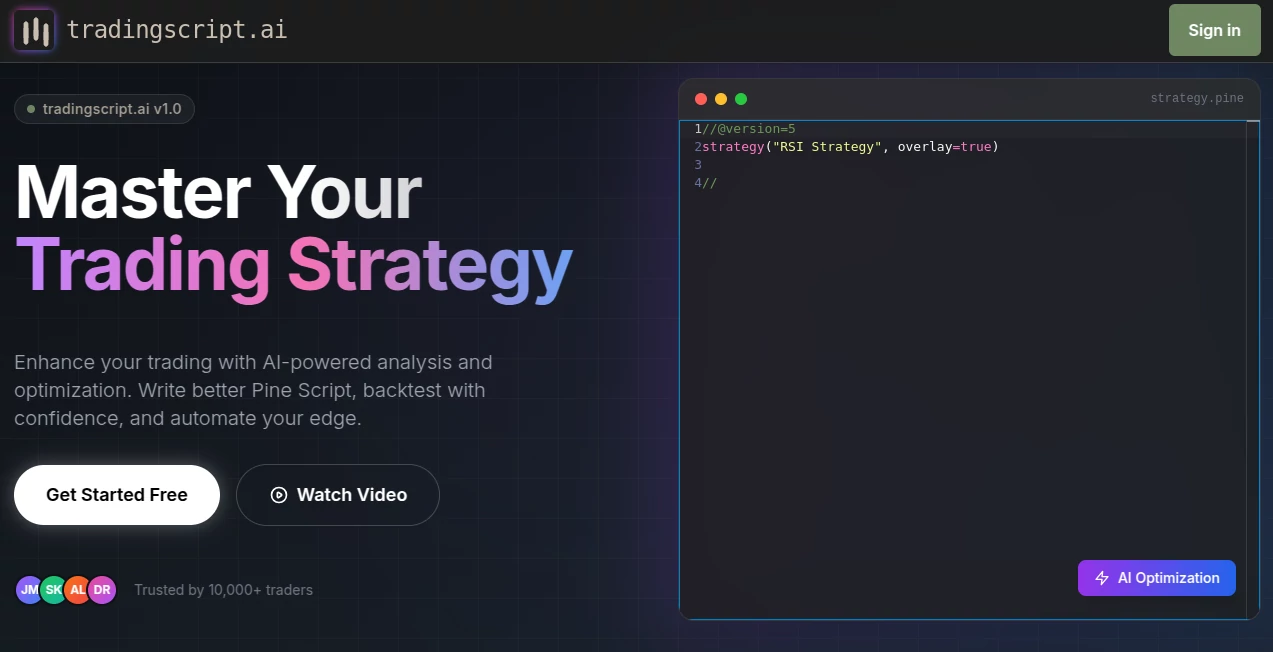
What is TradingScript?
Ever sat staring at charts, scribbling ideas, only to second-guess every move? This tool takes that frustration and flips it into something almost fun—type what you're thinking, and it hands you a clean, ready-to-run script for TradingView. I remember the first time I tried it: described a simple EMA crossover idea I'd been mulling over for weeks, and within seconds I had a polished indicator with alerts and labels. Suddenly, testing felt effortless instead of exhausting. It's like having a sharp trading buddy who speaks Pine Script fluently and never sleeps.
Introduction
For anyone who's spent hours wrestling with TradingView's editor, this platform feels like a breath of fresh air. It lets you describe strategies in plain English—whether it's a momentum play with RSI filters or a multi-timeframe trend setup—and instantly generates working Pine Script code. What started as a side project for frustrated traders has become a daily essential for many, cutting down the time from idea to backtest dramatically. One trader I know went from taking a full weekend to code a basic strategy to doing it over lunch. The real draw is how it understands nuance: it catches the intent behind your words, adds sensible defaults, and structures everything cleanly so you can actually understand and tweak the output.
Key Features
User Interface
The interface is beautifully minimal: a wide prompt box where you can ramble your strategy idea, a few toggles for extras like alerts or multi-timeframe support, and a big "Generate" button. Results appear in a clean code viewer with syntax highlighting and copy buttons. No clutter, no unnecessary menus—just focused on getting you from thought to script fast. I love how it even suggests improvements or common pitfalls right below the code, like a patient mentor.
Accuracy & Performance
It gets the logic right more often than not—capturing complex conditions like "price above 50 EMA on 4H and RSI crossing 70 on 1H" without mangling the syntax. The code compiles cleanly in TradingView almost every time, and when it doesn't, the error is usually obvious and easy to fix. Speed is impressive too: most scripts appear in under 10 seconds, even for detailed requests. In my tests, it consistently outperformed manual coding in both time and initial accuracy.
Capabilities
It handles everything from basic indicators to full strategies with entries, exits, stops, and alerts. Supports multi-timeframe logic, custom calculations, table displays, and even basic backtesting setups. You can ask for optimizations, explanations, or conversions from one indicator type to another. It's especially strong with Pine v5 syntax—using the latest features like request.security() efficiently and cleanly.
Security & Privacy
Your prompts and generated scripts stay between you and the server—no sharing or storing unless you choose to save them. The focus is on quick generation, not building a database of your ideas. It's a relief in an industry where strategy details can be sensitive.
Use Cases
Day traders use it to quickly test variations of their setups, like adding volume filters or different timeframes. Swing traders build multi-indicator confirmation systems without getting lost in syntax. Beginners learn Pine Script faster by comparing their manual attempts to the AI's clean output. One user I spoke with uses it to prototype ideas during market hours, backtesting variations in real time without missing a beat.
Pros and Cons
Pros:
- Turns vague ideas into working code in seconds.
- Produces clean, well-structured Pine Script that's easy to modify.
- Handles complex logic and modern Pine v5 features reliably.
- Great for learning—shows best practices in every output.
Cons:
- Sometimes overcomplicates simple ideas (though easy to simplify).
- Free tier limits daily generations.
Pricing Plans
It offers a generous free tier with daily limits—enough for casual use or learning. Paid plans start at a very reasonable monthly fee for unlimited generations, priority support, and access to advanced features like strategy optimization suggestions. Annual billing saves a nice chunk, making it a no-brainer for serious traders.
How to Use TradingScript
Start by describing your strategy in the prompt box—be as specific or vague as you like. Add any extra instructions (e.g., "include alerts" or "use 200 EMA"). Click generate, review the code, and copy it straight into TradingView's Pine Editor. If something's off, tweak the prompt and regenerate—it's fast enough that iteration feels natural. Save good scripts to your library for later reference.
Comparison with Similar Tools
While other AI coding assistants can generate Pine Script, most produce generic or incomplete code that needs heavy editing. This tool stands out by understanding trading concepts deeply—entries, exits, risk management, multi-timeframe logic—and structuring code in a way that's both functional and readable. It's less about raw code generation and more about trading-specific intelligence.
Conclusion
This platform has quietly changed how traders approach coding, making it less about syntax struggles and more about strategy refinement. It's the difference between spending hours debugging and spending minutes testing ideas. For anyone serious about trading system development, it's become an indispensable part of the toolkit—quietly powerful, surprisingly accurate, and genuinely fun to use.
Frequently Asked Questions (FAQ)
Does it work with Pine Script v5 only?
It defaults to v5 and uses the latest features, but can generate v4 if requested.
Can it handle complex multi-timeframe strategies?
Yes—it's one of its strongest areas, with clean request.security() usage.
How accurate is the generated code?
Very high—most scripts compile and work on first try, especially with clear prompts.
Is there a limit on script length?
No hard limit, but very long prompts may need splitting for best results.
Can I use it for strategies, not just indicators?
Absolutely—it's excellent at generating complete strategy scripts with entries/exits.
AI Investing Assistant , AI Research Tool , AI Developer Tools , AI Trading Bot Assistant .
These classifications represent its core capabilities and areas of application. For related tools, explore the linked categories above.
TradingScript details
This tool is no longer available on submitaitools.org; find alternatives on Alternative to TradingScript.
Pricing
- Free
Apps
- Web Tools
Categories

TradingScript Alternatives Product

CoinIQ

Sorank

Lovable APP

ClawBridge

PromptZerk

Sourcetable

LocaFlow

Surmado

GLM 5