
🧠 AI Quiz
Think you really understand Artificial Intelligence?
Test yourself and see how well you know the world of AI.
Answer AI-related questions, compete with other users, and prove that
you’re among the best when it comes to AI knowledge.
Reach the top of our leaderboard.

















translatemanga

What is translatemanga?
TranslateManga steps in as a game-changer for comic enthusiasts, letting you swap languages on those intricate panels without losing a stroke of the original art. This handy spot takes your scanned pages and flips the text into something readable in your tongue, all while keeping the frames and flair intact. Fans often chat about how it opens up whole worlds of stories they'd otherwise skim past, turning a language barrier into just another page turn.
Introduction
TranslateManga came along a little while back, sparked by the itch many felt when diving into foreign comics but hitting that wall of unfamiliar words. A small team of readers and tech tinkerers pooled their know-how to craft something that didn't just swap letters but held onto the heart of the drawings too. It caught on quick in online circles where folks trade scans and subtitles, with shares of before-and-afters that show the subtle magic at work. Over time, it's become a quiet staple for those late-night binges, proving that a clever bit of code can make tales from afar feel right at home, one bubble at a time.
Key Features
User Interface
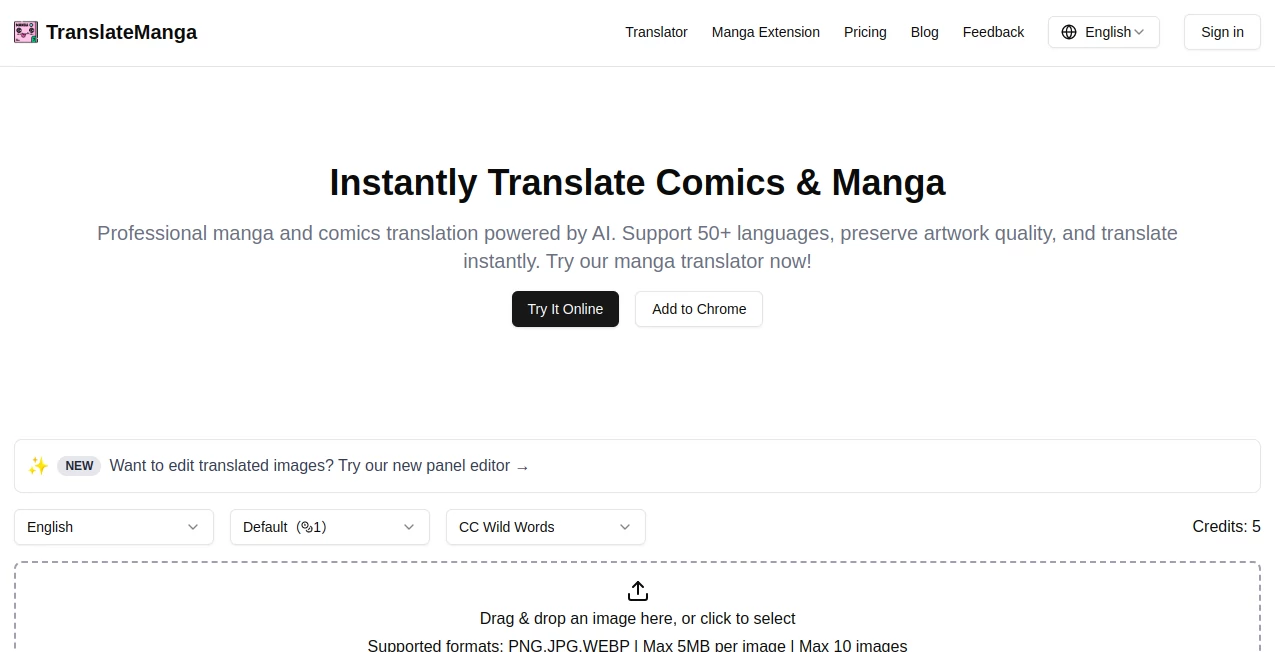
The setup greets you with a no-fuss drag area that practically pulls in your files on its own, or a simple click if that's more your speed. Language picks sit front and center, with a clean sweep of options that don't overwhelm, and a test image handy for a quick whirl. Once things kick off, results slide in smooth, ready for a peek or grab, making the whole thing feel like chatting with a patient librarian rather than wrestling a machine.
Accuracy & Performance
It digs into the details without mangling the flow, swapping phrases that fit the panel's punch and rarely dropping the ball on idioms or quirks. Jobs wrap up in a snap, even with a stack of pages, churning out files that look sharp on any screen. Those who've run it through their favorites often nod at how it keeps the tone true, dodging the stiff swaps that can suck the life out of a scene.
Capabilities
From everyday JPGs to crisp PNGs and handy WEBPs, it handles the common crowd up to a handful per go, flipping them across more than fifty tongues while hugging the original layout close. A fresh editor lets you nudge things post-swap, and paid perks toss in custom lettering for that extra polish. It's built for the scan-and-share set, opening doors to tweak or trade tales in ways that feel fresh yet faithful.
Security & Privacy
Your uploads get the once-over they need then bow out quietly, with no extra hangs or handoffs that raise eyebrows. It keeps things straightforward, letting you control the saves and shares, so personal collections stay just that—yours to revisit without a worry about wandering eyes.
Use Cases
Avid readers dust off old imports, breathing new life into series that sat dusty on shelves, sharing fresh takes with friends who missed the boat. Collectors curate multilingual sets for swaps at meets, turning one-offs into group gems. Aspiring creators mock up cross-border drafts, testing how jokes land in new lands before the big pitch. Even casual browsers batch a chapter for a weekend read, making global gems feel local without the legwork.
Pros and Cons
Pros:
- Holds the artwork's soul tight, no awkward stretches or smudges.
- Covers a crowd of languages, from common to corner curios.
- Quick as a page flip, perfect for binge urges.
- Editor adds that personal nudge without needing extra apps.
Cons:
- Credit counts can climb for steady stacks.
- Caps at ten per turn, so big volumes need batches.
- No endless free rides, though starters ease the dip.
Pricing Plans
It eases you in with a taste that's free to try, good for dipping toes without the tab. From there, credit packs start light at under five for a thousand turns, stepping to bigger bundles around ten or twenty for the long hauls, with deals that stretch further on the yearly nod. Perks like fancy fonts and fast queues tag along on the ups, keeping the gate low for occasional flips.
How to Use TranslateManga
Swing by the main spot and pick your end tongue from the lineup, then drag over your scans—up to ten at a clip, keeping each under five megs. Let it hum through the swap, peek at the previews for any fine touches via the editor, then snag the set for your stack. Loop back with tweaks or more pages, building a bridge to stories that span the seas.
Comparison with Similar Tools
Where general swap shops skim surfaces, TranslateManga hugs the panels close, trading broad brushes for that tailored touch, though those might muse more for mixed media. Against manual markup crews, it lightens the load for quick quests, skipping the slog but perhaps pinching on pixel-perfect poses. It fits fine for frame-focused fans, outpacing the ponderous with poise and precision.
Conclusion
TranslateManga bridges the gaps in graphic tales, handing over a key to kingdoms locked by lingo without losing the linework's lure. It turns the trek from foreign to familiar into a flick of the wrist, proving that smart stands can stretch stories further than solo scans. As comics keep crossing borders, this one's set to stay a steadfast sidekick, one translated twist at a time.
Frequently Asked Questions (FAQ)
What file flavors does it fancy?
JPGs, PNGs, and WEBPs roll right in, up to five megs a pop.
How many tongues in the mix?
Over fifty spots, covering the globe's graphic goodies.
Does it mess with the drawings?
Nah, keeps the frames firm, just freshens the words.
Free for a full flip?
A starter sample says yes, then credits keep the keys turning.
Big batches a bother?
Ten at a go works fine; split the stacks for smoother sails.
AI Translate , AI Rewriter , AI Content Generator , Photo & Image Editor .
These classifications represent its core capabilities and areas of application. For related tools, explore the linked categories above.
translatemanga details
This tool is no longer available on submitaitools.org; find alternatives on Alternative to translatemanga.
Pricing
- Free
Apps
- Web Tools
Categories

translatemanga Alternatives Product

Humanize AI …

Shutterstock

Kirkify

Harvey

AI page tran…

SocialRails

ZeroEdit

img2img.net

Random Promp…
