
🧠 AI Quiz
Think you really understand Artificial Intelligence?
Test yourself and see how well you know the world of AI.
Answer AI-related questions, compete with other users, and prove that
you’re among the best when it comes to AI knowledge.
Reach the top of our leaderboard.

















Receipt Maker

What is Receipt Maker?
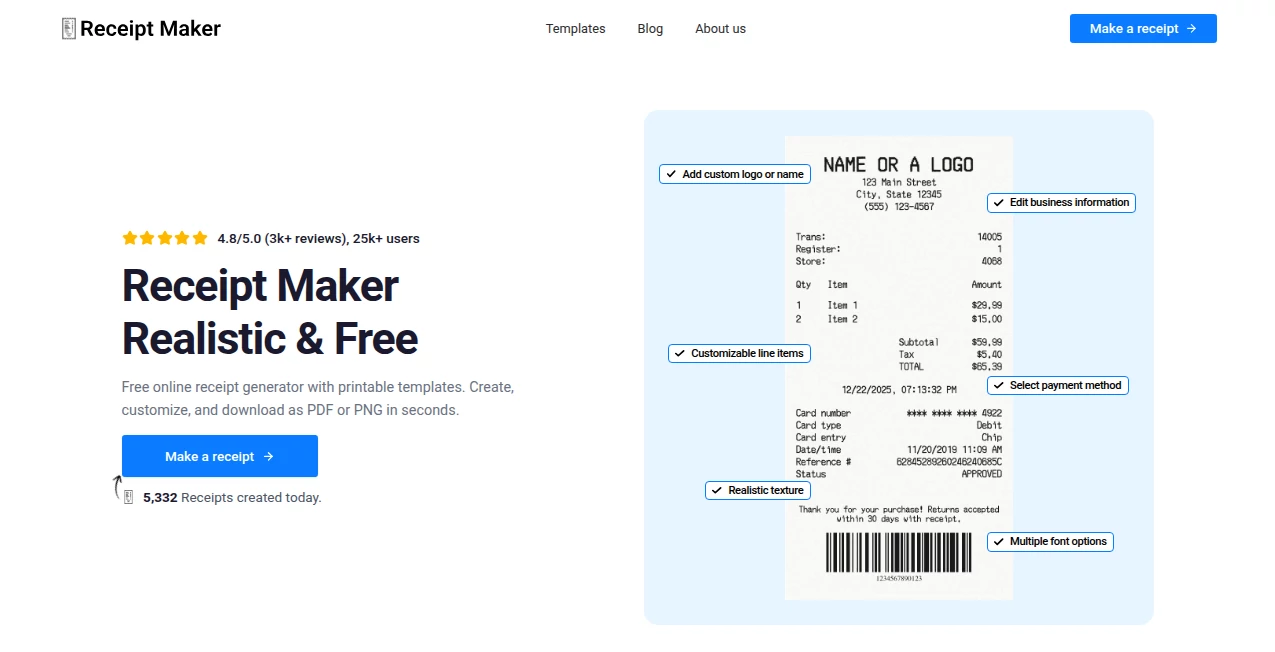
Need a receipt that looks like it just came out of a real cash register? This tool makes it ridiculously easy—and surprisingly convincing. You pick a store type, fill in the details (items, prices, date, taxes), choose a style, and seconds later you have a downloadable PDF or image that could fool most people at a glance. I’ve seen friends use it for prank returns, expense report backups, mock invoices for video shoots, and even as props in short films. The level of detail—the little tax lines, barcode, footer text, subtle crumple effects—is what makes people double-take and say, “Wait… this looks way too real.”
Introduction
Whether it's a harmless joke, a film prop, a mock expense claim for a presentation, or just wanting to recreate that coffee shop receipt from last week for memory’s sake, realistic receipts have a surprising number of legitimate (and fun) uses. This platform removes every hassle: no Photoshop skills, no templates to hunt down, no fiddly alignment. Just choose your look (grocery, restaurant, retail, gas station, etc.), enter the info, and get something that holds up under scrutiny. It’s become a quiet favorite for content creators, pranksters, filmmakers, and small business owners who need quick, believable stand-ins. The realism is impressive, but the simplicity is what keeps people coming back.
Key Features
User Interface
Everything is front and center: pick a receipt style from clear thumbnails (Walmart, Starbucks, local diner, etc.), then a form appears with sensible defaults. Change store name, address, date/time, payment method, add items with prices, taxes, discounts, custom footer notes. Real-time preview updates as you type. One click generates a clean PDF or high-res PNG. It’s the kind of interface that feels thoughtful—never makes you hunt for the “add item” button or wonder where the save option went.
Accuracy & Performance
The generated receipts match real-world layouts almost exactly: correct field placement, believable fonts, proper alignment, even subtle anti-counterfeit patterns or thermal printer dithering on some styles. Generation is near-instant (2–5 seconds), and the output is always crisp at 300 DPI or higher. No blurry edges, no misaligned text, no obvious “made in five seconds” tells. It’s one of those tools where the first result is usually usable as-is.
Capabilities
Dozens of realistic store templates (big chains, local shops, restaurants, cafes, gas stations, pharmacies), fully customizable fields (items, quantities, prices, taxes, discounts, payment type, cashier name, thank-you messages), optional barcode/QR, currency selection, date/time formatting, receipt crumple/distress effects, multi-page support for longer purchases, and export as PDF, PNG, or JPG. It handles VAT/GST, tips, split payments, loyalty points—pretty much anything you’d see on a real receipt.
Security & Privacy
No account needed for basic use—your data never touches a server beyond the generation moment. Generated receipts are created client-side where possible, and nothing is stored unless you explicitly save to your device. For pranksters or filmmakers using sensitive mock data, that zero-retention approach is a real plus.
Use Cases
A YouTuber creates a fake Starbucks receipt for a “I bought everything on the menu” prank video—looks completely legit on camera. A film student needs 90s-era grocery receipts as props; generates a batch in minutes. A stand-up comedian hands out printed “dinner with my ex” receipts to the audience—big laughs. A small business owner mocks up supplier invoices to test accounting workflows before going live. A prank-loving friend “buys” their roommate a $12,000 TV on a printed receipt—classic chaos ensues. Wherever you need believable paper trail magic, it delivers.
Pros and Cons
Pros:
- Realism is uncanny—most people can’t spot it as fake at a glance.
- Wide variety of store styles and customization options.
- Extremely fast—generate in seconds, download instantly.
- No watermark on basic use; clean outputs ready for print or screen.
- Free tier covers most casual needs without pressure to upgrade.
Cons:
- Very long receipts (50+ items) can get slow or require multiple generations.
- Some niche store formats (very country-specific) may need manual tweaks.
- Unlimited generations, batch export, and premium styles are paid.
Pricing Plans
Free plan covers plenty: several generations per day, most popular store styles, basic customization, no watermark on downloads. Premium unlocks unlimited use, every template, batch generation, higher resolution, distress effects, priority support, and custom store creation. Pricing is very reasonable—many users say it’s cheaper than printing fake receipts at a copy shop once you factor in time saved.
How to Use Receipt Maker
Choose a store template from the gallery (or start blank). Fill in the basics: store name/address, date/time, cashier name, payment method. Add items one by one (name, quantity, price) or paste a list. Adjust tax rate, add discounts, tips, custom footer text. Preview updates live—tweak until it looks right. Hit generate, download PDF or image. Print if needed or drop into your video/project. Whole process usually under two minutes.
Comparison with Similar Tools
Most receipt generators look dated or obviously fake—wrong fonts, bad alignment, missing details. This one invests in realism: accurate layouts, modern thermal printer aesthetics, believable math. Where others give you one or two styles, the variety here covers chains, independents, restaurants, international formats. Speed, customization depth, and output quality put it well ahead of free online generators and even some paid mockup sites.
Conclusion
Realistic receipts shouldn’t be hard to fake—especially when the use case is harmless fun, creative work, or testing. This tool makes it effortless while keeping the result believable. It turns a throwaway idea (“wouldn’t it be funny if…”) into something that looks completely legit in seconds. Whether you’re pranking, filming, presenting, or just having fun with design, it delivers every time. Sometimes the smallest detail makes the biggest difference—and this one nails the detail.
Frequently Asked Questions (FAQ)
How realistic do the receipts look?
Very—most people can’t tell at a glance. Correct fonts, alignment, thermal effects, barcodes, math.
Can I use it for pranks?
Yes—many do. Just keep it lighthearted and don’t use for fraud or deception.
Do you have international stores?
Yes—US, UK, EU, Asia, Australia styles included; VAT/GST support built-in.
Can I add custom logos or footers?
Paid plans allow custom elements; free has many built-in options.
Is there a watermark?
No watermark on free or paid—clean downloads every time.
AI Fun Tools , AI Design Generator .
These classifications represent its core capabilities and areas of application. For related tools, explore the linked categories above.
Receipt Maker details
This tool is no longer available on submitaitools.org; find alternatives on Alternative to Receipt Maker.
Pricing
- Free
Apps
- Web Tools
Categories

Receipt Maker Alternatives Product

funboxie

AI 3D World

ModelsLab

Diss Track G…

tarotguide

FeelsTheAura

Flux 2 Klein

flux 3

Seedream 5.0
