
🧠 AI Quiz
Think you really understand Artificial Intelligence?
Test yourself and see how well you know the world of AI.
Answer AI-related questions, compete with other users, and prove that
you’re among the best when it comes to AI knowledge.
Reach the top of our leaderboard.


















Veo 4 AI
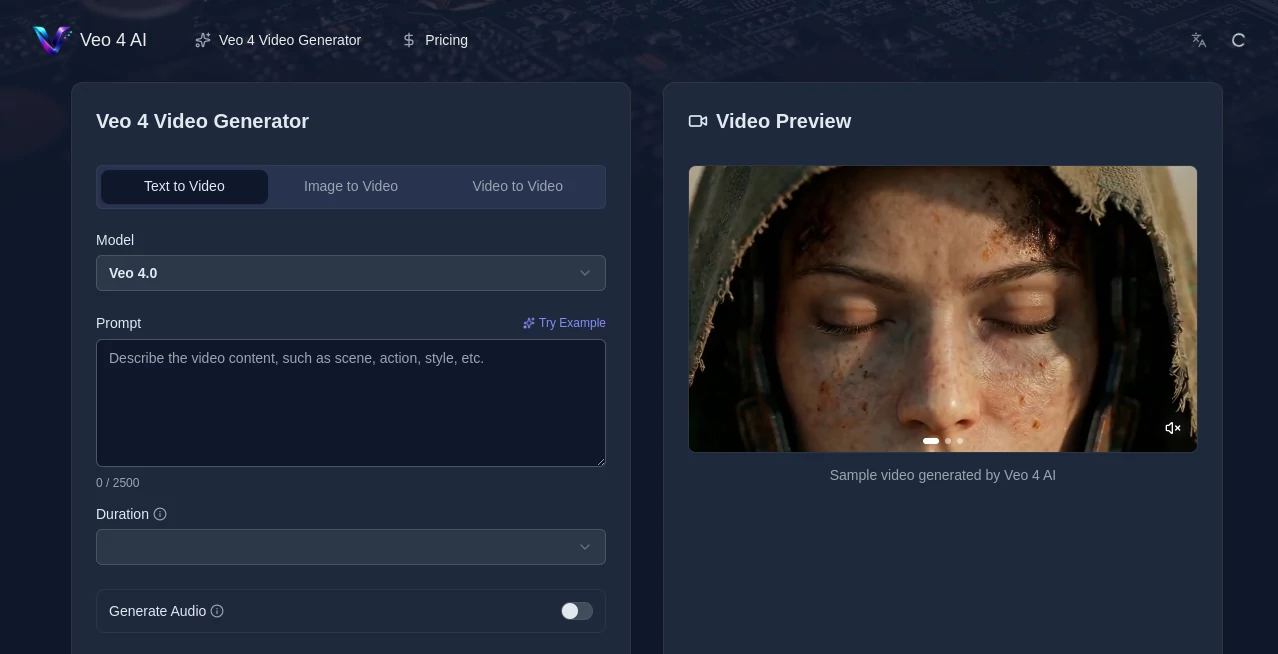
What is Veo 4 AI?
There’s something special about typing a simple scene description and watching it come alive as a short film with proper lighting, natural movement, and even synchronized sound. This tool makes that happen with a level of quality that still surprises me every time I use it. You describe what you want, optionally add a reference image, and within moments you get a clip that feels directed rather than randomly generated. Friends who saw the results asked if I had hired someone to shoot it. The motion has weight, the camera moves feel intentional, and the audio sync actually matches the lips and mood. It turns vague ideas into something you can share proudly, often in under a minute.
Introduction
Making video has always been time-consuming and expensive. Even short clips require planning, shooting, editing, and sound work. This platform changes the equation by letting you generate cinematic videos directly from text prompts or images using Google’s advanced Veo 4 model. It handles realistic physics, multi-angle shots, character consistency, and native audio with lip-sync—all in one go. What used to take hours or a small team now happens in your browser. Creators, marketers, and filmmakers are using it to prototype ideas, create social content, or even produce full ad creatives much faster than before. The results often look close enough to real footage that people do a double take.
Key Features
User Interface
The interface keeps things simple and focused. You type your prompt in a clean box, upload a reference image if you want more control, choose aspect ratio and duration, then hit generate. Previews load quickly so you can tweak and try again without losing momentum. It feels intuitive whether you’re a beginner or someone who’s been making videos for years. No complicated menus or overwhelming options—just enough controls to guide the AI without getting in the way of your creativity.
Accuracy & Performance
The model excels at understanding context and intent. It produces realistic motion with proper physics—fabric moves naturally, water flows convincingly, people walk with believable weight. Character consistency across shots is strong, especially when you provide a reference image. Generation speed is impressive for the quality level, and outputs hold up well at higher resolutions. In my tests, even complex scenes with multiple subjects and camera moves came out coherent more often than not, which is still rare in AI video tools.
Capabilities
You can generate from text alone or combine it with images for stronger visual guidance. It supports multi-angle generation (front, side, overhead, behind) in one pass, extended video durations, cinematic camera control, and native audio with synchronized dialogue and sound effects. Multilingual lip-sync works surprisingly well. The tool also offers real-time editing options like extending clips or using first/last frame control. Outputs are high-quality and ready for social media, marketing, or further editing in traditional software.
Security & Privacy
Your prompts and generated videos are handled securely. The platform focuses on user privacy, with no unnecessary data retention beyond what’s needed for the generation process. For creators working with client ideas or sensitive concepts, that peace of mind matters. Commercial use is supported on paid plans, so you can confidently use the videos in your projects.
Use Cases
Marketers create product ads and social clips 10x faster than shooting traditionally. Indie filmmakers prototype storyboards and test emotional beats before committing to full production. Musicians turn song ideas into visualizers with synced audio. Course creators produce engaging explainer videos or onboarding animations that keep learners hooked. Real estate agents turn property photos into walkthrough-style videos when weather cancels shoots. The common thread is speed and quality—getting something professional-looking without a big budget or crew.
Pros and Cons
Pros:
- Cinematic quality with realistic motion and lighting that rivals higher-end tools.
- Multi-angle and audio sync in a single generation saves enormous time.
- Strong character and scene consistency, especially with reference images.
- Fast enough to support real creative iteration instead of long waits.
- Accessible for both beginners and experienced creators.
Cons:
- Clip lengths are still relatively short, though multi-shot workflows help.
- Very abstract or highly complex prompts can occasionally need refining.
- Higher resolutions and unlimited generations require a paid plan.
Pricing Plans
It offers a starter plan for light users and more generous tiers for serious creators and teams. Credits are flexible, and you can cancel anytime. Paid plans unlock higher resolutions, longer clips, faster processing, priority queue, and commercial rights. Many users find that the time and cost savings on production quickly make the investment worthwhile, especially when comparing it to hiring videographers or buying stock footage.
How to Use Veo 4
Go to the generator page, type a clear scene description in the prompt box. Upload a reference image if you want the AI to match a specific look or character. Choose your aspect ratio and video length. Hit generate and wait a short moment. Review the preview, adjust the prompt or reference if needed, then download the MP4. For longer stories, generate multiple connected clips and stitch them together. The process is simple enough that you can create several variations in one sitting.
Comparison with Similar Tools
Many AI video generators still struggle with consistency, unnatural motion, or poor audio sync. This one stands out with stronger cinematic understanding, multi-angle capability, and native audio in one pass. It feels more like a creative collaborator than a basic generator, especially when you need believable human movement and emotional tone. While some tools are faster for ultra-short clips, the overall quality and control here make it a favorite for anyone aiming for professional-looking results.
Conclusion
Video creation no longer needs to be slow or expensive. This tool brings cinematic quality within reach for creators of all levels, turning ideas into moving stories with impressive speed and realism. Whether you’re making ads, prototypes, music videos, or personal content, it removes many traditional barriers while keeping the fun and creative control intact. Once you see your first prompt become a polished clip, it’s hard to go back to the old way of doing things. For anyone who loves telling stories visually, it’s a genuine game-changer.
Frequently Asked Questions (FAQ)
How long can the generated videos be?
Veo 4 supports extended durations compared to earlier models, making it suitable for short storytelling and marketing clips.
Do I need video editing experience?
No. The tool is designed so anyone can create high-quality videos from simple text or images.
Can I use reference images?
Yes, uploading images gives stronger visual control and better character consistency.
Is audio included?
Yes, it generates synchronized dialogue, sound effects, and ambient audio with lip-sync.
What resolutions are available?
Up to 4K on higher plans, with good quality even at 1080p and 720p.
AI Animated Video , AI Image to Video , AI Video Generator , AI Text to Video .
These classifications represent its core capabilities and areas of application. For related tools, explore the linked categories above.
Veo 4 AI details
Pricing
- Free
Apps
- Web Tools
Categories

Veo 4 AI Alternatives Product

Seedance 2 A…

Framepack AI

ai seedance …

Overlap

DomoAI

Seedance 2.0…

AI Baby Dance

RenderFlow AI

soro2
