🧠 AI Quiz
Think you really understand Artificial Intelligence?
Test yourself and see how well you know the world of AI.
Answer AI-related questions, compete with other users, and prove that
you’re among the best when it comes to AI knowledge.
Reach the top of our leaderboard.


















Turbo Transcription AI

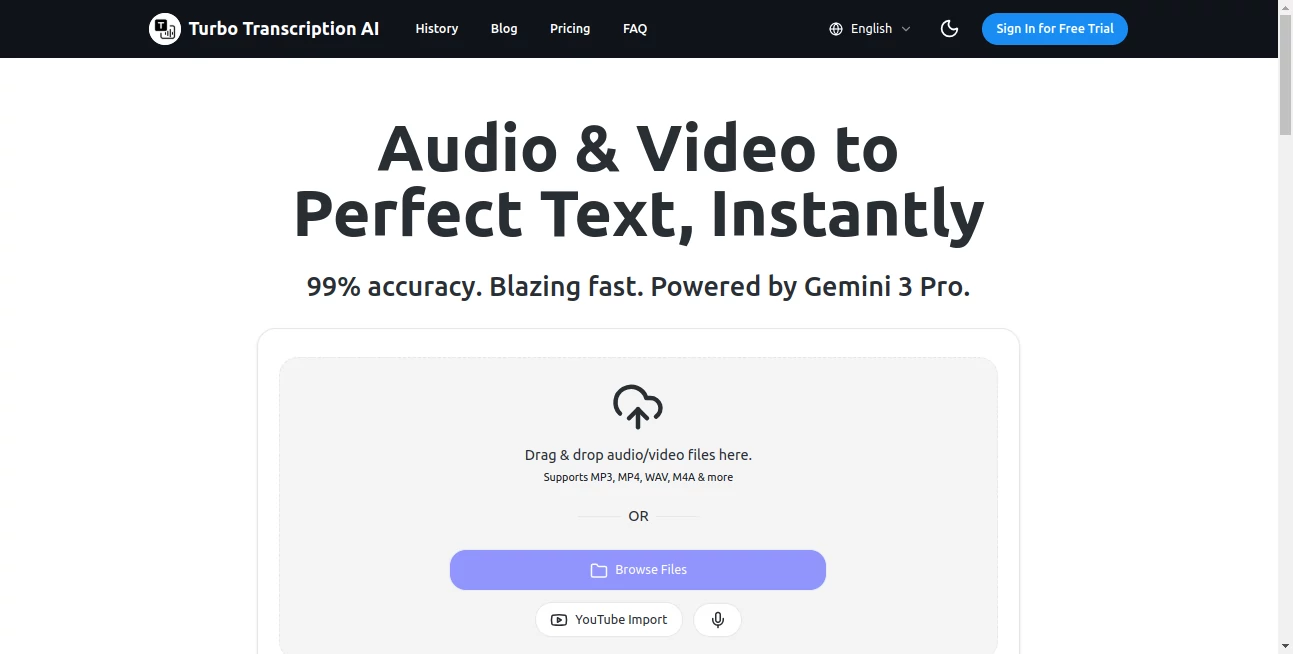
What is Turbo Transcription AI?
TurboScription steps in as a no-fuss helper for anyone buried under hours of recordings, turning spoken words into clean text faster than you can say "play it back." This service shines for its straightforward promise: upload, wait a beat, and walk away with notes that read like they were typed live. Busy folks from podcasters to meeting mavens keep it bookmarked for those moments when every second counts, praising how it cuts the chaos without cutting corners.
Introduction
TurboScription came along a short while back, cooked up by a team that knew the drill—endless audio files piling up while deadlines loomed. They set out to strip away the slog, focusing on speed and spot-on results that don't leave you second-guessing. It didn't take long for word to spread in online circles where creators swap tips, with users sharing how it saved their sanity during marathon edits or rushed reviews. What hooks them is the blend of free access and reliable output, making it a go-to for turning raw tapes into ready resources, all while keeping things light on the learning curve.
Key Features
User Interface
The setup couldn't be simpler: a clean landing spot with a drag-and-drop zone that grabs your file in a snap, followed by a quick pick for format and go. No dashboards drowning in options—just the essentials laid out like a quick checklist, with progress ticks that keep you in the loop without overwhelming the screen. Even first-timers nod at how it feels like handing off to a sharp assistant, wrapping up without a single confusing click.
Accuracy & Performance
It clocks in with claims of over ninety-nine percent spot-on, pulling words from muddled mics or crowded rooms with a steadiness that holds up under real scrubs. Turnarounds land in seconds for shorts, stretching to minutes for meatier clips, all without the dips that drag down the day. Users often point to how it nails accents or overlaps that trip up others, delivering drafts that need tweaks only on the edges.
Capabilities
From voice memos to full video reels, it chews through audio and clips alike, spitting out text in plain files, timed subs, or printable sheets, with a side of translation to bridge tongues. It juggles everyday formats without a fuss, making it handy for everything from solo rants to group gabfests, and even folds in extras like speaker tags for cleaner reads. The reach feels broad yet focused, opening doors for quick multilingual mixes or sub-ready streams.
Security & Privacy
Files get handled with a tight grip on the basics—processed fresh and flushed after, so nothing lingers longer than needed. It puts user trust front and center, sticking to standard shields that keep details from drifting, letting you focus on the output without the nagging what-ifs. For those juggling sensitive chats, it's the quiet assurance that comes with knowing your words stay where they land.
Use Cases
Podcasters drop episodes straight in, grabbing timed tracks for captions that keep listeners locked in across platforms. Teams recap calls in a flash, turning hour-long huddles into bullet-point briefs that spark next steps. Content makers layer subs on vids for wider reach, bridging gaps for non-native ears. Even students salvage lecture riffs, building notes that capture the full flow without frantic scribbles.
Pros and Cons
Pros:
- Zero cost to dive in, making it a low-risk win for trials.
- Blazing quick on the draw, fitting frantic schedules.
- High hit rate on tricky talks, saving cleanup time.
- Versatile exports that slot into any workflow.
Cons:
- Free tier might cap on longer hauls, nudging upgrades.
- Translation tweaks could use more tongue options.
- No offline mode for spotty signal spots.
Pricing Plans
It kicks off free for the basics, covering most everyday needs without a hidden hook, though heavier hitters might eye paid paths for unlimited runs. The entry point keeps it welcoming, with no walls blocking the first taste, letting you scale as the stack grows.
How to Use TurboScription
Drag your clip or clip to the zone, pick your output style from the short list, and tap transcribe—watch the wheel spin brief, then snag the file fresh from the tray. For extras like timing or tongues, just check the boxes before launch, and you're set to weave it into your next piece.
Comparison with Similar Tools
Where some charge upfront for the full feast, TurboScription teases with free flows that match in muscle, though pricier pals might pack more polish for pro piles. Against app-heavy rivals, it stays web-light, skipping downloads but perhaps missing mobile-native nudges. It carves a spot for swift starters, blending bang with bucks in a way that feels fair.
Conclusion
TurboScription wraps the whirlwind of words into workable wonders, handing users a shortcut that doesn't skimp on smarts. It turns the tide on tedious tapes, proving quick can be quality too. As recordings keep rolling in, this one's primed to keep pace, keeping creators one step ahead of the playback pile.
Frequently Asked Questions (FAQ)
What file types does it take?
Audio clips, video files, even live speech—most common ones slide right in.
How spot-on is the text?
Over ninety-nine percent, holding steady on clear cuts and tough talks alike.
Can it shift languages?
Yes, it folds in translations to keep things crossing borders smooth.
Is there a limit on free use?
Starts open, but watch for caps on length or loads for the long haul.
What if the audio's noisy?
It pushes through the fuzz better than most, but clean sources shine brightest.
AI Transcription , AI Transcriber , AI Speech to Text , AI Speech Recognition .
These classifications represent its core capabilities and areas of application. For related tools, explore the linked categories above.
Turbo Transcription AI details
This tool is no longer available on submitaitools.org; find alternatives on Alternative to Turbo Transcription AI.
Pricing
- Free
Apps
- Web Tools
Categories

Turbo Transcription AI Alternatives Product

PDF to MD

Transcribe A…

Quso AI

Zeemo AI

TurboScribe

Inpodcast AI

SAM Audio

WhispriNote

Adobe Podcast