
🧠 AI Quiz
Think you really understand Artificial Intelligence?
Test yourself and see how well you know the world of AI.
Answer AI-related questions, compete with other users, and prove that
you’re among the best when it comes to AI knowledge.
Reach the top of our leaderboard.


















TutuoAI
What is TutuoAI?
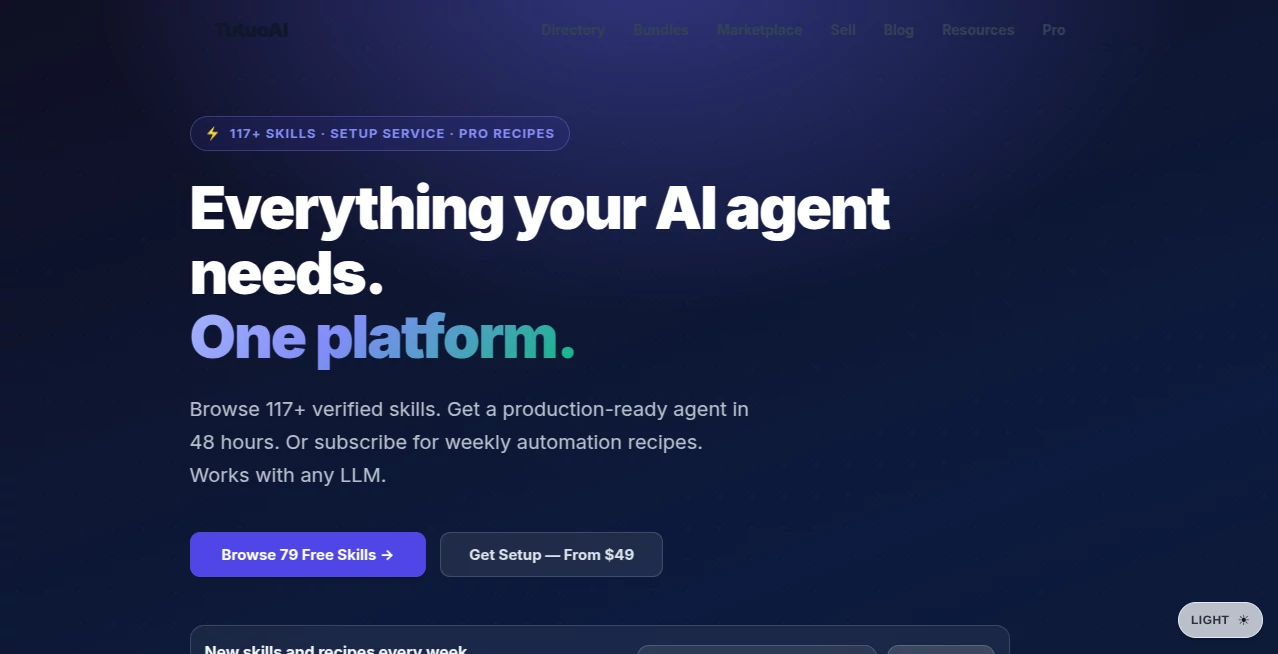
Building a truly useful AI agent often feels like assembling a puzzle with missing pieces. You have the base model, but it still needs specific skills to handle real tasks—writing code, managing emails, querying documents, or automating workflows. This platform quietly solves that frustration by offering a growing library of ready-to-use, verified skills that install in seconds. I’ve watched developers go from spending days wiring together basic functions to having production-ready capabilities almost instantly. It turns “my agent can sort of do that” into “my agent handles it reliably,” and that shift feels incredibly freeing.
Introduction
Most people building AI agents quickly realize the hard part isn’t the large language model itself—it’s giving the agent practical, reliable abilities that work consistently. TutuoAI steps in as a dedicated marketplace and automation hub, curating over 117 verified skills, many of them completely free. You browse, preview, and install with a single command, and suddenly your agent gains new superpowers without you having to code everything from scratch. It’s designed for both humans and agents themselves (yes, agents can discover and install skills autonomously). The weekly automation recipes are especially nice—they save hours of manual work every week and feel like getting a helpful upgrade delivered to your doorstep.
Key Features
User Interface
The site keeps things refreshingly straightforward. A clean search bar and category filters help you find relevant skills fast. Each listing includes a clear description, use cases, and a preview of the actual files before you install. The one-command install process (like `$ openclaw skill install coding-agent`) is dead simple and works across popular agent frameworks. No complicated dashboards or unnecessary steps—just browse, preview, install, and start using the new capability right away.
Accuracy & Performance
Every skill is verified, with checksums to ensure nothing sneaky slips in. They’re built to work reliably with major models like Claude, GPT-4o, and others. Installation is lightning quick—often under 30 seconds—and the skills deliver consistent results without the usual “it works sometimes” frustration. Users report noticeable time savings, with each weekly recipe replacing 3–8 hours of manual effort. That reliability builds real confidence in your agent setup.
Capabilities
The library covers practical, everyday agent needs: coding assistance, email management, document querying, RAG pipelines, prompt engineering, and more. Skills work across different LLMs and frameworks. Beyond individual skills, you get weekly automation recipes that combine them into ready-to-run workflows. Machine-readable catalogs let agents discover and install skills on their own. It’s a complete ecosystem that grows with new additions every week.
Security & Privacy
Skills come with verified checksums and file previews, so you know exactly what you’re installing. The platform focuses on transparency rather than hidden processes. For teams and enterprises, setup services include custom configurations with proper security considerations. Your agent’s capabilities stay under your control, and the focus remains on useful, trustworthy tools rather than risky experiments.
Use Cases
A solo developer installs a coding skill and suddenly delegates routine programming tasks to their agent, freeing up time for architecture decisions. A small business owner adds email and document skills to handle customer inquiries and file organization automatically. An enterprise team uses the Pro setup service to get a production-ready multi-agent system in 48 hours instead of weeks. Content creators subscribe to weekly recipes that automate repetitive research and drafting steps. Wherever agents need practical abilities beyond basic chat, this platform fills the gaps efficiently.
Pros and Cons
Pros:
- One-command installation makes adding new capabilities incredibly fast.
- Many skills are completely free, with no hidden catches.
- Weekly recipes deliver real time savings (3–8 hours per workflow).
- Works across popular LLMs and agent frameworks.
- Agents can discover and install skills autonomously.
Cons:
- Some advanced or highly specialized skills require paid access or setup services.
- Setup for complex enterprise environments may need professional help.
- The library is still growing, though new skills arrive regularly.
Pricing Plans
Basic browsing and installation of the 79 free skills costs nothing. Quick Start setup starts at $49, Pro Setup at $149 for more comprehensive agent configuration. The Pro Recipes subscription ($9/month or $79/year) brings weekly automation workflows. Enterprise plans offer custom multi-agent setups and dedicated support. It’s structured so you pay only for the level of help you actually need—whether that’s simple skill installs or full production-ready systems.
How to Use TutuoAI
Browse the catalog using search or categories to find skills that match your needs. Preview the files to see exactly what you’re getting. Install with a single command in your agent environment. Test the new capability right away. For weekly automation, subscribe to Pro Recipes and apply the latest workflows. For larger setups, use the professional setup service to get everything configured properly from the start. The process stays simple whether you’re adding one skill or building a complete agent system.
Comparison with Similar Tools
Many agent frameworks require you to build or integrate every capability manually, which eats up time and introduces bugs. Generic marketplaces can feel scattered or unverified. This platform stands out by focusing specifically on verified, ready-to-install skills and weekly practical recipes that actually save hours. It strikes a nice balance between openness (lots of free options) and quality control, making it more approachable than purely technical solutions while remaining powerful enough for serious use.
Conclusion
Building capable AI agents shouldn’t feel like reinventing the wheel every time. This platform provides the missing pieces in a clean, reliable way, letting you focus on what makes your agent unique rather than the basics. With fast installation, verified quality, and ongoing recipes that keep things fresh, it turns agent development from a frustrating chore into something genuinely productive and even enjoyable. For anyone serious about getting real work done with AI agents, it’s the kind of practical advantage that quickly becomes indispensable.
Frequently Asked Questions (FAQ)
How long does installation take?
Usually under 30 seconds with a single command.
Are the free skills really free forever?
Yes—79 skills are free with no catch or time limit.
Can my agent install skills by itself?
Yes—the machine-readable catalog allows agents to discover and install autonomously.
Do I need to be technical to use it?
Basic installation is simple, and professional setup services are available for more complex needs.
What if I need a custom skill or workflow?
Enterprise and Pro setup services can build exactly what you need.
AI Workflow Management , AI App Builder , AI Research Tool , AI Developer Tools .
These classifications represent its core capabilities and areas of application. For related tools, explore the linked categories above.
TutuoAI details
Pricing
- Free
Apps
- Web Tools
Categories

TutuoAI Alternatives Product

LocaFlow

AISEOMate

ClawBridge

Sound Level …

Lovable APP

GLM 5

SciSpace

Chrome Sidek…

langextract.…
