
🧠 AI Quiz
Think you really understand Artificial Intelligence?
Test yourself and see how well you know the world of AI.
Answer AI-related questions, compete with other users, and prove that
you’re among the best when it comes to AI knowledge.
Reach the top of our leaderboard.


















Ultimate Tools
Verified Blue CheckMark
Verified Blue CheckMark products are featured above free or unverified listings.
This badge indicates authenticity and builds trust, giving your product higher visibility across the platform.
Upgrade to get verified
Verified Blue CheckMark products are featured above free or unverified listings. This badge indicates authenticity and builds trust, giving your product higher visibility across the platform.
Upgrade to get verified
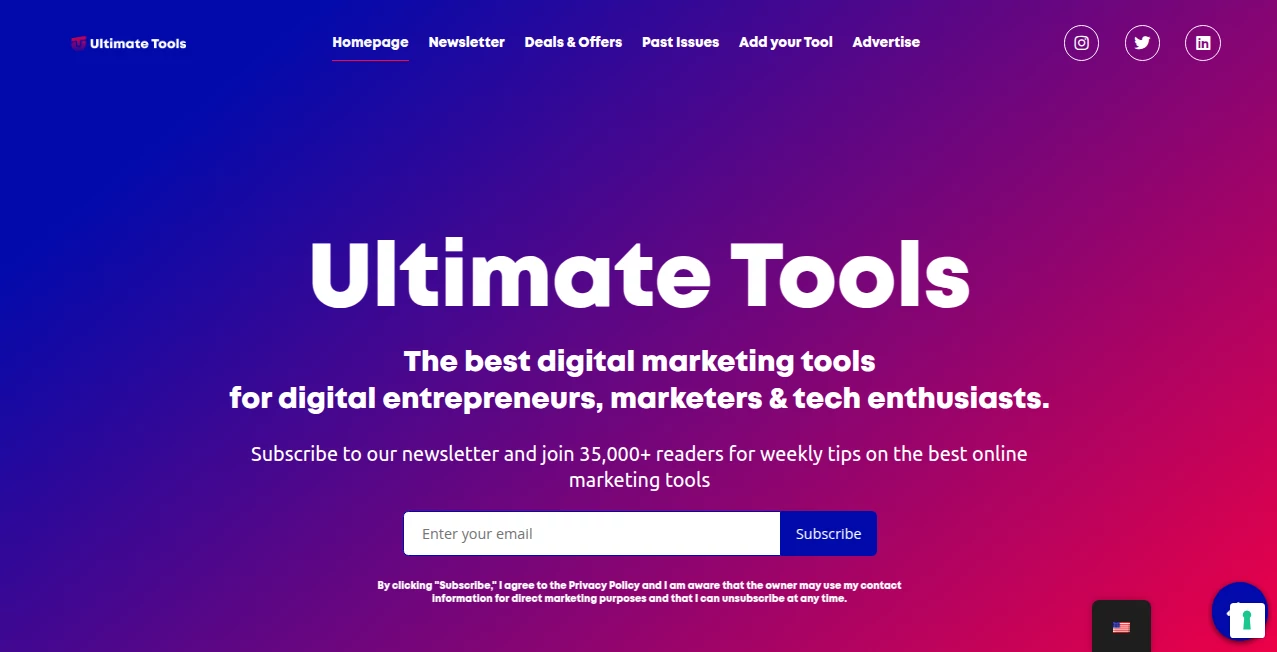
What is Ultimate Tools?
Building something new—whether it's a side project, a startup, content, or just fun experiments—should feel exciting, not exhausting. This platform quietly removes a lot of that friction by gathering some of the most useful AI helpers into one clean spot. Instead of juggling fifteen browser tabs and remembering which tool does what, you get a curated collection that actually works together. I've watched solo creators go from "I need to do X, Y, Z" to "done" in half the time because everything they needed was right there. It's not trying to be everything to everyone; it's just trying to be really good at being useful.
Introduction
Most people building online in 2025 are already using AI somewhere—writing copy, generating visuals, editing audio, prototyping ideas. The problem isn't the lack of tools; it's the chaos of switching between them, dealing with logins, paywalls, and inconsistent quality. This site changes that equation. It hand-picks reliable, high-performing AI tools across categories, presents them neatly, lets you try many for free or low cost, and keeps everything discoverable in one place. Founders, marketers, designers, educators, indie hackers—anyone who creates regularly—finds themselves coming back because it saves mental bandwidth. You spend less time hunting and more time making. That small shift adds up fast.
Key Features
User Interface
The homepage greets you like a well-organized toolbox: clear categories, eye-catching cards for each tool, short descriptions, and direct links to try them. No forced sign-up to browse, no aggressive pop-ups. Filters let you sort by free/paid, category, or popularity. Each tool page gives a quick overview, real usage examples, pricing snapshot, and usually a direct "Try it" button. It feels curated by someone who actually uses these tools daily—not a faceless aggregator.
Accuracy & Performance
Every tool listed here has been vetted for current quality and reliability. You won't find outdated wrappers or broken links. Descriptions are honest about strengths and limitations. Performance stays snappy—pages load fast, tools open quickly, and the directory itself rarely slows down even during traffic spikes. The selection process seems ruthless in a good way: only tools that deliver real value make the cut.
Capabilities
It covers the full creator stack: text generation, image creation/enhancement, video tools, audio/voice, code helpers, SEO/marketing assistants, productivity boosts, design utilities, and more. Many entries include free tiers or generous trials. Direct links, honest pros/cons, and quick summaries save you from reading ten reviews elsewhere. It's especially strong at spotlighting lesser-known but genuinely useful tools that big directories overlook.
Security & Privacy
No account is required to browse or try most tools—your privacy stays intact by default. When tools do require sign-up, it's clearly marked and you go directly to their site (no middleman tracking). The directory itself collects minimal data. For creators cautious about where their workflow lives, that clean, no-strings approach feels trustworthy.
Use Cases
A solo SaaS founder finds a new AI copy tool here, rewrites landing page headlines overnight, and sees conversion lift the next week. A YouTuber discovers a quick background removal + voice enhancer combo, cuts editing time in half, and starts posting more consistently. An indie game dev grabs a texture upscaler and normal-map generator from the design section, giving low-poly assets pro-level detail without learning Substance. A marketer uses the SEO + content tools to plan and write a month's worth of blog posts in a weekend. Wherever creation meets repetition or discovery, this becomes the quiet starting point.
Pros and Cons
Pros:
- Curated selection means less time wasted on mediocre tools.
- Honest summaries and direct links save mental energy.
- Strong mix of free and paid options across every major creator category.
- Fast-loading, clean design that respects your attention.
- Regularly updated—old or broken tools get removed.
Cons:
- Still a growing directory—not every niche has dozens of options yet.
- Some very new or ultra-specialized tools may not appear (though coverage improves monthly).
- No built-in trial tracking or personal dashboard (you manage that yourself).
Pricing Plans
Access to the directory and all recommendations is completely free—no ads, no premium wall to read listings. The value comes from the curation and time saved. Some listed tools have their own paid tiers (normal for AI), but discovering them and understanding their real strengths costs nothing here. For creators who hate wasting money on duds, that's a massive win before you spend a cent.
How to Use Ultimate Tools
Land on the homepage, scan the categories that match your current project (writing, visuals, audio, code, marketing, etc.). Click a tool card that looks interesting—read the short summary, pros/cons, pricing snapshot. Hit "Try it" to go straight to the tool's site. Bookmark the directory page or add it to your browser start page. Come back whenever you need something new or better. Over time it becomes your quiet second brain for "what tool should I use for this?" questions.
Comparison with Similar Tools
Big aggregator sites often drown you in quantity—hundreds of tools, many mediocre or outdated. This one chooses quality over quantity, focusing on tools that actually deliver today. Where others are ad-heavy or SEO-stuffed, this stays clean and honest. It's less about being the biggest directory and more about being the most useful one for makers who value time and results over endless scrolling.
Conclusion
Building in public or in private is already hard enough—finding the right tools shouldn't add to the weight. This platform quietly lightens that load by surfacing what works, explaining why, and linking you straight there. It's not trying to be flashy or sell you courses; it's just trying to help you ship faster, create better, and waste less time. For anyone making things online in 2025, that's a small but powerful ally worth keeping in your bookmarks.
Frequently Asked Questions (FAQ)
Is everything on the site free to use?
Browsing and discovering tools is 100% free. Many listed tools offer free tiers or trials; others are paid but clearly marked.
How often is the list updated?
Regularly—new high-quality tools are added weekly, outdated or low-quality ones are removed.
Do you get commission from the tools?
Some listings include affiliate links (transparent), but the selection is based on real quality, not payout.
Can I suggest a tool to add?
Yes—there's a simple submission form; good tools get reviewed and added if they meet the bar.
Is it only for AI tools?
Primarily AI-powered tools for creators, but also includes strong non-AI utilities that solve real problems.
These classifications represent its core capabilities and areas of application. For related tools, explore the linked categories above.
Ultimate Tools details
Pricing
- Free
Apps
- Web Tools
Categories

Ultimate Tools Alternatives Product

Bulletin

SaaSTool - R…

Mp3tag

Fleetproxy
NotebookVault

ATOZAITOOLS

Sand Loop Gu…

Fazier

Curate Click
